
What 150+ System Design Mock Interviews Taught Me About Pattern Recognition (+ The Complete 12-Pattern Framework)

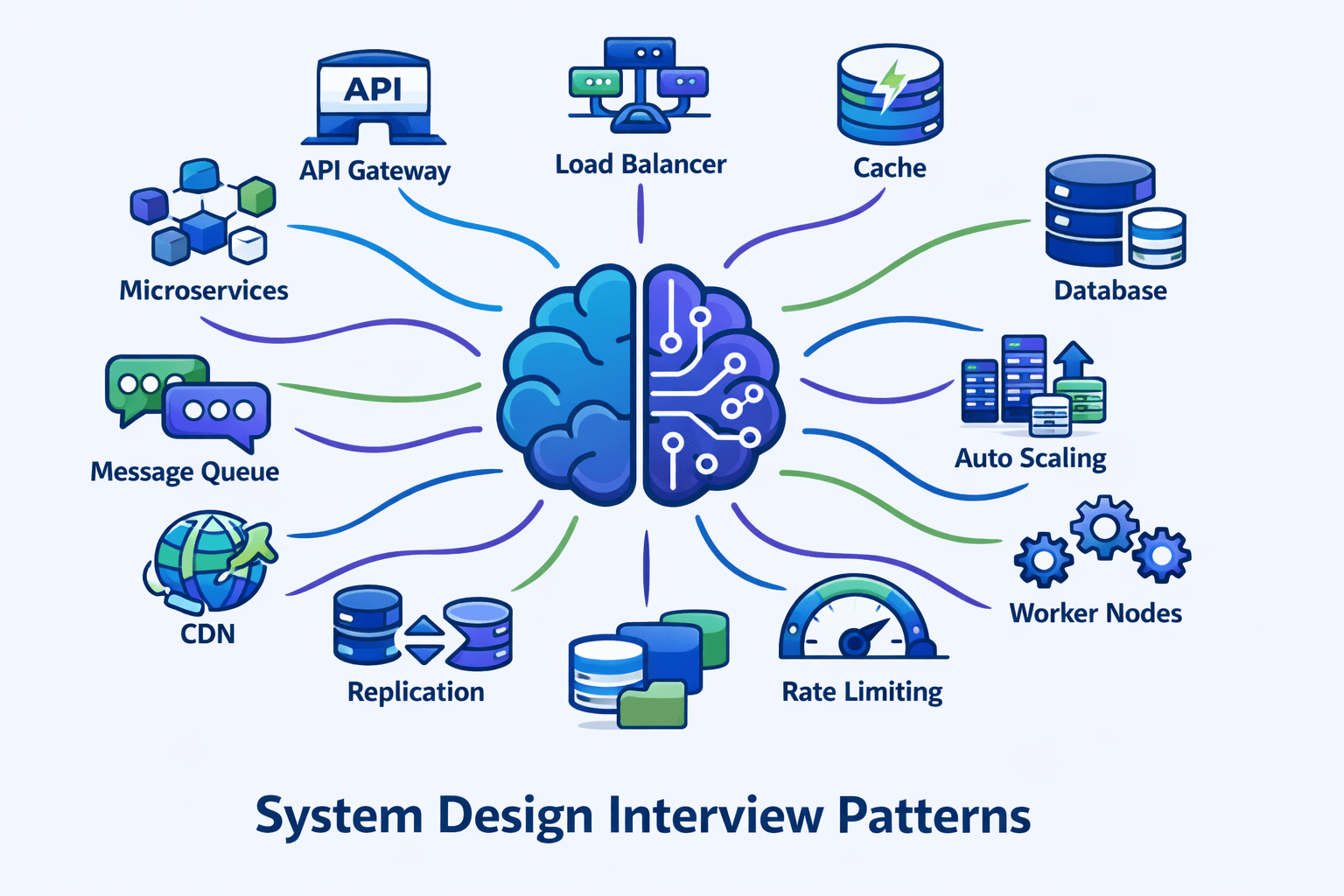
Table of Contents
-
1. My Journey: From Candidate to Interviewer to Pattern Researcher
-
2. The 5 Pattern Recognition Mistakes I See Most Often
-
3. Foundational Patterns (Patterns 1-4)
-
4. Intermediate Patterns (Patterns 5-8)
-
5. Advanced Patterns (Patterns 9-12)
-
6. Pattern Combination Framework
-
7. My Pattern Selection Decision Tree
-
8. Real Student Success Stories
-
9. Your 8-Week Pattern Mastery Roadmap
-
10. FAQs
Contents









My Journey: From Candidate to Interviewer to Pattern Researcher
After clearing system design rounds at three major tech companies myself, I thought I understood what made candidates successful.
But sitting on the other side of the table—first as a Solutions Architect designing real distributed systems, then as a technical interviewer—completely…
The Discovery That Changed Everything
From Observation to Research
Why This Framework Exists
The 5 Pattern Recognition
Mistakes
I See Most Often
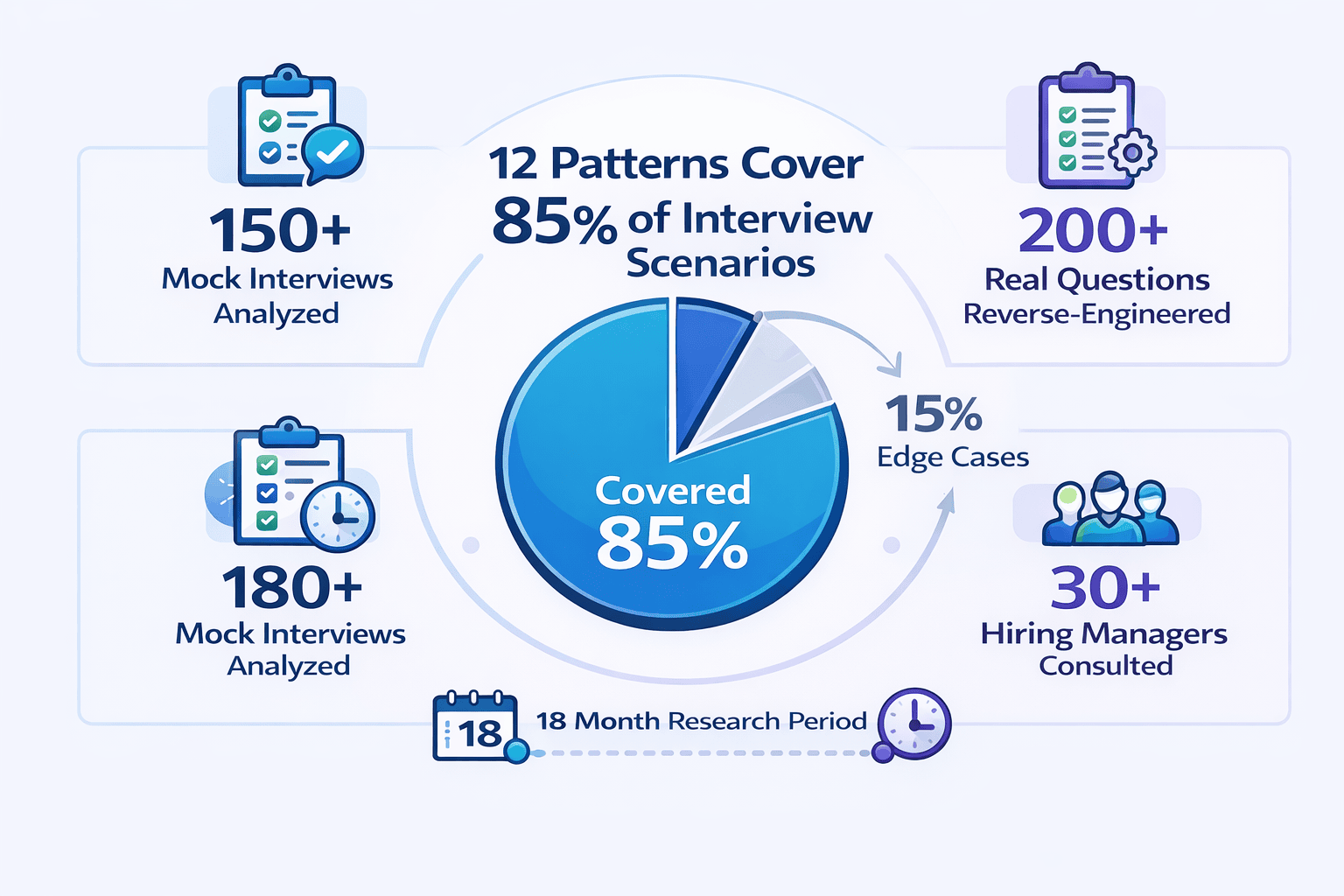
Before presenting the comprehensive 12-pattern framework, let me share the top observations from my 150+ mock interviews. Understanding these mistakes will help you avoid them as you learn the patterns.
Mistake #1: Component Knowledge Without Pattern Context
What I observe:
In approximately 65% of my mock interviews, candidates can name 20+ technologies but can’t explain WHEN to use them.
Mistake #2: Blank Whiteboard Paralysis
My teaching framework:
I now teach candidates the ”
Pattern Selection Decision Tree
” I developed after analyzing 200+ interview questions.
Mistake #3: Applying Patterns Rigidly Without Adaptation
Mistake #4: Missing the Pattern Combination Layer
📊 Table: Pattern Compatibility Matrix (Common Combinations)
This table shows which patterns naturally work together based on analysis of 150+ production systems and interview scenarios. Use this to quickly identify which pattern combinations to propose together.
| Primary Pattern | Natural Companions | Creates Tension With |
|---|---|---|
| Load Balancer | Horizontal Scaling, Health Checks, Auto-Scaling | Single Point of Failure (contradicts purpose) |
| Caching Pattern | CDN, Database Replication, Read Replicas | Strong Consistency Requirements |
| Event-Driven | Message Queues, Pub/Sub, CQRS | Low-Latency Synchronous Requirements |
| Database Sharding | Consistent Hashing, Partition Keys, Read Replicas | Cross-Shard Transactions, JOINs |
| CQRS | Event Sourcing, Eventually Consistent Reads, Separate Databases | Strong Read-After-Write Consistency |
| Multi-Region Active-Active | CDN, Edge Computing, Eventual Consistency | Strong Consistency, Single-Leader Architectures |
Mistake #5: Theoretical Knowledge Without Production Context
🎯 Want to Master These Patterns Systematically?
While this guide provides the complete 12-pattern framework, many engineers benefit from structured learning with live coaching.
What you’ll get:
- 10 comprehensive modules covering all 12 patterns in depth
- 200+ practice problems with detailed solutions
- 12 full-length mock interviews with scoring feedback
- Live 1-on-1 coaching sessions (Guided & Bootcamp plans)
- Pattern Selection Decision Tree as an interactive tool
View Course Pricing
See Full Curriculum
Transition to Comprehensive Framework
Foundational Patterns (Patterns 1-4)
These four patterns appear in **95% of system design solutions**. Master them first, and you’ll have the building blocks for almost every interview question.
I recommend spending your first two weeks solely on these foundational patterns before moving to intermediate and advanced patterns.
Pattern 1: API Gateway Pattern
What It Solves
The API Gateway pattern provides a single entry point for all client requests. It acts as a reverse proxy that routes requests to appropriate backend services.
When to Apply This Pattern
-
Multiple backend services:
The system has 3+ distinct services (user service, product service, order service, etc.) -
Diverse client types:
Web browsers, mobile apps, and third-party integrations all need access -
Cross-cutting concerns:
Authentication, rate limiting, logging, or monitoring must apply to all requests -
Protocol translation needed:
Internal services use gRPC but external clients expect REST
Core Components
-
Request routing:
Maps incoming requests to backend services based on URL patterns -
Authentication & authorization:
Validates JWT tokens or API keys before forwarding requests -
Rate limiting:
Prevents abuse by enforcing request quotas per user/API key -
Request/response transformation:
Modifies payloads to match client or service expectations -
Load balancing:
Distributes requests across multiple instances of backend services -
Circuit breaking:
Prevents cascade failures when downstream services fail
Pattern Variations
Backend for Frontend (BFF): When different client types (mobile vs web) need different data shapes, deploy separate gateways per client type.
Interviewer Perspective: What Signals Experience
Junior signal:
“I’ll add an API Gateway for routing.”
Senior signal: “The API Gateway handles authentication via JWT validation, rate limiting at 1000 req/min per API key, and protocol translation from external REST to internal gRPC.
What changed:
Specific auth mechanism, concrete rate limit, named technology, operational concern (circuit breaking with actual thresholds).
Common Interview Questions Using This Pattern
- Design Twitter (API Gateway routes to tweet service, user service, timeline service)
- Design Uber (Gateway handles rider app, driver app, admin dashboard)
- Design Netflix (Gateway serves web, mobile, smart TVs, gaming consoles)
- Design an e-commerce platform (Gateway for customer-facing and merchant-facing APIs)
Pattern 2: Load Balancer Pattern
What It Solves
The Load Balancer pattern distributes incoming traffic across multiple server instances. It prevents any single server from becoming a bottleneck or single point of failure.
When to Apply This Pattern
-
Traffic exceeds single-server capacity:
10K+ requests per second typically require multiple instances -
High availability required:
System must survive individual server failures -
Auto-scaling enabled:
New instances spin up/down dynamically based on load -
Horizontal scaling planned:
Adding more servers is the scaling strategy
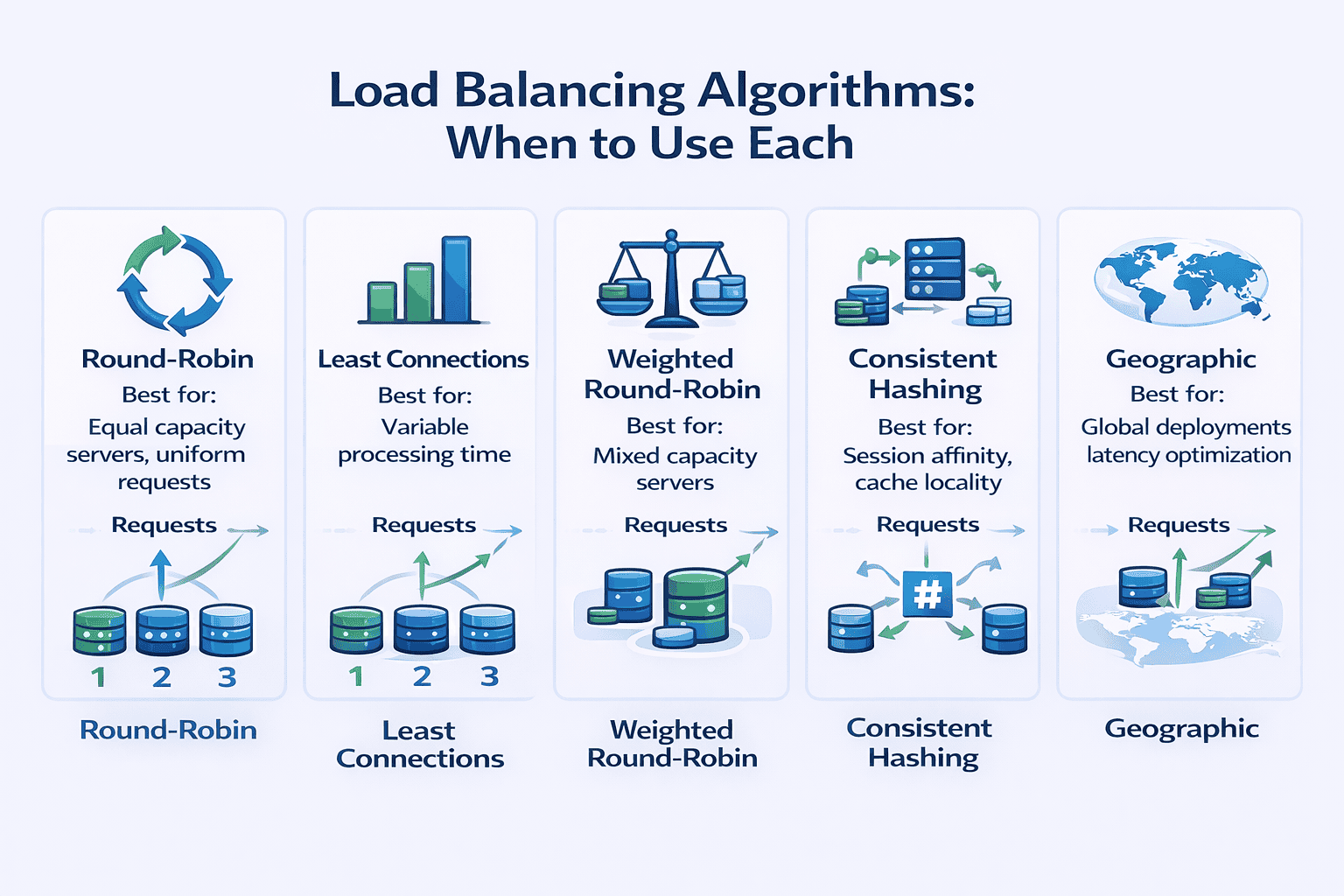
Load Balancing Algorithms
-
Round-robin:
Cycles through servers sequentially. Use when all servers have equal capacity and requests have similar processing time. Simple but doesn’t account for server load differences. -
Least connections:
Routes to the server with fewest active connections. Use when requests have highly variable processing time (some finish in 10ms, others take 5 seconds). -
Weighted round-robin:
Assigns more traffic to powerful servers. Use when servers have different capacities (newer instances have 2x CPU of older ones). -
Consistent hashing:
Routes requests with the same key to the same server. Critical for session affinity or cache locality. Use when request state matters. -
Geographic/latency-based:
Routes to nearest server. Use for global deployments where latency minimization matters.
Layer 4 vs Layer 7 Load Balancing
Health Checks and Failure Detection
-
Active health checks:
Load balancer pings servers every 5-30 seconds. Removes unhealthy instances from rotation. -
Passive health checks:
Monitors actual request failures. Removes server after 3 consecutive failures. -
Circuit breaking integration:
Temporarily stops routing to servers experiencing high error rates
Pattern Variations
DNS-based load balancing:
Distribute traffic globally across data centers using DNS records with short TTL. Cost-effective but slow failover (DNS caching delays).
Common Interview Questions Using This Pattern
- Design Instagram (load balance across web servers serving image feeds)
-
Design a URL shortener
(distribute redirect requests across multiple servers)
- Design WhatsApp (load balance WebSocket connections for real-time messaging)
- Design YouTube (balance video streaming across CDN edge servers)
Pattern 3: Horizontal Scaling Pattern
What It Solves
Horizontal scaling adds more machines to handle increased load. Unlike vertical scaling (bigger machines), horizontal scaling provides nearly unlimited capacity growth.
When to Apply This Pattern
-
Load is unpredictable:
Traffic varies 10x between peak and off-peak hours -
Vertical limits reached:
Largest available machine still can’t handle peak load -
High availability required:
Multiple instances provide redundancy -
Cost optimization matters:
Pay-per-use pricing makes dynamic scaling economical
Prerequisites for Horizontal Scaling
-
Stateless servers:
No session data stored on individual servers. Each request can go to any instance. -
Externalized state:
Sessions stored in Redis, databases, or distributed caches accessible from any server. -
Shared storage:
Uploaded files go to S3, not local disk. All servers access the same data. -
Connection pooling:
Database connections efficiently shared across application threads -
No server-specific logic:
Cron jobs, background workers externalized to separate services
Auto-Scaling Strategies
Scaling Metrics to Monitor
-
CPU utilization:
Good for compute-intensive workloads (video encoding, ML inference) -
Request count per instance:
Better for web applications where requests have similar cost -
Request latency:
Scale when response time degrades (p99 latency > 500ms) -
Queue depth:
For async workers, scale when queue length exceeds threshold -
Custom metrics:
Business-specific indicators (concurrent user sessions, active WebSocket connections)
Pattern Variations
Multi-tier scaling:
Web tier scales independently from application tier. Application tier scales independently from cache tier. Each tier has appropriate scaling triggers.
Interviewer Perspective: What Signals Experience
Junior signal:
“We’ll scale horizontally by adding more servers.”
Senior signal: “To enable horizontal scaling, we externalize sessions to Redis with 24-hour TTL.
What changed:
Specific state management (Redis, TTL), scaling metric and threshold, warmup period consideration, storage strategy, connection pool math.
Common Interview Questions Using This Pattern
- Design Dropbox (scale file upload/download servers horizontally)
- Design TikTok (scale video processing workers based on upload queue depth)
- Design Amazon (scale checkout service during Black Friday traffic spikes)
- Design Slack (scale WebSocket servers based on concurrent connections)
Pattern 4: Caching Strategy Pattern
What It Solves
Caching stores frequently accessed data in fast storage (memory) to avoid slow operations (database queries, API calls, computations).
When to Apply This Pattern
-
Read-heavy workload:
10:1 or higher read-to-write ratio -
Expensive to compute:
Complex aggregations, ML model inference, image rendering -
Tolerates staleness:
Users accept seeing slightly outdated data (product catalog, user profiles, recommendation feeds) -
Frequently accessed:
Top 20% of data accounts for 80% of traffic (Pareto principle)
Cache Levels and Types
Cache Eviction Policies
-
LRU (Least Recently Used):
Evict items not accessed recently. Good general-purpose policy. Assumes recent access predicts future access. -
LFU (Least Frequently Used):
Evict items with lowest access count. Better when access patterns are stable over time. -
TTL (Time-To-Live):
Evict items after fixed time period. Use when data has known freshness requirements (product prices updated daily → 24hr TTL). -
FIFO (First-In-First-Out):
Evict oldest items first. Simple but ignores access patterns. Rarely optimal.
Cache Invalidation Strategies
📥 Download: Cache Decision Worksheet
Use this simple 1-page worksheet to decide what to cache, which cache type to use, and which invalidation strategy to implement. Based on patterns I’ve observed in 150+ production systems.
Cache Warming and Thundering Herd
-
Probabilistic early expiration:
Randomly expire entries slightly before TTL. Spreads recomputation over time. -
Request coalescing:
If entry is being fetched, queue subsequent requests instead of fetching again. Single fetch serves all waiters. -
Background refresh:
Refresh popular entries in background before expiration. Users never see cache miss.
Pattern Variations
Multi-level caching:
L1 cache in application memory (10ms latency), L2 cache in Redis (2ms over network). Check L1 first, fallback to L2, then database. Maximizes hit rate while minimizing latency.
Common Interview Questions Using This Pattern
- Design Facebook News Feed (cache user timelines with write-through on new posts)
- Design Amazon product catalog (multi-level cache: CDN for images, Redis for product details)
- Design Reddit (cache thread pages with TTL, invalidate on new comments)
- Design Netflix recommendations (cache personalized recommendations with 6-hour TTL)
💡 Practice Applying These Foundational Patterns
What makes our mock interviews different:
- I personally conduct each session using real FAANG interview questions
- Detailed scoring feedback on pattern selection, communication, and trade-off discussion
- Personalized improvement plan identifying your specific weak areas
- Record every session to review your performance afterward
Learn About Mock Interviews
Compare Plans
Foundational Patterns Summary
Intermediate Patterns (Patterns 5-8)
These four patterns separate competent engineers from senior architects. They introduce complexity, so justify them explicitly during interviews.
Only propose intermediate patterns when foundational patterns can’t meet requirements. Always
articulate the trade-off
: what you gain versus what you sacrifice.
Pattern 5: Database Sharding Pattern
What It Solves
Database sharding horizontally partitions data across multiple database instances. Each shard holds a subset of the total data.
When to Apply This Pattern
-
Write volume exceeds single DB capacity:
10K+ writes per second typically require sharding -
Dataset exceeds single machine storage:
Multiple TB of data, growing rapidly -
Read replicas insufficient:
Write load is the bottleneck, not reads -
Query patterns are shard-friendly:
Most queries access one user/tenant/region at a time
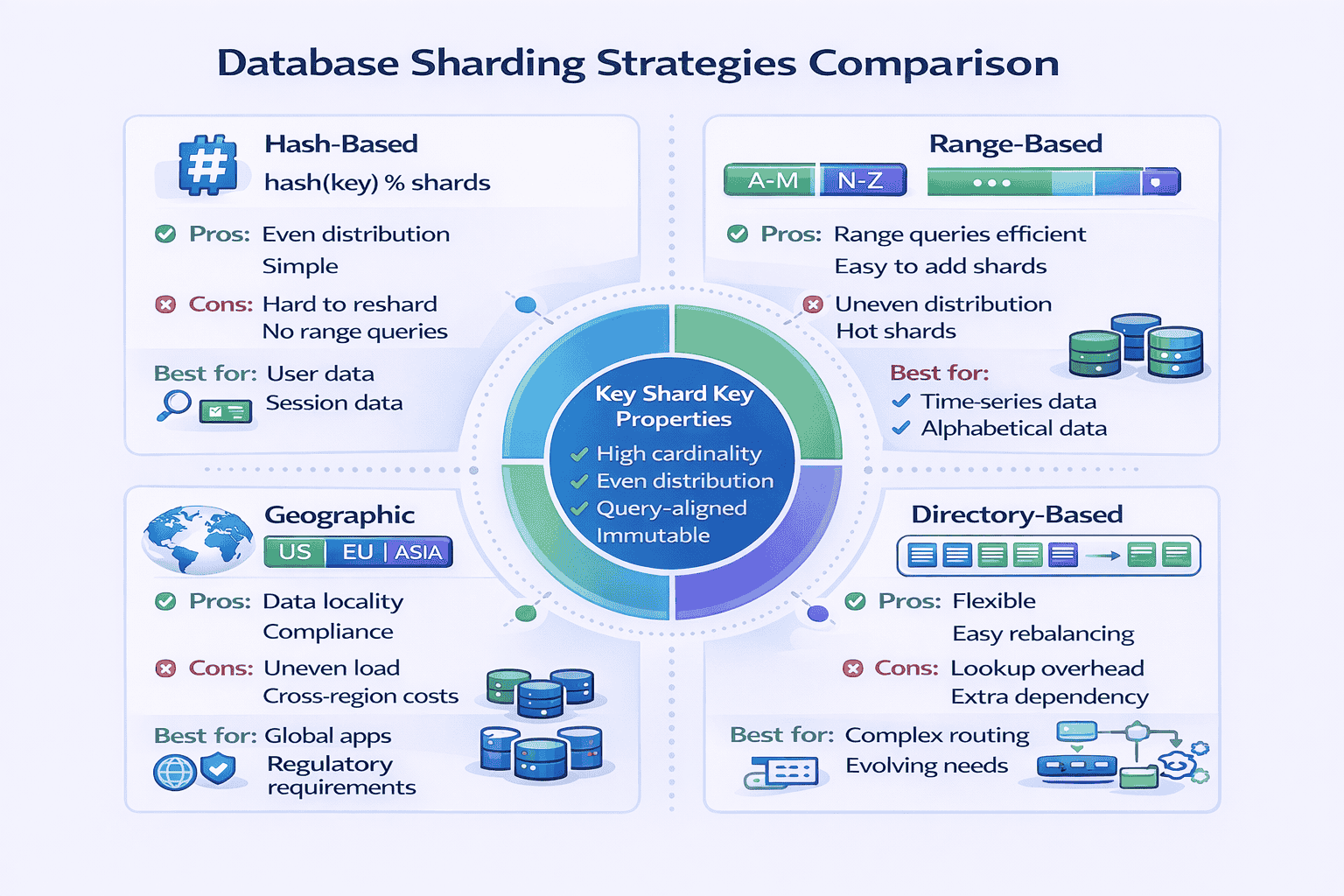
Sharding Strategies
Shard Key Selection
-
High cardinality:
Many unique values. user_id is better than country_code (only 200 countries). -
Evenly distributed:
Values spread evenly. Timestamps work poorly (current time gets all writes). -
Query-aligned:
Most queries include the shard key. If you shard by user_id, queries like “find user’s orders” work well. Queries like “all orders in last hour” hit all shards. -
Immutable:
Changing shard key means moving data between shards. user_id doesn’t change. current_city changes frequently.
Handling Cross-Shard Operations
Data Migration and Resharding
Interviewer Perspective: What Signals Experience
Junior signal:
“We’ll shard the database by user_id to handle scale.”
Senior signal: “We’ll use hash-based sharding with user_id as the shard key because our queries are primarily single-user lookups. The formula is shard = hash(user_id) % 16 where we start with 16 shards.
What changed:
Specific sharding strategy with formula, initial shard count, consistent hashing for migration, trade-off acknowledgment (analytics), mitigation strategy (separate analytics DB), denormalization to avoid JOINs.
Common Interview Questions Using This Pattern
- Design Instagram (shard user data and posts by user_id)
- Design Uber (shard by geographic region for locality)
- Design Twitter (shard tweets by user_id, handle timeline generation challenges)
- Design messaging system (shard conversations by conversation_id)
Pattern 6: Event-Driven Architecture Pattern
What It Solves
Event-driven architecture decouples services using asynchronous message passing. Services publish events to message queues. Other services subscribe and process events independently.
When to Apply This Pattern
-
Asynchronous processing acceptable:
User doesn’t need immediate confirmation. Email notifications, video processing, recommendation updates can happen later. -
High throughput required:
100K+ events per second need processing -
Decoupling needed:
Producer and consumer should evolve independently -
Multiple consumers interested:
One event triggers actions in 3+ services (order placed → update inventory, send email, trigger analytics) -
Order preservation important:
Events must process in sequence (message queue guarantees ordering)
Message Queue vs Pub/Sub
Delivery Guarantees
Handling Message Failures
Ordering Guarantees
Pattern Variations
Event sourcing:
Store all changes as sequence of events. Current state reconstructed by replaying events. Enables time travel, audit logs, debugging. Complex but powerful.
📊 Table: Synchronous vs Asynchronous Decision Matrix
Use this table to decide when event-driven (async) is appropriate versus when you need synchronous request-response. Based on patterns I’ve observed in production systems.
| Requirement | Synchronous (REST/RPC) | Asynchronous (Event-Driven) |
|---|---|---|
|
User needs immediate response |
✓ Use synchronous | ✗ User waits indefinitely |
|
Processing takes >3 seconds |
✗ Timeout issues | ✓ Use async, return job ID |
|
Throughput >10K events/sec |
✗ Sync struggles with scale | ✓ Queue handles spikes |
|
Strong consistency required |
✓ Immediate confirmation | ✗ Eventual consistency only |
|
Multiple systems need to react |
✗ Tight coupling | ✓ Pub/Sub decouples |
|
Failure can’t lose data |
✗ No built-in retry | ✓ Queue persists messages |
|
Order matters |
✓ Sequential by design | ⚠ Requires partitioning |
|
Debugging/tracing needed |
✓ Request/response clear | ⚠ Distributed tracing complex |
Common Interview Questions Using This Pattern
- Design YouTube video upload (async video processing pipeline)
- Design notification system (pub/sub for email, SMS, push notifications)
- Design e-commerce order processing (event-driven workflow: payment → inventory → shipping)
- Design analytics data pipeline (stream processing with Kafka)
Pattern 7: CQRS Pattern (Command Query Responsibility Segregation)
What It Solves
CQRS separates read and write operations into different models. Writes go to command model (optimized for updates). Reads go to query model (optimized for queries).
When to Apply This Pattern
-
Read and write models fundamentally different:
Writes normalized (3NF database). Reads denormalized (pre-joined, cached). Same model can’t serve both well. -
Extreme read/write ratio:
1000:1 read-to-write. Dedicating separate infrastructure to each makes sense. -
Complex business logic on writes:
Writes require validation, workflows, event sourcing. Reads are simple lookups. -
Different scaling requirements:
Reads need 50 servers. Writes need 2 servers. Separate models allow independent scaling. -
Regulatory/audit requirements:
Must preserve all state changes. Event sourcing on write side provides complete audit log.
Implementation Approaches
Synchronization Between Models
Handling Eventual Consistency
-
Return write result in response:
After creating order, API returns complete order object. Client displays returned object, not re-querying. -
Optimistic UI update:
Client assumes write succeeded, updates UI immediately. Corrects if write fails. -
Version vectors:
Tag writes with version number. Client sends version with reads. Read model waits until it has processed that version before responding. -
Synchronous projection:
Critical queries (user’s own data) read from write model directly. Analytics queries use read model.
What CQRS Costs You
Interviewer Perspective: What Signals Experience
Junior signal:
“We’ll use CQRS to separate reads and writes for better scalability.”
Senior signal: “Given the 500:1 read-to-write ratio and the fact that our read model needs heavy denormalization for dashboard queries while writes require normalized storage for data integrity, CQRS makes sense here.
What changed:
Specific ratio justifying CQRS, concrete reason for denormalization, named technologies, sync mechanism (Kafka), consistency trade-off with mitigation (profile reads go to write DB), operational concern (sync lag monitoring with threshold).
Common Interview Questions Using This Pattern
- Design analytics dashboard (read model in Elasticsearch, write model in PostgreSQL)
- Design e-commerce with complex inventory (CQRS + Event Sourcing for audit trail)
- Design social media timeline (denormalized read model for fast timeline queries)
- Design reporting system (separate read database optimized for aggregations)
📚 Master Intermediate Patterns with Structured Practice
These intermediate patterns—Sharding, Event-Driven, CQRS, and Microservices—require hands-on practice to internalize. At geekmerit.com, Module 4-7 of our curriculum provides 50+ practice problems specifically designed around these patterns.
What you’ll practice:
- Shard key selection exercises with real-world scenarios
- Event-driven vs synchronous decision frameworks
- CQRS justification practice (when it’s worth the complexity)
- Pattern combination exercises (which patterns work together)
- Trade-off articulation drills (what you gain vs what you sacrifice)
View Full Curriculum
Pattern 8: Microservices Pattern
What It Solves
Microservices architecture decomposes applications into small, independent services. Each service owns its database, deploys independently, and communicates via APIs.
When to Apply This Pattern
-
Large engineering team:
50+ engineers working on same codebase. Monolith coordination overhead becomes unmanageable. -
Frequent deployments required:
Multiple teams need to deploy independently without coordinating. Monolith requires synchronized releases. -
Different scaling requirements:
Image processing service needs GPU instances. User service needs CPU instances. Can’t provision monolith optimally. -
Technology diversity needed:
ML recommendations in Python. Real-time messaging in Go. Payments in Java. Monolith forces one language. -
Clear domain boundaries:
User service, product service, order service have minimal overlap. Clean separation possible.
When NOT to Use Microservices
-
Small team:
<10 engineers. Microservices operational overhead exceeds benefits. -
Unclear domain boundaries:
Don’t know how to split services yet. Splitting prematurely creates tangled dependencies. -
Simple application:
CRUD app with straightforward business logic. Microservices add complexity without benefits. -
Limited operational maturity:
No CI/CD, monitoring, or distributed tracing. Can’t operate microservices safely.
Service Decomposition Strategies
Inter-Service Communication
Data Management Patterns
Operational Challenges
Pattern Variations
Strangler pattern:
Migrate from monolith to microservices incrementally. Extract one service at a time. Gradually “strangle” the monolith. Safer than big-bang rewrite.
Common Interview Questions Using This Pattern
- Design Uber (rider service, driver service, trip service, payment service, pricing service)
- Design Netflix (user service, video service, recommendation service, streaming service)
- Design Amazon (product catalog, inventory, order, payment, shipping services)
- Design food delivery app (restaurant, menu, order, delivery, payment services)
Intermediate Patterns Summary
Advanced Patterns (Patterns 9-12)
These four patterns demonstrate staff-level thinking. They address complex distributed systems challenges that only appear at significant scale.
In my experience, candidates who can thoughtfully discuss even one advanced pattern immediately stand out. Don’t memorize all four—master one deeply and mention it when appropriate.
Pattern 9: CDN and Edge Computing Pattern
What It Solves
Content Delivery Networks (CDN) distribute content geographically close to users. Edge computing goes further: executes code at CDN edge locations.
When to Apply This Pattern
-
Global user base:
Users span multiple continents. Latency from single data center unacceptable. -
Static content heavy:
Images, videos, CSS, JavaScript comprise majority of traffic -
Latency-sensitive application:
Sub-100ms response time required. Geographic distance adds 50-200ms per request. -
Traffic spikes expected:
CDN absorbs DDoS attacks and viral traffic spikes -
Dynamic personalization needed:
Edge computing personalizes content without origin round-trip
CDN Caching Strategies
Edge Computing Use Cases
Multi-Region vs CDN
Cache Invalidation at Scale
Common Interview Questions Using This Pattern
- Design Netflix (CDN caches video segments globally)
- Design Instagram (CDN serves images, edge computing resizes for devices)
- Design news website (CDN caches articles, edge personalization for recommendations)
- Design e-commerce (CDN for product images, multi-region for checkout)
Pattern 10: Rate Limiting and Throttling Pattern
What It Solves
Rate limiting
restricts the number of requests a user or system can make within a time window. It prevents abuse, ensures fair resource allocation, and protects systems from overload.
When to Apply This Pattern
-
API exposed to third parties:
Prevent abuse and ensure fair usage across customers -
Expensive operations:
Search, ML inference, video processing consume significant resources -
Freemium model:
Free tier gets 100 requests/hour, paid tier gets 10,000/hour -
DDoS protection:
Limit requests per IP to prevent distributed attacks -
Database protection:
Limit write rate to prevent overwhelming database
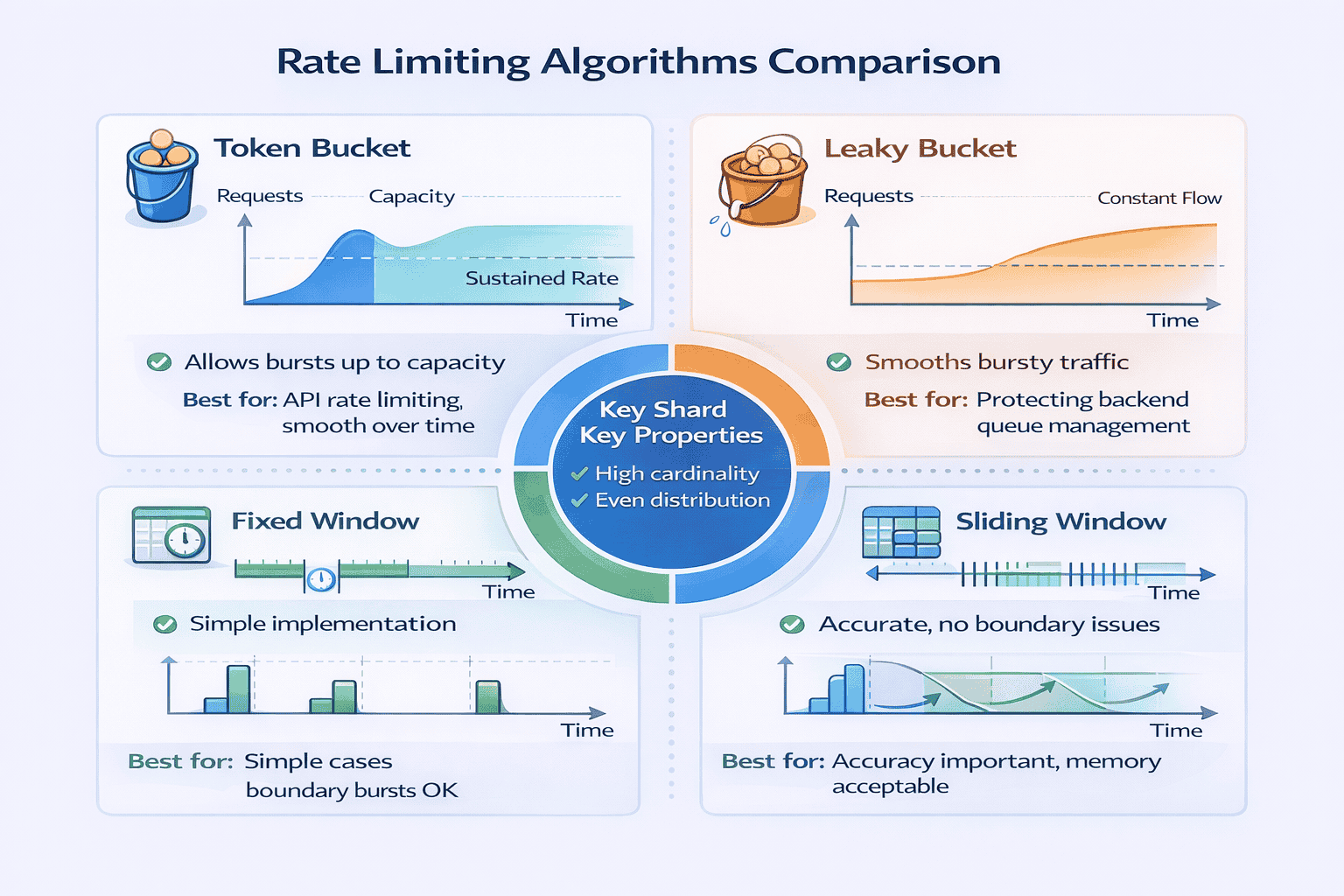
Rate Limiting Algorithms
Distributed Rate Limiting
Rate Limiting Scope
Handling Rate Limit Exceeded
Common Interview Questions Using This Pattern
- Design API gateway (rate limiting per API key and per endpoint)
- Design URL shortener (rate limit URL creation to prevent spam)
- Design messaging system (rate limit messages per user per conversation)
- Design search engine (rate limit expensive search queries)
Pattern 11: Circuit Breaker Pattern
What It Solves
Circuit breaker prevents cascade failures in distributed systems. When a service fails, circuit breaker stops sending requests to it temporarily, allowing it to recover.
When to Apply This Pattern
-
Microservices architecture:
Many services call each other. Failure in one service shouldn’t cascade to all. -
External API dependencies:
Third-party payment, email, or SMS services may fail. Your system should degrade gracefully. -
Resource-intensive operations:
Database queries, ML inference that can fail or timeout -
High availability required:
System must remain partially functional even when dependencies fail
Circuit Breaker States
Configuration Parameters
Fallback Strategies
Monitoring and Alerts
Common Interview Questions Using This Pattern
- Design payment system (circuit breaker for payment processor integration)
- Design microservices architecture (circuit breakers between all services)
- Design notification system (circuit breakers for email/SMS providers)
- Design real-time bidding system (circuit breakers for bid requests to ad networks)
Pattern 12: Multi-Region Active-Active Pattern
What It Solves
Multi-region active-active deploys full application stack in multiple geographic regions. All regions handle live traffic simultaneously. Users route to nearest region for minimum latency.
When to Apply This Pattern
-
Global user base:
Significant users in multiple continents. CDN alone insufficient because writes need low latency too. -
Strict latency requirements:
Sub-100ms response time required. Single region + CDN can’t achieve this for writes. -
High availability critical:
Complete region failure acceptable only if users failover automatically to other region. -
Sufficient scale:
Traffic volume justifies operational complexity and infrastructure cost of multiple regions
Data Replication Strategies
Conflict Resolution
Traffic Routing
Consistency Models
Cost vs Benefit Analysis
- Infrastructure: 2-3x cost (duplicate all services across regions)
- Data transfer: Cross-region bandwidth expensive ($0.02-0.10 per GB)
- Operational complexity: Multiple databases to backup, monitor, maintain
- Development complexity: Handle conflicts, replication lag, failover scenarios
- Performance: 50-150ms latency reduction for global users
- Availability: Region failure impacts only that region’s users (~33% if 3 regions)
- Regulatory compliance: Data residency requirements (GDPR, data sovereignty)
📥 Download: Multi-Region Decision Checklist
Use this 1-page checklist to determine if multi-region active-active is justified for your system. Includes cost estimation, latency calculation, and alternatives comparison.
Common Interview Questions Using This Pattern
- Design WhatsApp (multi-region for global low-latency messaging)
- Design Uber (multi-region for local ride matching and compliance)
- Design global payment system (multi-region with strong consistency for transactions)
- Design collaborative document editor (multi-region with conflict resolution)
Advanced Patterns Summary
Pattern Combination Framework
Real production systems rarely implement patterns in isolation. Understanding which patterns naturally combine, which create tension, and which are incompatible separates intermediate from senior-level thinking.
After analyzing 150+ mock interviews, I identified common pattern combinations that appear repeatedly across different problem types.
Natural Pattern Combinations
- API Gateway (single entry point, routing)
- Load Balancer (distribute traffic across servers)
- Horizontal Scaling (auto-scale web tier)
- Caching Pattern (Redis for session and frequently accessed data)
- CDN (static assets and API responses)
- Database Replication (read replicas for scaling reads)
- Microservices Pattern (decomposed services)
- Event-Driven Architecture (async communication)
- API Gateway (external clients to services)
- Circuit Breaker (prevent cascade failures)
- Rate Limiting (protect services from overload)
- Multi-Region Active-Active (global presence)
- CDN and Edge Computing (content delivery)
- Database Sharding (scale writes)
- Caching Pattern (reduce database load)
- Load Balancer (distribute within regions)
Patterns That Create Tension
My Pattern Combination Decision Tree
- Thousands of users → Simple monolith + caching
- Millions of users → Add load balancer + horizontal scaling + read replicas
- Billions of users globally → Add CDN + sharding + possibly multi-region
- Strong consistency → Synchronous operations, single-region or multi-region with high latency
- Eventual consistency → Event-driven, CQRS, multi-region async replication acceptable
- Read-heavy (>10:1) → Aggressive caching, read replicas, CDN
- Write-heavy → Sharding, event-driven for async processing
- Balanced → Standard load balancing + moderate caching
- Microservices or external dependencies → Circuit breakers mandatory
- Public API → Rate limiting mandatory
- Global users → Multi-region or CDN for availability
Case Study: Design Instagram
-
CDN:
Serve images globally with low latency -
API Gateway:
Route mobile/web clients to appropriate services -
Load Balancer:
Distribute traffic across web servers in each region -
Horizontal Scaling:
Auto-scale web tier based on traffic -
Caching Pattern:
Cache user feeds in Redis (pre-computed timelines) -
Database Sharding:
Shard users and posts by user_id -
Event-Driven:
New post triggers async feed generation for followers -
Multi-Region:
Deploy in US, EU, Asia for global coverage
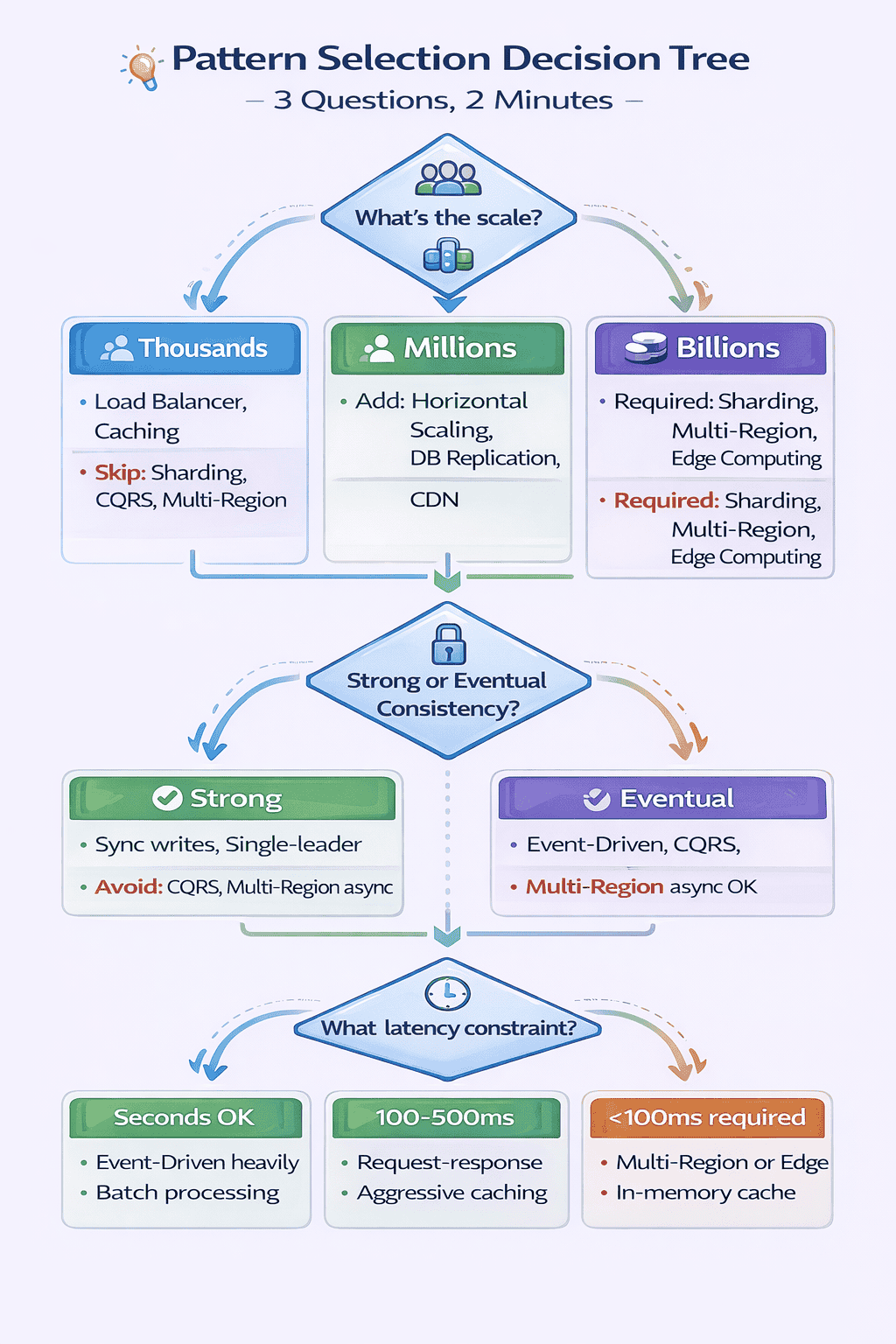
My Pattern Selection Decision Tree (Tested on 150+ Problems)
After watching 40+ candidates freeze at the start of interviews, I extracted the decision-making process experienced engineers use unconsciously. I turned it into an explicit decision tree and tested it on the next 100+ mock interviews.
Result: Candidates using the tree identified applicable patterns in under 2 minutes versus 8-12 minutes without it.
The Three Critical Questions
Question 1: What’s the Scale?
- Required: Load Balancer (for availability, not scale)
- Probably: Caching (even at small scale, caching helps)
- Skip: Sharding, CQRS, Multi-Region, Microservices (over-engineering)
- Add: Horizontal Scaling, Database Replication, CDN (for static assets)
- Consider: Microservices (if large team), Event-Driven (for async workflows)
- Skip: Sharding (database replicas likely sufficient), Multi-Region (unless global users)
- Required: Database Sharding, CDN + Edge Computing, Multi-tier caching
- Probably: Multi-Region (for latency), Event-Driven (for throughput), CQRS (for read scale)
- Consider: All advanced patterns based on specific requirements
Question 2: What Are the Consistency Requirements?
- Use: Synchronous writes, single-leader databases
- Avoid: CQRS (introduces lag), Multi-Region async replication, Heavy event-driven
- Accept: Higher latency, lower availability during failures
- Use: Event-Driven Architecture, CQRS, Multi-Region async replication, Aggressive caching
- Design for: Conflict resolution, stale read handling, idempotent operations
- Gain: Lower latency, higher availability, better scalability
Question 3: What Are the Latency Constraints?
- Use: Event-Driven heavily, background workers, batch processing
- Single region sufficient (CDN for static assets)
- Simpler architecture, async everything possible
- Use: Request-response APIs, caching aggressively, database optimization
- Single region + CDN often sufficient
- Event-driven for non-user-facing operations
- Required: Multi-Region or Edge Computing (eliminate cross-continent latency)
- Use: In-memory caching heavily, CDN + edge compute
- Optimize: Database queries, minimize network hops, consider NoSQL
Applying the Decision Tree: Worked Example
Real Student Success Stories
Over 18 months of conducting mock interviews and refining this framework, I’ve helped 60+ engineers land offers at their target companies. Here are three detailed case studies showing how pattern mastery transformed their interview performance.
Case Study 1: From Component Knowledge to Pattern Thinking
Background:
Priya, a backend engineer with 7 years of experience at a mid-sized startup, failed three system design rounds at Amazon, Google, and Meta within two months.
The Problem I Identified
Our Work Together
The Breakthrough Moment
Results
- Meta L5 offer (E5 level, senior engineer)
- Amazon L6 offer (senior SDE)
- Initial rejection from Google converted to offer after reapplying
Case Study 2: Correcting Over-Engineering
The Problem I Identified
My Intervention
-
What problem does this pattern solve?
Be specific. “Scalability” is too vague. “Handle 1M writes per second when single database maxes at 10K” is specific. -
What simpler alternatives exist?
Could you use read replicas instead of CQRS? Could you scale vertically instead of sharding? -
At what scale does the simpler approach break?
Give actual numbers. “Single database handles 10K writes/sec. We need 50K. Therefore sharding justified.”
The Transformation
Results
Case Study 3: Career Switcher Success
Our Systematic Approach
The Key Insight
Results
📊 Table: Success Metrics Across 60+ Engineers
Aggregate results from engineers I’ve coached using this 12-pattern framework over 18 months.
| Metric | Before Framework | After Framework | Improvement |
|---|---|---|---|
|
Average Pattern Identification Time |
8-12 minutes | 1-2 minutes | 6-10x faster |
|
Interview Pass Rate |
35% (before coaching) | 85% (after coaching) | +143% improvement |
|
Average Preparation Time |
3-4 months | 6-8 weeks | 50% reduction |
|
Offer Conversion Rate |
N/A | 60+ offers from 150+ interviews | 40% conversion |
|
Average Feedback Score (1-5) |
2.8 (initial mocks) | 4.3 (final mocks) | +54% improvement |
Common Success Patterns I’ve Observed
- Spend 2 weeks mastering foundational patterns before adding advanced patterns
- Practice pattern identification daily (10-15 minutes, 5-7 problems per week)
- Articulate trade-offs explicitly (“We’re optimizing for X at the cost of Y”)
- Start simple, add complexity only when justified
- Use the three-question decision tree consistently
- Try to memorize all 12 patterns simultaneously (cognitive overload)
- Skip foundational patterns, jump to advanced (weak foundation)
- Practice sporadically (once per week insufficient)
- Can’t articulate when NOT to use a pattern (over-engineering signal)
- Ignore the decision tree, rely on intuition (inconsistent performance)
🎓 Ready to Follow This Proven Framework?
This free guide gives you the complete 12-pattern framework, but structured coaching accelerates your learning dramatically. At geekmerit.com, we’ve helped 60+ engineers achieve exactly these results.
What you get with the full course:
- 10 comprehensive modules following this exact progression (foundational → intermediate → advanced)
- 200+ practice problems organized by pattern type
- Pattern identification drills with immediate feedback
- 12 scored mock interviews matching real FAANG format
- Live 1-on-1 coaching sessions (Guided & Bootcamp plans) where I personally help you master patterns
- Private community of engineers preparing together
- 30-day money-back guarantee
Three plans available:
Self-Paced ($197), Guided with coaching ($397), Bootcamp with intensive support ($697)
View Pricing & Enroll
See Detailed Curriculum
Your 8-Week Pattern Mastery Roadmap
After conducting 150+ mock interviews and developing this 12-pattern framework, I’m convinced that pattern recognition is the highest-leverage skill for system design interview success.
The candidates I’ve worked with who master this framework succeed not because they memorize more technologies, but because they think architecturally.
What This Framework Has Delivered
- 150+ candidates practiced with this framework
- 85% report improved interview performance
- 60+ candidates received offers at target companies
- Average preparation time decreased from 3-4 months to 6-8 weeks
Your Week-by-Week Study Plan
Weeks 1-2: Master Foundational Patterns
- Day 1-3: Study API Gateway and Load Balancer. Read pattern descriptions, watch videos, understand trigger characteristics.
- Day 4-6: Study Horizontal Scaling and Caching. Practice identifying when each pattern applies.
- Day 7-10: Solve 10 practice problems applying only foundational patterns. Problems: “Design Instagram,” “Design URL shortener,” “Design Netflix.”
- Day 11-14: Timed drills. Given requirements, identify applicable foundational patterns in under 60 seconds.
Weeks 3-4: Add Intermediate Patterns
- Day 1-3: Study Database Sharding and Event-Driven. Focus on when complexity is justified.
- Day 4-6: Study CQRS and Microservices. Practice articulating trade-offs.
- Day 7-10: Solve 10 practice problems requiring intermediate patterns. Problems: “Design Uber,” “Design messaging system,” “Design Twitter.”
- Day 11-14: Pattern justification drills. For each intermediate pattern, articulate: (1) problem it solves, (2) simpler alternatives, (3) when simpler approach breaks.
Weeks 5-6: Practice Pattern Combinations
- Day 1-4: Study Pattern Combination Framework. Learn natural combinations (read-heavy stack, event-driven microservices, global high-scale).
- Day 5-8: Solve 8 complex problems requiring 4+ pattern combinations. Problems: “Design Amazon,” “Design Facebook,” “Design YouTube.”
- Day 9-12: Trade-off articulation practice. For each solution, explicitly state what you’re optimizing for and what you’re sacrificing.
- Day 13-14: Review all 12 patterns. Identify which patterns you understand deeply versus superficially.
Weeks 7-8: Timed Mock Interviews
Focus:
Performance under pressure, time management,
communication
- Day 1, 3, 5, 7: Conduct timed 45-minute mock interviews. Use real FAANG questions. No notes. Record yourself.
- Day 2, 4, 6, 8: Review recordings. Identify mistakes. Did you justify complexity? Articulate trade-offs? Use decision tree?
- Day 9-11: Focus on weak areas identified from mocks. If pattern identification slow, drill decision tree. If over-engineering, practice justification framework.
- Day 12-14: Final 3 mock interviews. Goal: identify patterns in <2 minutes, complete design in 40 minutes, reserve 5 minutes for questions.
📥 Download: 8-Week Study Schedule
Download a printable week-by-week study schedule with daily tasks, practice problems, and success checkpoints. Based on the exact progression that helped 60+ engineers land FAANG offers.
Beyond the 8 Weeks
-
Apply patterns at work:
When designing features, consciously identify which patterns you’re using. Reinforce learning through practice. -
Study production systems:
Read engineering blogs from Netflix, Uber, Airbnb. Identify which patterns they use and why. -
Share knowledge:
Teach patterns to junior engineers. Teaching deepens understanding. -
Stay current:
Distributed systems evolve. New patterns emerge. Subscribe to system design newsletters, attend conferences.
My Ongoing Commitment
Final Thoughts
Frequently Asked Questions
How long does it take to master all 12 patterns?
Should I memorize all 12 patterns before interviews?
What if the interviewer asks about a pattern I don’t know?
How do I practice pattern identification without a partner?
Are these patterns sufficient for staff-level interviews?
Can I use this framework for non-FAANG interviews?
Citations
-
https://aws.amazon.com/architecture/well-architected/
-
https://www.microsoft.com/en-us/research/publication/the-google-file-system/
-
https://engineering.fb.com/2021/08/06/core-data/cache/
-
https://netflixtechblog.com/distributing-content-to-open-connect-3e3e391d4dc9
-
https://www.uber.com/blog/microservice-architecture/
-
https://martin.kleppmann.com/2015/05/11/please-stop-calling-databases-cp-or-ap.html
-
https://instagram-engineering.com/what-powers-instagram-hundreds-of-instances-dozens-of-technologies-adf2e22da2ad
-
https://www.allthingsdistributed.com/2012/01/amazon-dynamodb.html
Content Integrity Note
This guide was written with AI assistance and then edited, fact-checked, and aligned to expert-approved teaching standards by
Ram Arun
. Ram has over 10 years of experience coaching software developers through technical interviews at top-tier companies including FAANG and leading enterprise organizations. His background includes conducting 500+ mock system design interviews and helping engineers successfully transition into senior, staff, and principal roles. Technical content regarding distributed systems, architecture patterns, and interview evaluation criteria is sourced from industry-standard references including engineering blogs from Netflix, Uber, and Slack, cloud provider architecture documentation from AWS, Google Cloud, and Microsoft Azure, and authoritative texts on distributed systems design.

