
Design Distributed Cache System: The Complete System Design Guide for Interviews

You’re 20 minutes into your system design interview when the interviewer leans back and asks: “How would you **design a distributed cache system**?” Your palms sweat. You know Redis. You know Memcached. But how do you actually design one from scratch?
The distributed cache question is deceptively simple. It appears in roughly 30% of senior engineer interviews at companies like Amazon, Google, Meta, and Netflix. Yet candidates with 10+ years of experience routinely stumble—not because they lack technical knowledge, but because they don’t know how to structure their answer.
This guide walks you through the complete interview approach: clarifying requirements , building architecture incrementally, handling failure scenarios, and demonstrating the systems thinking that separates strong hires from rejected candidates.
Choosing how to prepare? Compare System Design Course vs Self-Study (and if you rely mostly on videos, see System Design Coaching vs YouTube).
Last updated: Feb. 2026
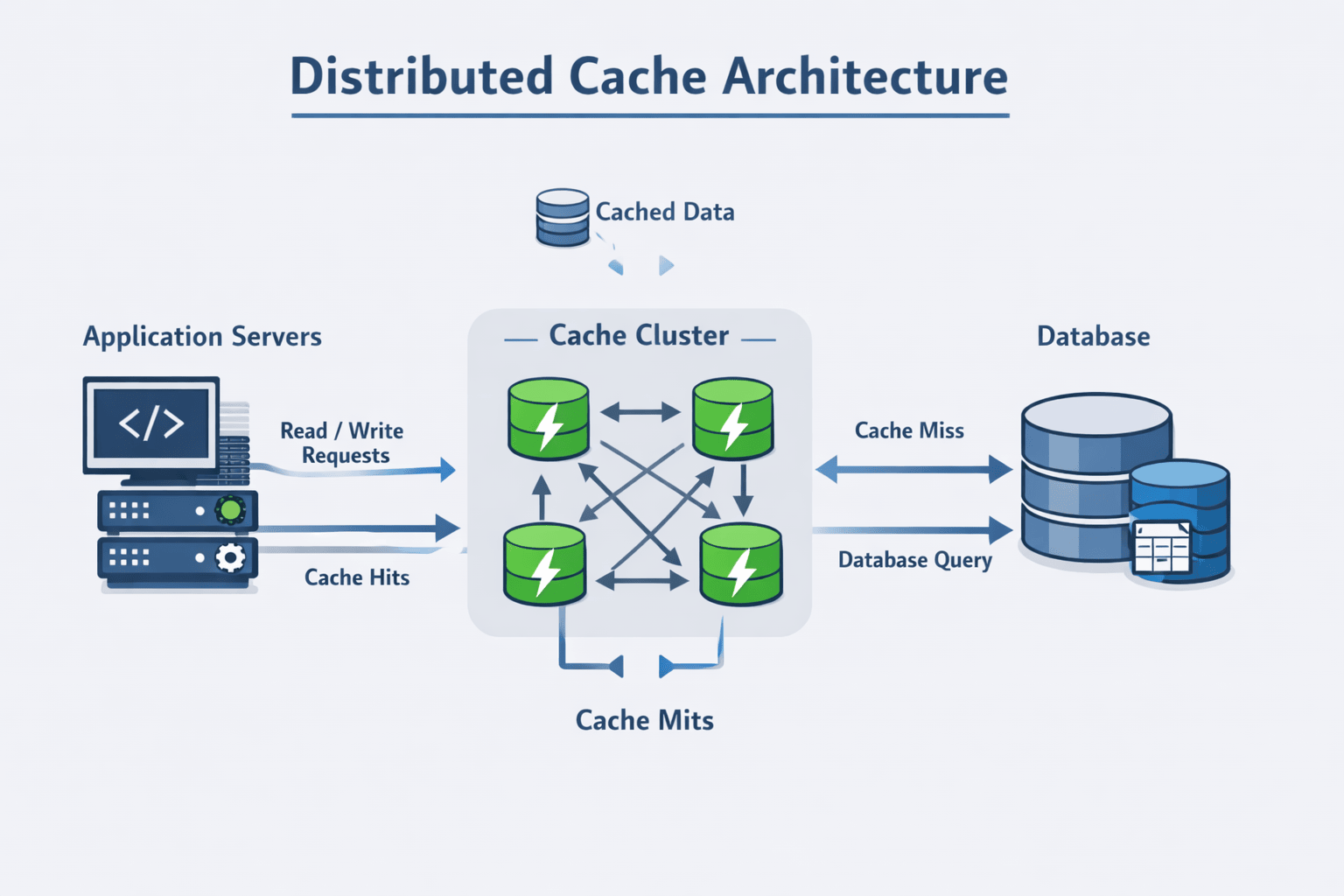
Table of Contents
- 1. What Interviewers Really Test With This Question
- 2. Clarifying the Problem (Start Strong)
- 3. Defining Functional and Non-Functional Requirements
- 4. High-Level Architecture Design
- 5. Data Flow and Cache Patterns
- 6. Partitioning and Horizontal Scaling Strategy
- 7. Handling Failure Scenarios
- 8. Eviction Policies, TTLs, and Hot Key Management
- 9. Consistency Trade-Offs in Distributed Caching
- 10. Real-World System Evolution
- 11. How to Close the Interview Answer
- 12. Common Interview Mistakes to Avoid
- Your Path to Mastering Cache System Design
- FAQs
Contents













1. What Interviewers Really Test With This Question
When an interviewer asks you to design a distributed cache system, they’re not testing whether you’ve memorized Redis commands. They’re evaluating three critical engineering competencies.
Systems Thinking Over Tool Knowledge
Strong candidates understand why caching exists in distributed systems. They explain the performance gap between memory (nanoseconds) and disk (milliseconds), the cost of database connections, and the user experience impact of slow response times.
Weak candidates immediately jump to implementation details. They start describing Redis data structures or Memcached internals without first establishing the problem context.
The interviewer wants to see you think from first principles. Why does Netflix cache movie metadata? Why does Amazon cache product information? What fundamental performance constraint makes caching necessary?
Structured Problem Decomposition
Senior engineers break complex problems into manageable pieces. The distributed cache question tests whether you can:
- Identify which aspects to tackle first (requirements before architecture)
- Separate concerns cleanly (data model, partitioning strategy, failure handling)
- Build incrementally from simple to complex (single cache → distributed cluster → multi-region)
Candidates who succeed don’t try to design everything simultaneously. They start with core functionality, validate assumptions with the interviewer, then layer in complexity based on stated requirements.
Trade-Off Reasoning Under Pressure
Every design decision involves trade-offs. Cache-aside simplifies application logic but risks stale data. Write-through guarantees consistency but increases write latency. LRU eviction is simple but may evict frequently-used items during traffic bursts.
Interviewers probe your ability to:
- Articulate multiple valid approaches
- Explain what each approach optimizes for
- Justify why one fits the stated requirements better
- Acknowledge what you’re sacrificing with each choice
The best candidates explicitly state their assumptions. “If we prioritize read latency over consistency, cache-aside makes sense. If we need strong consistency, we’d use write-through despite the performance cost.”
How This Differs From Other System Design Questions
The cache design question sits at an interesting intersection. It’s more focused than “design Twitter” but more open-ended than “design a rate limiter.”
Interviewers use it to assess:
- Data structure knowledge: Hash tables, LRU lists, probabilistic structures
- Distributed systems concepts: Partitioning, replication, consistency models
- Performance optimization: Latency reduction, throughput improvement, resource efficiency
- Operational awareness: Monitoring, debugging, handling production issues
Unlike pure algorithmic questions, there’s no single “correct” answer. Unlike pure architectural questions, you can’t hand-wave implementation details. You need both breadth and depth.
2. Clarifying the Problem (Start Strong)
The interview prompt is deliberately vague: “Design a distributed cache.” Your first response determines whether the interviewer sees you as a senior engineer or someone who needs handholding.
The Questions That Establish Context
Strong candidates don’t start designing immediately. They ask clarifying questions that demonstrate understanding of real-world cache usage.
What kind of data are we caching?
This isn’t a throwaway question. User sessions behave differently than product catalogs. Session data is small (a few KB), private to individual users, and requires strict isolation. Product catalogs are larger (potentially MB per item with images), shared across users, and tolerate some staleness.
The data type influences your entire design—eviction policy, consistency model, and even whether to use a single global cache or user-specific partitions.
What’s the read-to-write ratio?
This question signals you understand workload characteristics matter. A 1000:1 read-to-write ratio (typical for product catalogs) justifies aggressive caching with eventual consistency. A 10:1 ratio requires more careful invalidation strategies.
Heavy write workloads might even suggest caching isn’t the right solution—or that you need write-through with synchronous invalidation.
How stale can the data be?
Different use cases have different staleness tolerances:
- Banking balances: Seconds of staleness creates serious problems
- Product recommendations: Hours of staleness is completely acceptable
- Static content (help pages): Days of staleness doesn’t matter
- User preferences: Minutes of staleness frustrates users
Your answer determines whether you need cache invalidation, what TTL values to use, and whether write-through makes sense.
📊 Table: Clarifying Questions and What They Reveal
These questions demonstrate systems thinking and help you gather the constraints that will guide your design decisions. Each question maps to specific architectural implications.
| Question Category | Specific Examples | What It Reveals About You | Design Impact |
|---|---|---|---|
| Data Characteristics | Data type, size per item, access patterns | You understand cache workloads vary dramatically | Influences eviction policy, partition strategy |
| Scale Requirements | QPS, data volume, geographic distribution | You’re thinking about capacity planning | Determines cluster size, replication factor |
| Consistency Needs | Staleness tolerance, read-after-write guarantees | You know consistency is negotiable | Shapes invalidation strategy, write patterns |
| Availability vs. Latency | Can we serve stale data during failures? | You grasp fundamental trade-offs | Affects replica usage, failure handling |
The Scale Question Everyone Forgets
What’s the expected traffic scale?
This seems obvious but many candidates skip it. The difference between 1,000 requests per second and 1,000,000 requests per second completely changes your architecture.
At low scale, a single cache server works fine. You don’t need complex partitioning or replication. At high scale, you’re dealing with horizontal scaling, consistent hashing , replica management, and operational complexity.
Smart candidates ask: “Should I design for thousands or millions of requests per second?” This prevents wasting time on over-engineering or under-engineering the solution.
Geographic Distribution Matters
Are we serving a single region or multiple regions?
Single-region caching is fundamentally simpler. You have low network latency between cache nodes and can use strong consistency models if needed.
Multi-region caching introduces:
- Significant propagation delays between regions
- Need for regional cache clusters
- Questions about cache warming after regional updates
- Consistency challenges that may require eventual consistency
This question shows you understand physical constraints shape architectural decisions.
3. Defining Functional and Non-Functional Requirements
After clarifying the problem, strong candidates explicitly summarize requirements. This demonstrates structured thinking and creates a contract with the interviewer about what you’re building.
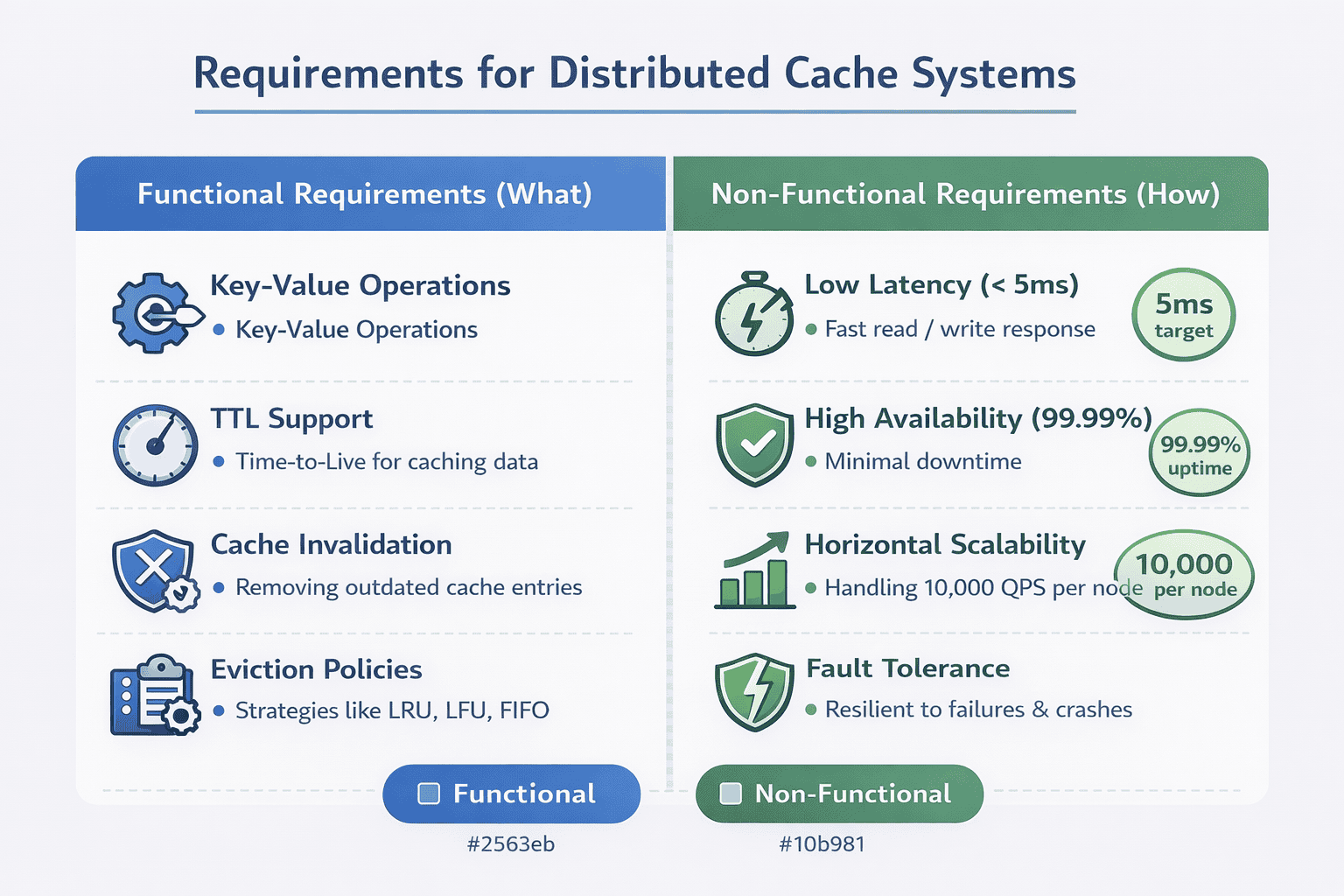
Functional Requirements: What the System Must Do
Functional requirements describe the core operations your cache must support. Keep these concrete and specific to the use case you discussed during clarification.
Fast key-value reads and writes. This is the fundamental cache operation. You should specify expected latency—typically single-digit milliseconds for reads, slightly higher for writes.
Time-to-live (TTL) support. Items should expire automatically after a specified duration. This prevents stale data and manages memory without manual intervention.
Cache invalidation. Applications need the ability to explicitly remove items when underlying data changes. This is critical for maintaining consistency.
Eviction under memory pressure. When the cache fills up, the system must automatically remove items based on a defined policy (LRU, LFU, random, etc.).
Non-Functional Requirements: How Well It Must Perform
Non-functional requirements define quality attributes. These often reveal whether a candidate understands production systems.
Low latency: Specify concrete numbers. “The cache should respond to 99% of requests within 5 milliseconds” is better than “the cache should be fast.” Interviewers appreciate quantifiable targets.
High availability: Define what this means. Are you targeting 99.9% uptime? 99.99%? Each additional nine has architectural implications. 99.9% allows 8 hours of downtime per year. 99.99% allows only 52 minutes.
Horizontal scalability: The system should handle increased load by adding more cache nodes, not by upgrading individual servers. This is fundamental to distributed cache design.
Fault tolerance: Individual node failures shouldn’t cause data loss or service disruption. Specify whether you need replica redundancy.
Stating Your Assumptions Explicitly
After listing requirements, strong candidates state their assumptions. This prevents misunderstandings and shows you’re thinking about edge cases.
Common assumptions to clarify:
- Data size: “I’m assuming individual cache entries are under 1MB. Larger objects would require different handling.”
- Consistency model: “I’m designing for eventual consistency. Strong consistency would require significant changes.”
- Network reliability: “I’m assuming datacenter networking with low packet loss. Internet-facing caches have different requirements.”
- Security: “I’m focusing on performance and availability. We can discuss authentication and encryption separately.”
These statements give the interviewer opportunities to adjust scope. “Actually, we do need strong consistency for this use case” changes your entire architecture.
The Requirements That Separate Senior From Junior
Junior candidates list generic requirements. Senior candidates include requirements that show production experience.
Observability: “We need metrics on hit rate, latency percentiles, eviction frequency, and memory utilization.” This shows you understand operating systems in production.
Operational simplicity: “The system should minimize operational overhead—automatic node discovery, self-healing, simple configuration.” This demonstrates awareness that complexity has costs.
Graceful degradation: “If the cache fails, the system should fall back to the database without crashing.” Many candidates forget that caches are performance optimizations, not critical dependencies.
Including these signals you’ve run production systems and dealt with operational realities beyond pure technical design.
4. High-Level Architecture Design
With requirements established, you’re ready to present high-level architecture . Start simple, then build complexity incrementally based on interviewer feedback.
The Simplest Architecture That Could Work
Begin with a minimal viable design. Many candidates make the mistake of immediately presenting a complex distributed system with multiple layers.
Start here:
- Application servers: Request data and check the cache before querying the database
- Cache cluster: Stores key-value pairs in memory across multiple nodes
- Database: Authoritative source of truth
This three-tier architecture is clear and establishes the basic flow. You’ll add complexity as the interviewer probes deeper.
Why Distribution Matters
Explicitly explain why this is a distributed cache rather than a single server. This demonstrates understanding of scale limitations.
Memory constraints: A single server has limited RAM. Even with 512GB of memory, you can’t cache terabytes of data.
CPU bottlenecks: A single server can only handle so many requests per second. Network I/O, serialization, and hash table operations all consume CPU cycles.
Network bandwidth: One server has finite network throughput. At high request rates, you’ll saturate the network interface before exhausting CPU or memory.
Fault tolerance: A single point of failure is unacceptable for production systems. If that server crashes, your entire cache disappears.
Stating these constraints shows you think about real-world limitations, not just theoretical designs.
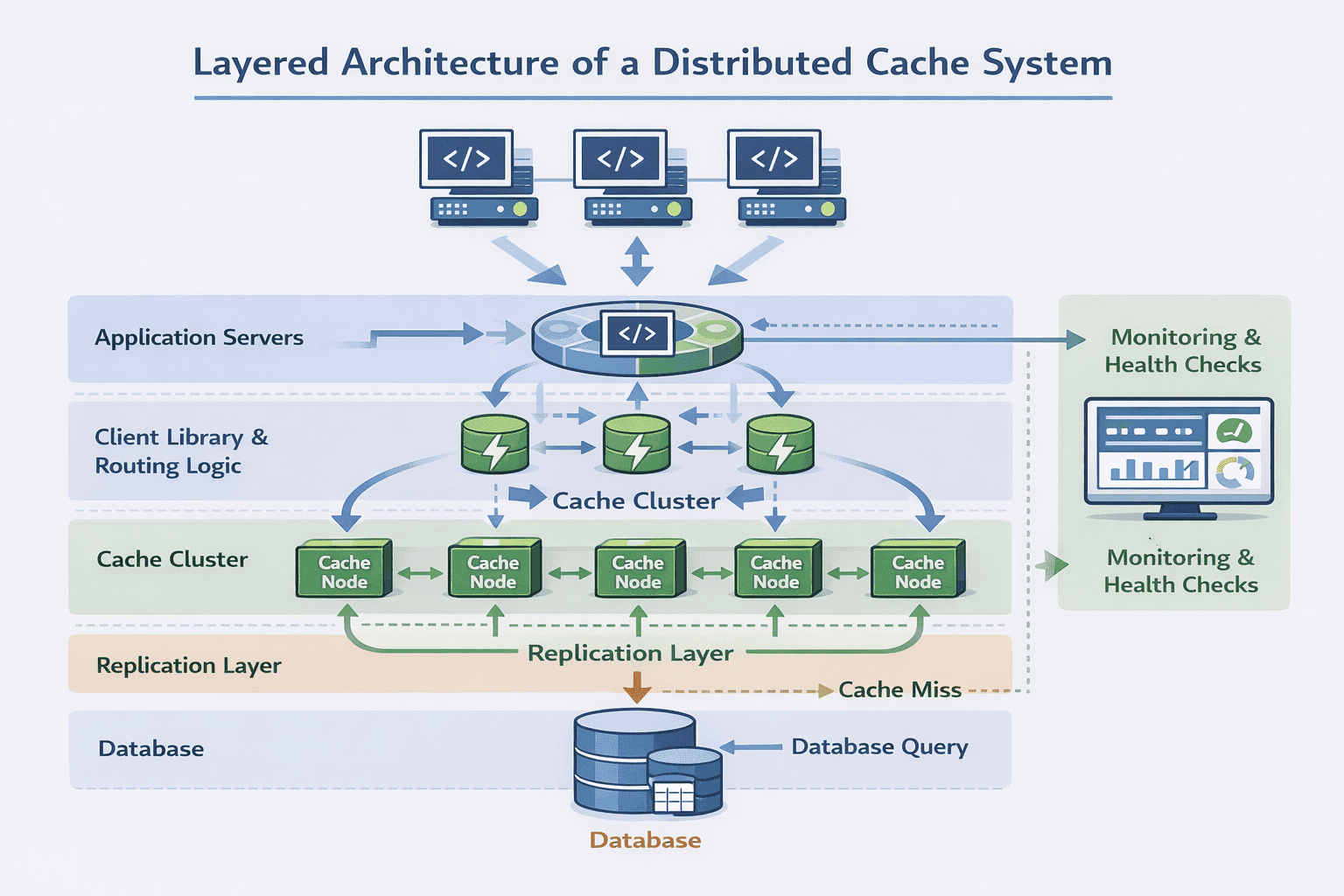
Core Architectural Components
Once you’ve established the need for distribution, introduce the key components that make it work.
Cache nodes: Individual servers running cache software, each storing a subset of the total cached data. These nodes are typically homogeneous—same hardware, same software version.
Partitioning layer: Logic that determines which cache node stores which keys. Usually implemented via consistent hashing to minimize data movement when nodes are added or removed.
Replication layer: Maintains copies of cached data across multiple nodes for fault tolerance. You might use master-replica or peer-to-peer replication depending on consistency requirements.
Client library: Code that applications use to interact with the cache cluster. This library typically handles node discovery, request routing, and connection pooling.
Monitoring and health checks: Systems that track cache performance, detect node failures, and alert operators to problems. This isn’t optional—it’s essential for production operation.
Data Flow at a Glance
Walk through a complete request lifecycle. This shows you understand how components interact.
Read request flow:
- Application calls cache client library with a key
- Client library hashes the key and determines which node should have it
- Client library sends request to that node
- Cache node looks up the key in its local hash table
- On hit: return value immediately (typically 1-2ms)
- On miss: application queries database, stores result in cache with TTL, returns to user
This step-by-step walkthrough demonstrates you’re thinking about actual implementation, not just drawing boxes.
5. Data Flow and Cache Patterns
Interviewers often ask: “How does a read actually work?” This is where you demonstrate understanding of cache access patterns and their trade-offs.
Cache-Aside: The Most Common Pattern
In cache-aside (also called lazy loading), the application is responsible for both cache and database access.
Read flow:
- Application checks cache for requested data
- Cache hit → return cached value
- Cache miss → fetch from database
- Store fetched data in cache with appropriate TTL
- Return data to user
Why it’s popular: Cache-aside is simple and flexible. The application has full control over what gets cached and when. If the cache fails completely, the application can still function by querying the database directly.
Trade-offs: Initial requests are always slow (cache miss). You have “lazy” population—only frequently accessed data ends up in the cache. This works well for read-heavy workloads with skewed access patterns.
Write-Through: Strong Consistency
In write-through, every write goes to both cache and database synchronously.
Write flow:
- Application writes data to cache
- Cache synchronously writes to database
- Only after database confirms write does cache return success
- Reads always find fresh data in cache
Why it’s used: Write-through guarantees cache and database are consistent. Reads are fast because data is always cached after being written.
Trade-offs: Higher write latency—every write waits for database confirmation. You’re essentially making writes slower to make reads faster. This makes sense when reads vastly outnumber writes.
Write-Behind: Maximum Throughput
In write-behind (write-back), writes go to cache immediately and are asynchronously persisted to the database.
Write flow:
- Application writes to cache
- Cache immediately returns success
- Cache asynchronously batches writes and sends to database
- Database updates happen in the background
Why it’s used: Extremely fast writes. The application doesn’t wait for slow database operations. You can also batch multiple writes together for efficiency.
Trade-offs: Risk of data loss if cache crashes before persisting to database. You have eventual consistency—the database lags behind the cache. This pattern is less common and typically only used for specific high-throughput scenarios.
📊 Table: Cache Pattern Comparison
Each caching pattern optimizes for different characteristics. Choose based on your consistency requirements, read/write ratio, and acceptable latency trade-offs.
| Pattern | Read Latency | Write Latency | Consistency | Best Use Case | Main Risk |
|---|---|---|---|---|---|
| Cache-Aside | Fast on hit, slow on miss | Fast (DB only) | Eventual | Read-heavy, skewed access | Stale reads |
| Write-Through | Always fast | Slow (cache + DB) | Strong | Read-heavy, consistency critical | Slow writes |
| Write-Behind | Always fast | Very fast | Eventual | Write-heavy, loss-tolerant | Data loss on failure |
| Read-Through | Slow on miss | Fast (DB only) | Eventual | Simplified app logic | Cache couples to DB |
Justifying Your Choice
Don’t just list patterns—explain which one fits your requirements and why.
For a product catalog cache: “I’d use cache-aside because reads vastly outnumber writes, and we can tolerate brief staleness when products are updated. The simplicity is worth the occasional cache miss.”
For a session store: “I’d lean toward write-through because session consistency matters—users expect their login state to be immediately reflected. The write latency is acceptable since sessions are created infrequently.”
This reasoning demonstrates you’re making decisions based on requirements, not memorization.
6. Partitioning and Horizontal Scaling Strategy
A single cache node has finite capacity. When interviewers ask “how do you scale this?”, they’re testing whether you understand data partitioning in distributed systems.
Why Simple Hash Partitioning Fails
The naive approach is simple modulo hashing:
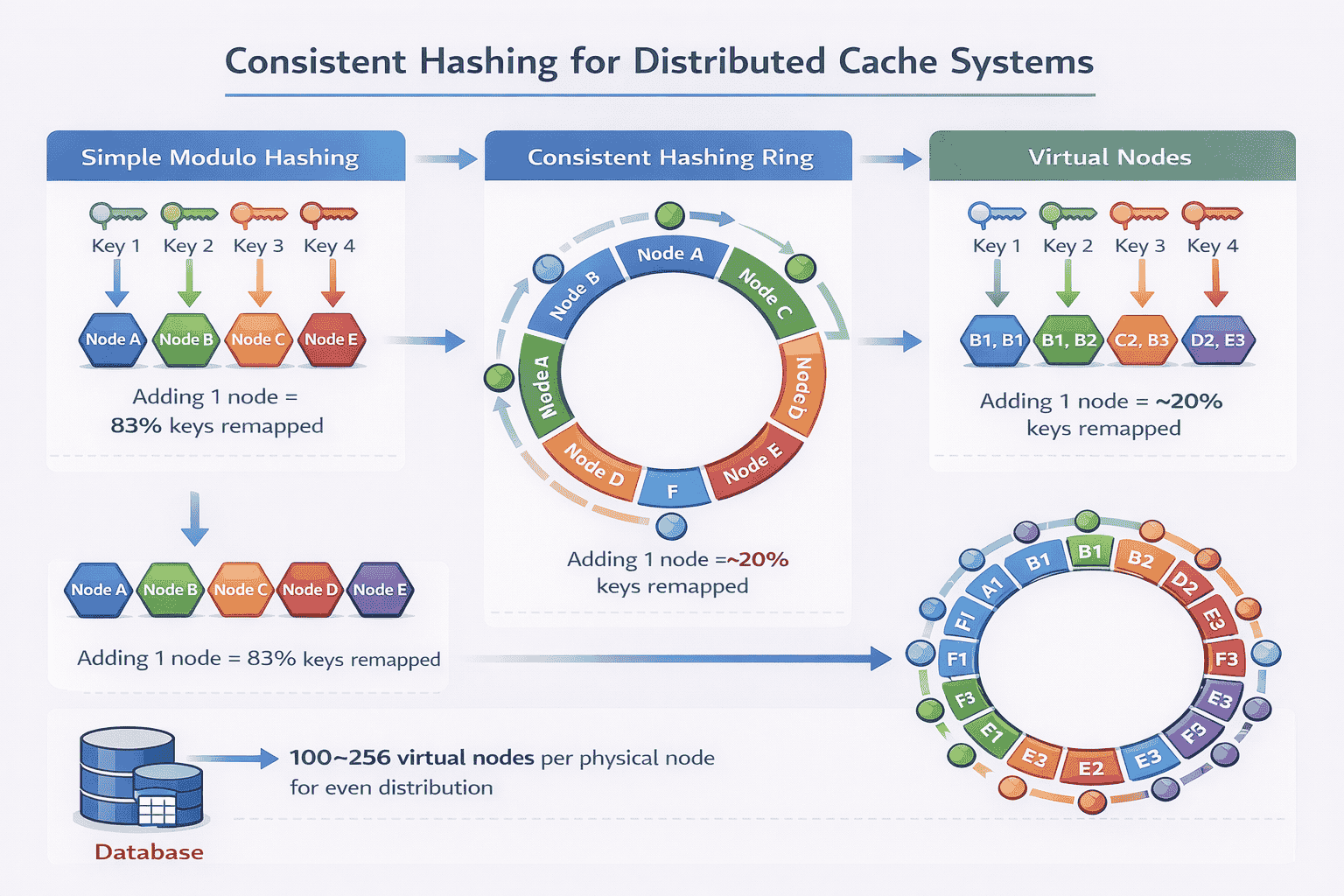
node = hash(key) % num_nodes
. If you have 5 cache nodes, key “user:123” hashes to node 3.
This seems elegant until you add or remove nodes. When you scale from 5 to 6 nodes, almost every key maps to a different node. Your entire cache becomes invalid simultaneously.
The problem: Adding one node remaps 5/6 of all keys (83%). Removing one node remaps 4/5 of keys (80%). This triggers massive cache misses and database load spikes that can crash your system.
Strong candidates immediately identify this problem and propose consistent hashing instead.
Consistent Hashing: The Standard Solution
Consistent hashing minimizes key remapping when the cluster changes. Instead of mapping keys directly to nodes, you map both keys and nodes onto a hash ring.
How it works:
- Imagine a circular hash space from 0 to 2^32-1
- Hash each node identifier onto this ring
- Hash each key onto the same ring
- A key is stored on the first node encountered moving clockwise
Why it’s better: When you add a node, only keys between that node and the previous node need remapping. With 10 nodes, adding one node only affects ~10% of keys instead of 90%.
When you remove a node, its keys simply move to the next node on the ring. The impact is localized.
Virtual Nodes: Solving Uneven Distribution
Consistent hashing has a subtle problem: uneven key distribution. With only 5 physical nodes, some nodes might get 25% of keys while others get 15%.
The solution is virtual nodes. Each physical node claims multiple positions on the hash ring.
Implementation: Instead of hashing “node1” once, you hash “node1-vnode1”, “node1-vnode2”, …, “node1-vnode100”. Now node1 has 100 positions on the ring.
Benefits:
- More even key distribution across nodes
- Better load balancing—no single node becomes a hotspot
- Smoother data migration when adding/removing nodes
- Ability to handle heterogeneous hardware (powerful nodes get more vnodes)
Typical production systems use 100-256 virtual nodes per physical node.
Replication for Fault Tolerance
Partitioning distributes data, but what happens when a node crashes? Without replication, those keys become unavailable.
Replication strategy: Store each key on N nodes instead of just one. Common choices are N=2 (one primary, one replica) or N=3 (one primary, two replicas).
With consistent hashing, this is straightforward: a key lives on the node it maps to plus the next N-1 nodes clockwise on the ring.
Read handling with replicas:
- Primary reads: Always read from the primary node (faster, simpler)
- Replica reads: Read from any replica if primary is unavailable (better availability)
- Quorum reads: Read from majority of replicas for stronger consistency (slower, more consistent)
The choice depends on your consistency requirements from the requirements phase.
Adding and Removing Nodes Gracefully
Strong candidates explain the operational procedure, not just the theory.
Adding a node:
- New node joins and announces its virtual node positions
- Existing nodes identify keys that now belong to the new node
- Keys are gradually migrated while still serving requests
- Once migration completes, old nodes delete transferred keys
- Client libraries update their routing tables
Removing a node:
- Mark the node as “leaving” but keep it running
- Identify which nodes will inherit its keys (next nodes on the ring)
- Migrate keys to successor nodes
- After migration completes, take the node offline
- Update client routing tables to exclude the removed node
This operational awareness demonstrates you’ve thought beyond design to actual deployment.
7. Handling Failure Scenarios
This is where interviews intensify. Interviewers probe how your design handles reality—network partitions, crashed nodes, and cascading failures.
Cache Node Crashes
The most common failure mode is a single node crashing due to hardware failure, software bugs, or operational mistakes.
Without replication: All keys on that node are lost. Clients get cache misses until keys are repopulated from the database. This triggers a load spike that can cascade to database failures.
With replication: Client libraries detect the failed node and redirect requests to replicas. The cache cluster remains fully available. Background processes gradually rebuild the failed node’s replica elsewhere.
Explain your detection mechanism: health checks every 5 seconds, remove node from routing after 3 consecutive failures, automatic replica promotion.
Network Partitions
Network partitions are trickier than simple crashes. Half your cache cluster might be unreachable, but those nodes are still running and serving requests.
The problem: Different clients see different subsets of the cache cluster. They may write conflicting values to different partitions. When the network heals, you have inconsistent data.
Common approach: Detect partition via heartbeat failures. When a partition is detected, the minority partition enters read-only mode to prevent split-brain scenarios. Only the majority partition continues accepting writes.
Strong candidates mention that caches often choose availability over consistency during partitions—serve stale data rather than fail completely.
Thundering Herd Problem
This is a classic cache failure pattern that many candidates miss.
The scenario: A popular key expires or gets evicted. Simultaneously, 10,000 requests arrive for that key. All 10,000 requests see a cache miss and query the database.
Your database, designed to handle 100 requests/second, suddenly receives 10,000 concurrent queries for the same data. It crashes.
Solutions:
- Request coalescing: The cache layer detects multiple concurrent requests for the same missing key and only sends one database query. Other requests wait for that result.
- Probabilistic early expiration: Expire popular keys randomly within a time window rather than all at once.
- Background refresh: Refresh popular keys before they expire, so cache misses are rare.
- Stale-while-revalidate: Serve the expired value while asynchronously fetching fresh data.
Mentioning thundering herd demonstrates production experience.
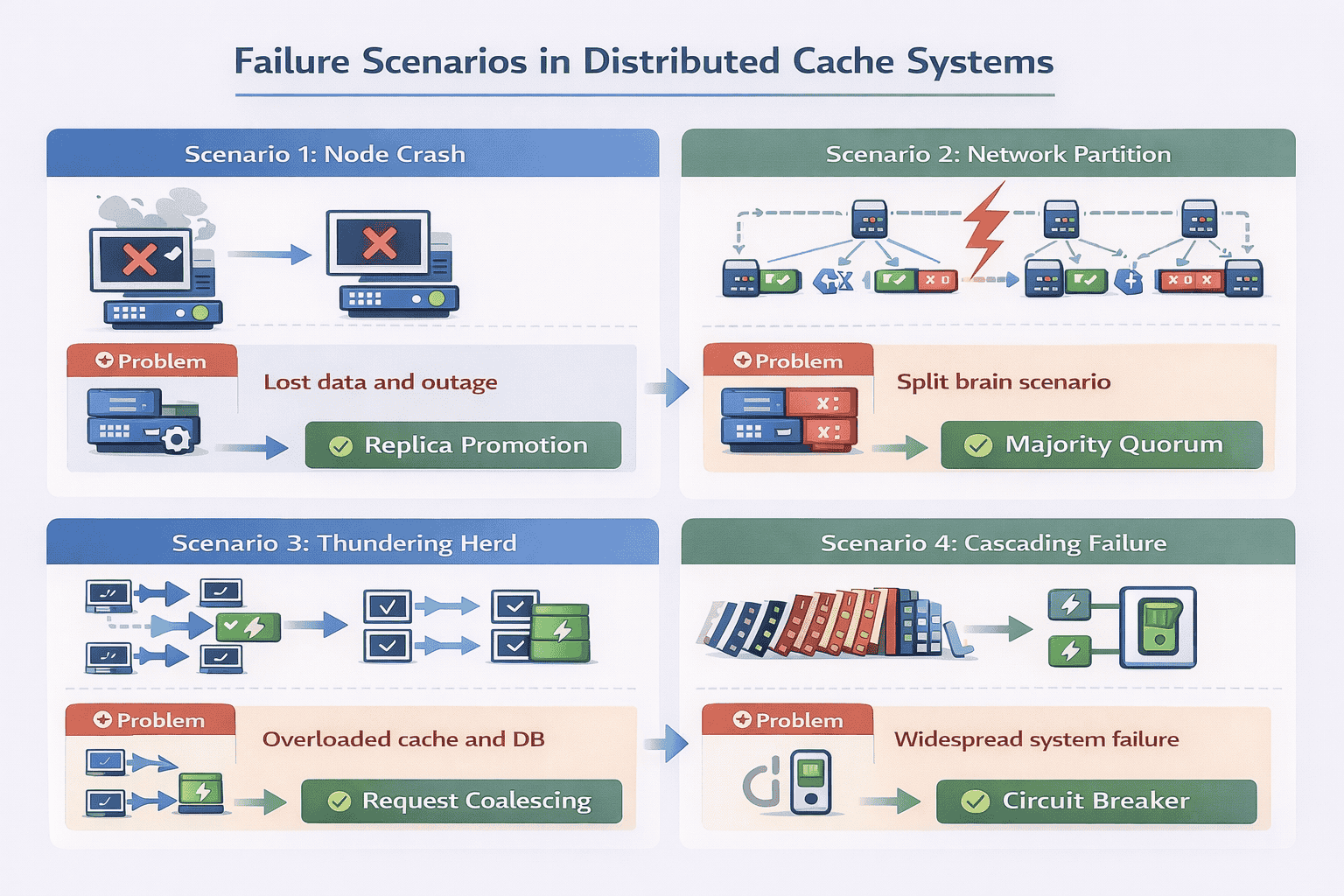
Cascading Failures and Circuit Breakers
When the cache fails, applications fall back to the database. But what if database queries are slow?
The cascade: Applications wait for slow database queries. Request threads pile up. Application servers run out of threads. New requests can’t be processed. The entire service fails even though only the cache had a problem.
Circuit breaker pattern:
- Track cache request failures and timeouts
- If failure rate exceeds threshold (e.g., 50% over 10 seconds), open the circuit
- While circuit is open, immediately fail requests without trying the cache
- After a timeout period, allow a few test requests through (half-open state)
- If test requests succeed, close the circuit and resume normal operation
This prevents the cache failure from taking down dependent services.
Partial Data Loss
Even with replication, you can lose data if multiple replicas fail simultaneously (rare but possible).
Mitigation strategies:
- Accept the loss—caches are meant to be ephemeral. The database has the authoritative data.
- Use rack-aware or zone-aware replica placement to survive datacenter failures
- For critical data, persist cache contents to disk periodically (reduces pure in-memory benefits)
- Have cache-warming procedures to quickly repopulate after major failures
Strong candidates emphasize that caches are performance optimizations, not durability guarantees. Some data loss is acceptable.
8. Eviction Policies, TTLs, and Hot Key Management
Memory is finite. When the cache fills up, the system must decide which items to remove. This decision dramatically impacts cache effectiveness.
LRU: Least Recently Used
LRU is the most common eviction policy. It removes items that haven’t been accessed recently, based on the assumption that recently accessed items are likely to be accessed again soon.
Implementation: Maintain a doubly-linked list alongside your hash table. When an item is accessed, move it to the front of the list. When evicting, remove items from the back.
Strengths: Simple to understand and implement. Works well for workloads with temporal locality—recent items are frequently re-accessed.
Weaknesses: A large sequential scan can evict your entire cache even if those items are never accessed again. Doesn’t consider access frequency, only recency.
In interviews, mention the implementation detail (hash table + linked list) to show you understand data structures, not just concepts.
LFU: Least Frequently Used
LFU tracks how many times each item has been accessed and evicts the least frequently accessed items.
Implementation: Maintain access counters for each key. More complex variants use min-heap or approximate counters to avoid expensive exact counting.
Strengths: Better for workloads where some items are consistently popular (e.g., homepage data, top products). Won’t evict frequently accessed items just because they weren’t accessed recently.
Weaknesses: Items popular in the past but no longer accessed stay in cache. Requires more memory overhead for counters. Harder to implement efficiently.
Practical Hybrid Approaches
Production systems often use hybrids that balance implementation complexity with effectiveness.
LRU-K: Track the last K access timestamps. Evict items with the oldest K-th access. This combines recency with frequency—items must be accessed K times to be considered “hot.”
Segmented LRU: Divide cache into segments (probation, protected). New items start in probation. After second access, promote to protected. Evict from probation first. This prevents scans from evicting truly popular items.
Random eviction: Sometimes used for simplicity. Surprisingly effective when cache hit rate is already high and exact eviction policy doesn’t matter much.
📊 Table: Eviction Policy Trade-Offs
Choose eviction policies based on your workload characteristics. LRU works for most cases, but specific access patterns may benefit from alternatives.
| Policy | Implementation Complexity | Memory Overhead | Best For | Worst For | Cache Hit Rate |
|---|---|---|---|---|---|
| LRU | Medium | Low (2 pointers/item) | Temporal locality workloads | Sequential scans | Good |
| LFU | High | Medium (counter/item) | Stable popular items | Changing popularity | Very Good |
| LRU-K | High | Medium (K timestamps/item) | Mixed recency + frequency | Purely random access | Very Good |
| Random | Very Low | None | High hit rate scenarios | Low hit rate scenarios | Acceptable |
| FIFO | Low | Low (1 pointer/item) | Time-sensitive data | Re-accessed items | Poor |
Time-to-Live (TTL) Strategy
TTL controls how long items remain in cache before automatic expiration. This prevents stale data even if the cache never fills up.
Setting TTL values: Base TTL on data volatility, not arbitrary numbers.
- User sessions: 30 minutes to match typical session timeout
- Product information: 1-6 hours (updates are infrequent)
- Inventory counts: 30-60 seconds (changes frequently)
- User profiles: 15-30 minutes (balance freshness and database load)
- Static configuration: 24 hours or more (rarely changes)
Strong candidates justify their TTL choices based on business requirements rather than picking round numbers.
TTL with Jitter
A subtle problem: if you cache 10,000 items simultaneously with identical TTLs, they all expire simultaneously. This triggers 10,000 cache misses at once.
Solution: Add randomization (jitter) to TTL values. Instead of exactly 3600 seconds, use 3600 ± 10% random. Items expire gradually rather than all at once.
This small implementation detail demonstrates awareness of thundering herd variations.
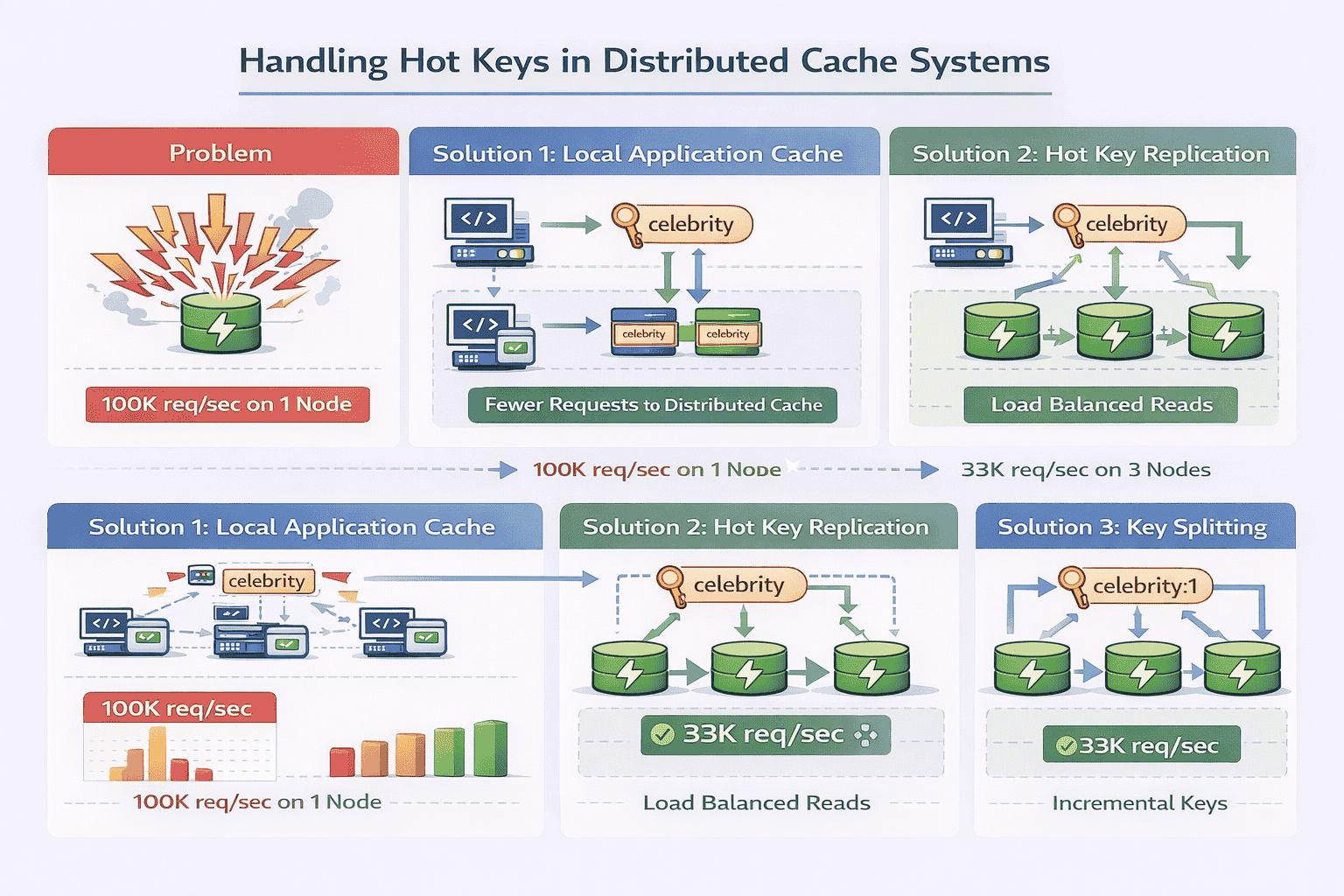
Hot Key Problem
Some keys are accessed far more frequently than others. A celebrity’s profile might receive 100,000 requests per second while most users get 1 request per minute.
The problem: Even with distributed caching, a single hot key lives on a single node. That node becomes a bottleneck while other nodes sit idle.
Solution 1: Local caching
Application servers maintain a small local cache for extremely hot items. This reduces requests to the distributed cache entirely. The local cache has very short TTLs (seconds) to prevent severe staleness.
Solution 2: Key replication
Store hot keys on multiple cache nodes rather than just one. Client libraries randomly select among replicas for reads, distributing load. Writes still go to all replicas to maintain consistency.
Solution 3: Key splitting
For extremely hot keys, split them into multiple keys: “user:celebrity:1”, “user:celebrity:2”, etc. Clients randomly select a suffix. Each split contains identical data but lives on different nodes.
Cache Stampede Prevention
When a popular cached item expires, many concurrent requests might simultaneously discover the cache miss and all query the database.
Probabilistic early recomputation: Before an item expires, randomly decide whether to refresh it based on remaining TTL and request rate. High-traffic keys get refreshed before they expire.
Lock-based approach: When a cache miss occurs, the first request acquires a lock for that key, queries the database, and populates the cache. Subsequent requests wait for the lock rather than querying the database.
Mentioning stampede prevention shows you think about production edge cases.
9. Consistency Trade-Offs in Distributed Caching
Interviewers probe consistency models to see if you understand the fundamental trade-offs in distributed systems.
Why Strong Consistency Is Hard
Strong consistency means all replicas always show the same value. If you write “X=5” to the cache, every subsequent read must return 5.
This requires synchronous replication: writes don’t complete until all replicas acknowledge the update. With 3 replicas across different datacenters, you’re waiting for network round-trips to all locations.
The latency cost makes strong consistency impractical for most cache use cases. Caches exist to reduce latency—adding 50-100ms for cross-datacenter synchronous writes defeats the purpose.
Eventual Consistency: The Pragmatic Choice
Most caches accept eventual consistency: replicas may temporarily show different values, but eventually converge to the same value.
How it works:
- Writes go to the primary replica and return immediately
- Updates propagate asynchronously to other replicas
- Different clients might temporarily read different values
- After propagation completes (typically milliseconds), all replicas agree
Why it’s acceptable: For most cache use cases, brief inconsistency doesn’t matter. Product catalogs, recommendations, user preferences—none require instant global consistency.
Strong candidates explicitly state: “Since we’re caching product information and can tolerate seconds of staleness, eventual consistency is fine. This lets us optimize for read latency.”
Cache Invalidation Challenges
The classic computer science problem: “There are only two hard things in computer science: cache invalidation and naming things.”
The challenge: When database data changes, how do you ensure the cache reflects those changes?
Option 1: Time-based invalidation (TTL only)
Simplest approach: rely entirely on TTL expiration. Data becomes stale but automatically refreshes after TTL expires.
Works well when: updates are infrequent, staleness is acceptable, you want minimal complexity.
Option 2: Explicit invalidation
Application explicitly deletes cache entries when it updates the database. Provides fresher data at the cost of additional code complexity.
Works well when: you need fresher data, you control all write paths, invalidation logic is simple.
Option 3: Write-through (cache as synchronous layer)
Every database write also updates the cache synchronously. Cache is always fresh but writes are slower.
Works well when: reads vastly outnumber writes, consistency is critical, write latency is acceptable.
📊 Table: Consistency Models in Distributed Caching
Different consistency models involve different trade-offs between freshness, latency, and complexity. Choose based on your application’s tolerance for stale data.
| Consistency Model | Staleness Window | Read Latency | Write Latency | Complexity | Best Use Case |
|---|---|---|---|---|---|
| Strong Consistency | None (always fresh) | Medium-High | High | High | Financial data, critical state |
| Eventual Consistency | Milliseconds-Seconds | Very Low | Low | Low | Product catalogs, recommendations |
| TTL-Only | Up to TTL duration | Very Low | Very Low | Very Low | Slowly changing data |
| Read-Your-Writes | None for writer | Low | Medium | Medium | User preferences, session data |
Read-Your-Writes Consistency
A special case many candidates miss: users expect to see their own writes immediately, even if other users see stale data.
Example: You update your profile picture. You immediately refresh the page. If you see the old picture, you assume the update failed even if it succeeded.
Implementation: Route a user’s reads to the same cache replica that handled their writes (session affinity). Or, maintain version numbers and ensure user reads always get at least the version they wrote.
This middle ground between strong and eventual consistency works well for user-facing features.
Stale Reads Are Usually Fine
Strong candidates are comfortable with stale reads and explicitly state when they’re acceptable.
“For this product recommendation cache, users won’t notice if recommendations are 30 seconds stale. We can use eventual consistency and prioritize read latency over freshness.”
This demonstrates business judgment, not just technical knowledge. Not every system needs the strongest possible consistency.
10. Real-World System Evolution
Strong candidates don’t just design for stated requirements. They explain how the system would evolve as the business grows.
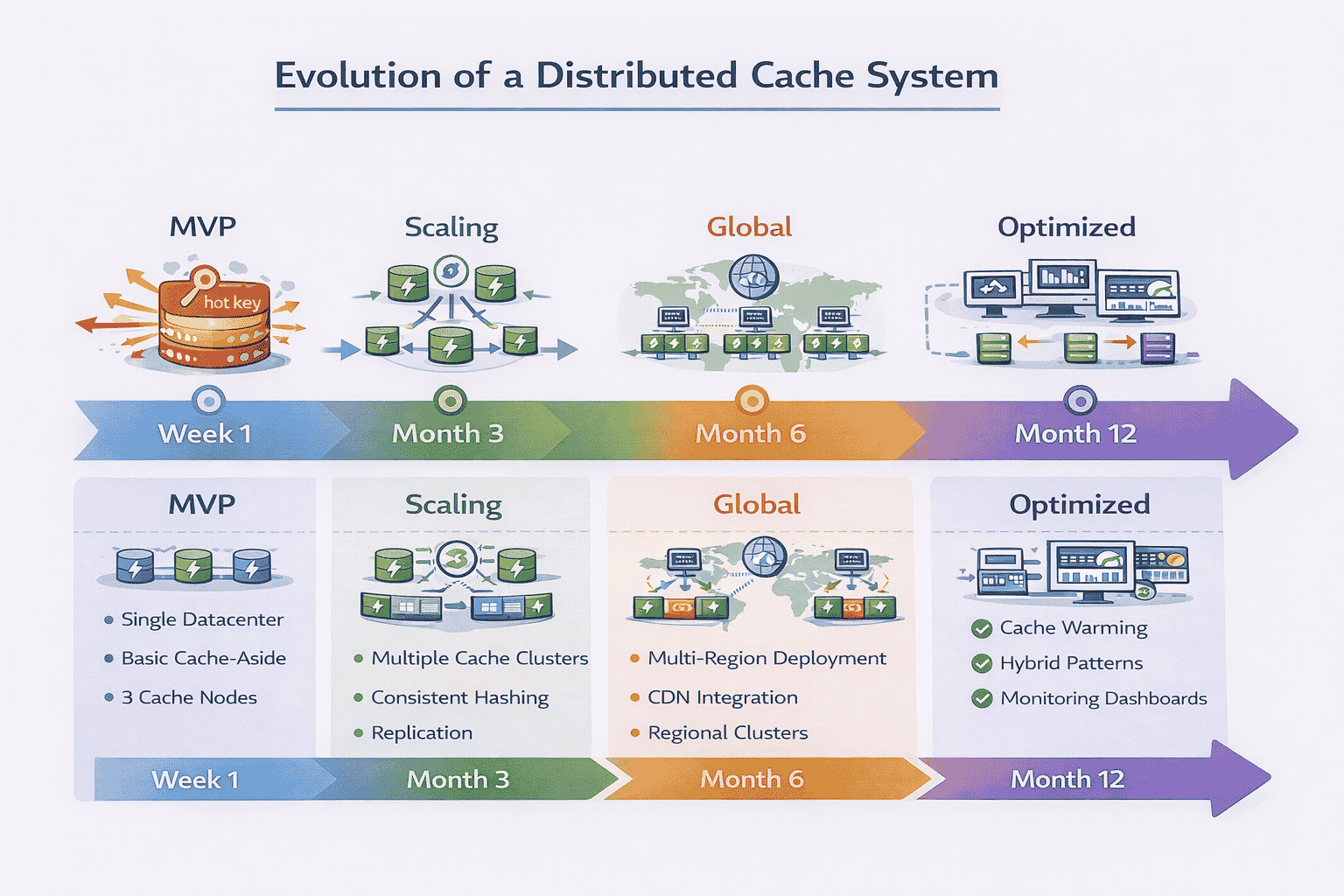
Multi-Region Cache Architecture
Your initial design might assume a single datacenter. What changes for global deployment?
Regional cache clusters: Deploy independent cache clusters in each region (US-East, EU-West, Asia-Pacific). This minimizes latency for users worldwide.
Cross-region consistency: Updates in one region eventually propagate to others. Typical propagation time is 100-500ms depending on distance. Users might see slightly different data based on their region.
Cache warming: When you deploy a new region, pre-populate its cache with popular items rather than starting cold. This prevents database load spikes as the cache fills.
CDN Integration for Static Content
For truly static content (images, CSS, JavaScript), a CDN provides better caching than your application-level cache.
Architecture layer:
- CDN (Cloudflare, Akamai) caches static assets at edge locations worldwide
- Application cache handles dynamic user data and API responses
- Database stores authoritative data
This hybrid approach optimizes for different content types.
Read-Through and Write-Behind Hybrids
Production systems often combine caching patterns based on data characteristics.
Example architecture:
- User session data: write-through for consistency
- Product catalog: cache-aside for simplicity
- View counts: write-behind for high throughput
- Static content: read-through with long TTLs
Different data types justify different strategies within the same system.
Cache Warming Strategies
Starting with an empty cache creates poor initial performance. Production systems pre-populate caches.
Approach 1: Replay recent queries
Analyze query logs from the past hour. Execute the most common queries to populate the cache before routing traffic to it.
Approach 2: Predictive warming
For time-sensitive systems (news, sports), pre-load data you know will be popular. Before a major sporting event, cache team rosters, player stats, and schedules.
Approach 3: Gradual migration
Route 5% of traffic to the new cache cluster initially. As it warms up naturally, gradually increase traffic. This avoids overwhelming the database.
Monitoring and Observability
Production systems require comprehensive monitoring. Strong candidates specify what to track.
Key metrics:
- Hit rate: Percentage of requests served from cache (target: 90-99% depending on workload)
- Latency percentiles: P50, P95, P99 response times (track degradation)
- Eviction rate: Items evicted per second (high rate suggests insufficient cache size)
- Memory utilization: Percentage of cache capacity used (alert before hitting limits)
- Error rates: Failed requests, timeouts, connection errors
- Hot key detection: Identify keys receiving disproportionate traffic
This level of operational detail demonstrates you’ve run production systems.
11. How to Close the Interview Answer
After walking through the architecture, strong candidates provide a concise summary that reinforces their structured thinking.
The Three-Part Summary
Part 1: Requirements recap. “We designed a distributed cache for product catalog data with 100,000 QPS, prioritizing read latency under 5ms with eventual consistency being acceptable.”
Part 2: Architecture highlights. “Our solution uses consistent hashing for partitioning, triple replication for fault tolerance, cache-aside pattern for simplicity, and LRU eviction with jittered TTLs.”
Part 3: Key trade-offs. “We chose eventual consistency over strong consistency to optimize for read latency. We accepted that cache node failures cause temporary load spikes on the database.”
This recap demonstrates you maintained coherent thinking throughout the discussion.
Acknowledge What You Didn’t Cover
Strong candidates explicitly mention aspects they simplified or skipped.
“We didn’t discuss authentication and authorization in detail—in production, you’d need access controls to prevent unauthorized cache access.”
“We assumed homogeneous hardware. With heterogeneous clusters, you’d weight virtual nodes based on server capacity.”
“We didn’t cover cost optimization. In practice, you’d tune cache size based on hit rate improvements versus infrastructure costs.”
This shows awareness that real systems have more complexity than interview discussions allow.
Offer Extensions Based on Requirements
Demonstrate you can adapt the design by mentioning variations for different use cases.
For session caching: “If this were a session cache instead of product data, I’d use write-through for stronger consistency and shorter TTLs around 30 minutes matching session timeouts.”
For leaderboard caching: “For a gaming leaderboard with frequent updates, I’d consider write-behind with batched database updates to handle high write throughput.”
For configuration caching: “For application configuration that changes rarely, I’d use very long TTLs (hours or days) and explicit invalidation when configs are updated.”
These variations show you understand design decisions depend on context, not memorized solutions.
📥 Download: Interview Closing Checklist
Use this simple checklist in your final 2-3 minutes to ensure you’ve communicated your design effectively and demonstrated senior-level thinking.
Download PDFInvite Further Discussion
End by showing you’re ready to go deeper on any aspect the interviewer finds interesting.
“That covers the core architecture. Are there any specific aspects you’d like me to elaborate on—failure handling, monitoring, or operational procedures?”
This signals confidence and willingness to engage with tough questions rather than hoping the interview ends.
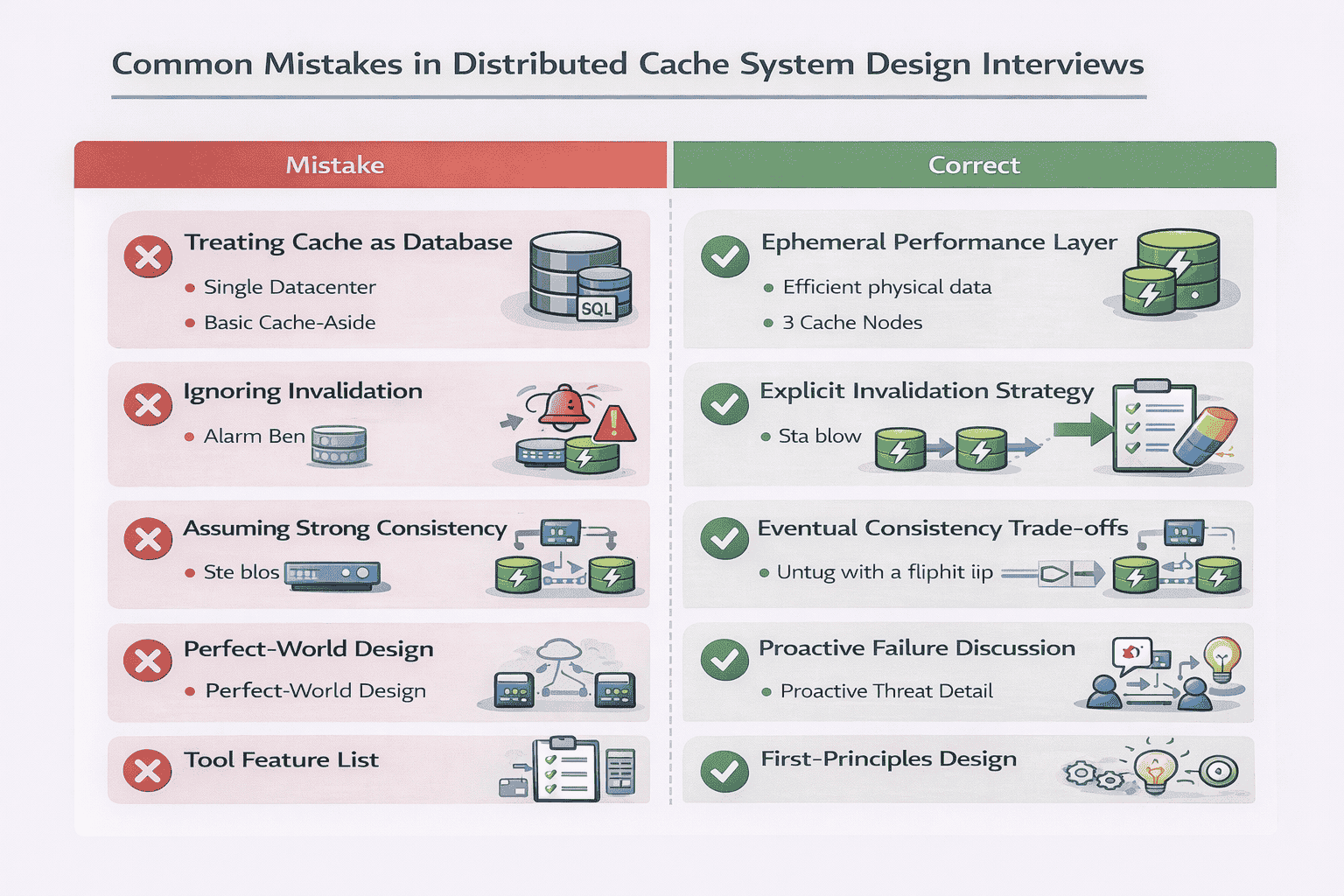
12. Common Interview Mistakes to Avoid
Even experienced engineers make predictable mistakes in cache design interviews. Avoiding these separates strong candidates from the rest.
Mistake 1: Treating Cache as a Database
Candidates sometimes design elaborate consistency mechanisms, persistence layers, and ACID transaction support.
Why it’s wrong: Caches are ephemeral performance optimizations, not durable data stores. The database is the source of truth. Cache data can be lost without catastrophic consequences.
What to do instead: Emphasize that cache failures degrade performance but don’t lose data. Design for fast recovery (cache warming) rather than bulletproof durability.
Mistake 2: Ignoring Cache Invalidation
Candidates design the write path but forget to explain how stale data gets removed when the database changes.
Why it’s wrong: Without invalidation strategy, your cache serves increasingly stale data. Users see outdated product prices, old profile information, or deleted content.
What to do instead: Explicitly discuss invalidation—whether through TTLs, explicit deletion, or write-through patterns. Acknowledge that invalidation is challenging and explain your chosen trade-offs.
Mistake 3: Assuming Strong Consistency
Candidates claim “all replicas are always consistent” without explaining the latency cost or implementation complexity.
Why it’s wrong: Strong consistency in distributed systems requires synchronous replication and consensus protocols (Paxos, Raft). This adds significant latency and complexity that defeats caching benefits.
What to do instead: Default to eventual consistency for most cache use cases. If the interviewer pushes for strong consistency, explain the trade-offs: higher write latency, more complex implementation, reduced availability during partitions.
Mistake 4: Skipping Failure Scenarios
Candidates present a perfect-world architecture where nothing fails.
Why it’s wrong: Production systems fail constantly. Interviewers want to see how you handle crashed nodes, network partitions, and cascading failures.
What to do instead: Proactively discuss failure modes even if not asked. “When a cache node crashes, requests route to replicas. We detect failures via health checks every 5 seconds and remove failed nodes from the routing table.”
Mistake 5: Jumping to Redis/Memcached Features
Candidates immediately start describing Redis data structures, Memcached protocols, or specific product features.
Why it’s wrong: The question asks you to design a cache, not explain existing tools. Interviewers want to see first-principles thinking, not product knowledge.
What to do instead: Design from scratch using fundamental concepts (hash tables, consistent hashing, replication). You can mention “production systems like Redis implement this using X” after explaining the concept.
Mistake 6: Over-Engineering the Initial Design
Candidates present complex multi-region, multi-tier architectures with elaborate monitoring and complex consistency protocols from the start.
Why it’s wrong: This suggests you don’t understand incremental design or prioritization. It also leaves no room for the interviewer to guide the discussion toward complexity.
What to do instead: Start simple. Present a basic three-tier architecture (apps, cache, database). Add complexity only when the interviewer asks about scale, failures, or specific requirements.
Mistake 7: Vague Hand-Waving About “Replication”
Candidates say “we’ll replicate the data” without explaining replication factor, synchronous vs asynchronous, or failover procedures.
Why it’s wrong: Vague statements suggest superficial understanding. Replication has many implementation choices that affect consistency, latency, and availability.
What to do instead: Be specific. “We’ll use asynchronous replication with a replication factor of 3. Writes go to the primary and return immediately. Updates propagate to replicas within 10-50ms. If the primary fails, we promote the first replica.”
Your Path to Mastering Cache System Design
Designing a distributed cache system tests your ability to think systematically under pressure, make informed trade-offs, and communicate technical decisions clearly.
The interview isn’t about memorizing Redis commands or Memcached protocols. It’s about demonstrating systems thinking—understanding why caches exist, how distribution solves scale problems, and what trade-offs different design choices involve.
What Strong Answers Demonstrate
When you walk through this design effectively, you prove:
- Requirements gathering: You ask clarifying questions that shape the entire design
- First-principles thinking: You understand caching from fundamentals, not just tools
- Trade-off reasoning: You articulate what each decision optimizes for and sacrifices
- Failure awareness: You proactively discuss edge cases and operational realities
- Communication skills: You structure complex technical concepts clearly
These competencies transfer beyond caching to any distributed system design challenge.
Practice With Real Scenarios
Don’t just read about cache design—practice explaining it out loud. Work through variations:
- Design a cache for user sessions with strict consistency requirements
- Design a cache for product catalogs with 1M items and 100K QPS
- Design a multi-region cache for a global social network
- Design a cache that handles celebrity traffic spikes (hot keys)
Each scenario emphasizes different aspects—consistency, scale, geography, or uneven load. Practicing multiple scenarios builds flexibility.
If you’re preparing for system design interviews at top tech companies, consider working with experienced engineers who’ve conducted hundreds of these interviews. Our mock interview sessions provide realistic practice with personalized feedback on your communication, technical depth, and trade-off reasoning.
Beyond the Interview
The cache design concepts you’ve learned here apply directly to production engineering:
- Understanding when caching helps versus when it adds unnecessary complexity
- Choosing appropriate eviction policies based on access patterns
- Debugging production cache issues (low hit rates, hot keys, stampedes)
- Optimizing cache configuration for cost and performance
Whether you’re interviewing or building production systems, the principles remain the same. Design for the requirements you have, not the ones you imagine. Start simple and add complexity only when justified. Embrace trade-offs rather than seeking perfect solutions.
The distributed cache question appears simple but reveals deep understanding of distributed systems, performance optimization, and operational thinking. Master this question, and you’ll approach other system design challenges with greater confidence and clarity.
Frequently Asked Questions
Should I mention specific technologies like Redis or Memcached in the interview?
You can reference them briefly to show awareness of production tools, but don’t make them the focus. Say “Production implementations like Redis use these concepts” after explaining the underlying principles. Interviewers want to see you design from first principles, not recite product documentation. Spend 90% of the time on your design and 10% mentioning that real-world tools implement these ideas.
How do I decide between LRU and LFU eviction policies?
LRU works better for workloads with temporal locality—recently accessed items are likely accessed again soon (user sessions, recent news). LFU works better when certain items are consistently popular regardless of recency (homepage data, trending products). In interviews, choose based on the access pattern described in requirements. If unsure, default to LRU and explain it’s simpler to implement and works well for most cases.
What if the interviewer asks about cache consistency guarantees?
Explicitly state that most caches choose eventual consistency because strong consistency defeats the purpose of caching (adds latency). Explain that for use cases requiring strong consistency, you’d use write-through with synchronous replication, acknowledging this makes writes slower. Always connect consistency choice to the business requirements discussed during clarification.
How much detail should I provide about consistent hashing?
Explain the core concept (hash ring, keys map to nodes clockwise) and why it’s better than modulo hashing (minimizes remapping when cluster changes). Mention virtual nodes if you have time, as they show deeper understanding. Don’t spend more than 2-3 minutes on this unless the interviewer specifically wants more detail. It’s one piece of the overall design, not the entire answer.
What if I’m asked how to handle a cache that’s constantly at 100% capacity?
This reveals capacity planning issues. Options include: horizontally scale by adding cache nodes, vertically scale with more memory per node, reduce TTLs to expire data faster, implement more aggressive eviction, or analyze what’s cached and remove low-value items. The best answer depends on whether you’re hitting memory, CPU, or network limits. Strong candidates ask clarifying questions before recommending a solution.
Should I discuss monitoring and observability in my answer?
Yes, briefly mentioning monitoring demonstrates operational maturity. Spend 1-2 minutes explaining you’d track hit rate, latency percentiles, eviction rate, and memory utilization. This shows you think about running systems in production, not just designing them. However, don’t let monitoring dominate the discussion—it’s supporting infrastructure, not the core architecture.
Citations
Content Integrity Note
This guide was written with AI assistance and then edited, fact-checked, and aligned to expert-approved teaching standards by Andrew Williams . Andrew has over 10 years of experience coaching software developers through technical interviews at top-tier companies including FAANG and leading enterprise organizations. His background includes conducting 500+ mock system design interviews and helping engineers successfully transition into senior, staff, and principal roles. Technical content regarding distributed systems, architecture patterns, and interview evaluation criteria is sourced from industry-standard references including engineering blogs from Netflix, Uber, and Slack, cloud provider architecture documentation from AWS, Google Cloud, and Microsoft Azure, and authoritative texts on distributed systems design.

