
Complete System Design Interview Guide for Senior Developers (2026): The End-to-End Playbook (Framework + Checklists + Case Studies)

A system design interview framework is your safety net when ambiguity hits You’re sitting across from a principal engineer who just asked…
I’ve watched 150 senior developers freeze at this moment The talented ones who could debug a microservice cluster…
This guide gives you the repeatable playbook I use to coach developers from I have no idea where…
If you’re debating the best prep path, see System Design Course vs Self-Study to choose the right approach for your timeline and experience.
Last updated: Feb. 2026
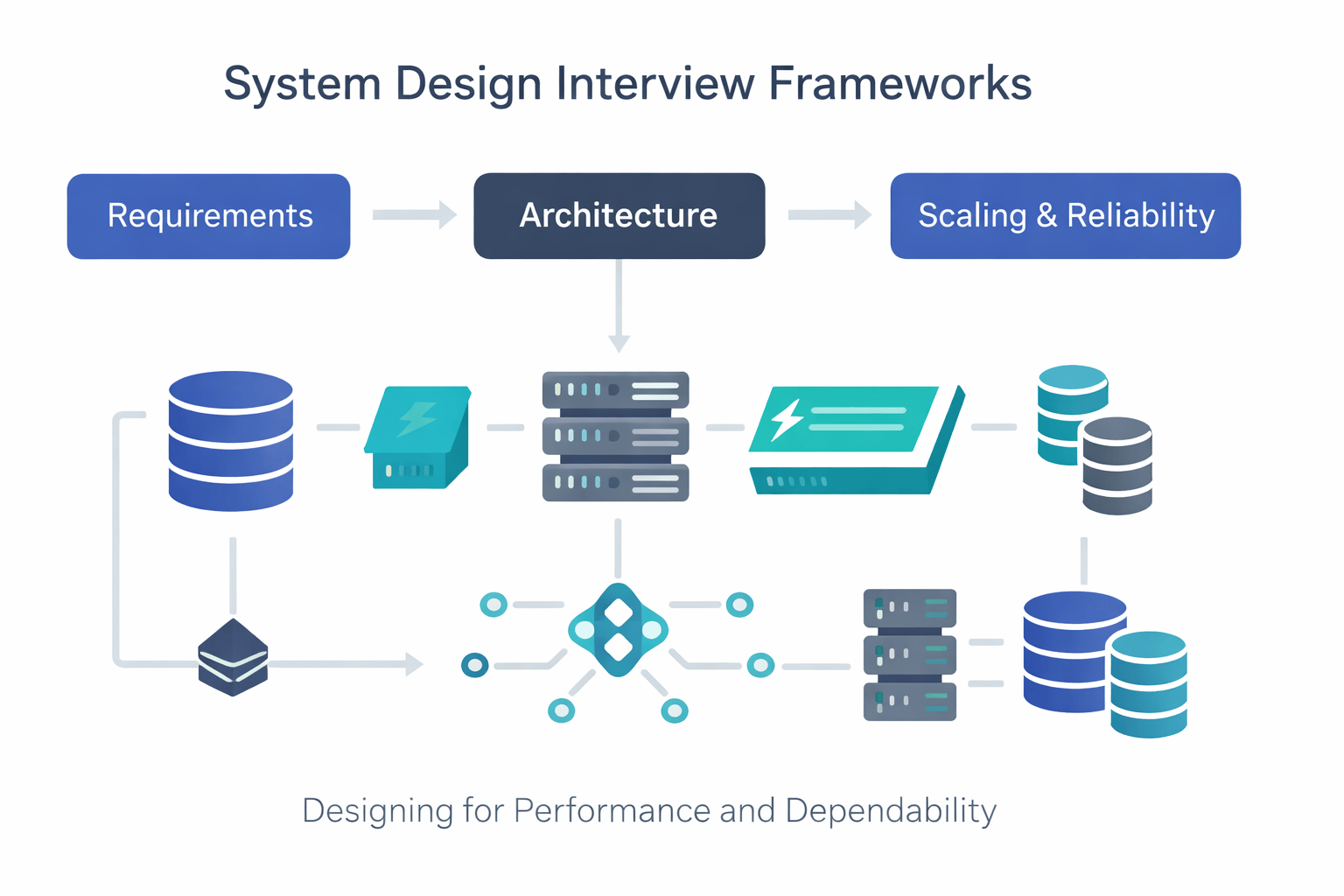
Table of Contents
- 1. Why Most Developers Fail System Design (And Why a Framework Fixes It)
- 2. What Is a System Design Interview?
- 3. How Companies Evaluate You: The Scorecard
- 4. Common Failure Reasons (And How to Fix Them Fast)
- 5. The Complete System Design Interview Framework
- 6. Worked Examples: Run the Framework End-to-End
- 7. Templates, Checklists, and Downloadable Worksheets
- 8. How to Prepare in 8–12 Weeks (The Practice System)
- 9. Common Myths (That Make People Prepare Wrong)
- 10. Your Next Steps: From Framework to Fluency
- 11. Frequently Asked Questions
Contents









Why Most Developers Fail System Design (And Why a Framework Fixes It)
Sarah was a senior backend engineer at a fintech startup She’d built distributed systems serving millions of daily…
Then she sat down for her Meta system design interview. The question was straightforward: ” Design a rate limiter .”
She jumped straight to Redis Then backtracked to talk about token buckets Then mentioned distributed consensus without explaining…
The Problem Isn’t Technical Knowledge
Sarah knew rate limiting cold. She’d implemented three different algorithms in production.
Her problem was structural Without a framework she had no mental map of what to cover in what…
This is the hidden trap of system design interviews . They test process and communication as much as technical depth.
What a Framework Actually Does
A framework is your interview operating system. It tells you:
- What questions to ask in the first 3 minutes
- How to sequence your thinking (scope → API → data → architecture → scale)
- When to go deep versus stay high-level
- How to manage time across ten competing priorities
- What artifacts to produce (diagrams, capacity math, failure modes)
Without it, you’re improvising. With it, you have a checklist that ensures you hit every scoring dimension.
The Difference Between Senior and Staff+ Expectations
At senior level, interviewers want to see that you can drive a conversation, handle ambiguity, and make trade-offs .
At staff and principal level they expect you to also surface reliability concerns security boundaries operational complexity and…
The framework in this guide scales It works for L5 senior interviews and extends naturally to L6 by…
📊 Table: Senior vs Staff+ Interview Expectations
Understanding evaluation differences helps you calibrate depth and emphasis during your preparation and the actual interview.
| Dimension | Senior (L5) | Staff+ (L6+) |
|---|---|---|
| Scope Clarification | Asks clarifying questions with prompting | Proactively defines boundaries and priorities |
| Requirements | Lists functional requirements | Proposes non-functional requirements unprompted latency… |
| Architecture | Designs core system with standard… | Justifies every component choice with… |
| Scaling | Mentions caching and sharding when… | Provides capacity estimation and identifies… |
| Reliability | Discusses basic failure scenarios | Designs for timeouts retries circuit… |
| Security | Mentions authentication if asked | Covers AuthN AuthZ rate limiting… |
| Observability | May mention logging | Defines SLIs SLOs key metrics… |
| Time Management | Covers most topics with guidance | Self-manages time knows when to… |
What You’ll Get From This Guide
This isn’t theory. Every section gives you something you can use in your next interview:
- A 10-step framework with exact questions to ask and outputs to produce
- Three complete walkthroughs showing the framework in action
- Templates for scope definition, API design, capacity estimation, and trade-off documentation
- An 8-12 week practice system that builds fluency through deliberate repetition
- Checklists to self-evaluate and identify gaps in your preparation
If you only have one week to prepare there’s a crash plan If you have three months there’s…
What Is a System Design Interview?
A system design interview is a collaborative conversation where you architect a system to solve a specific problem…
The format varies but the core pattern stays consistent You get a problem statement you clarify requirements you…
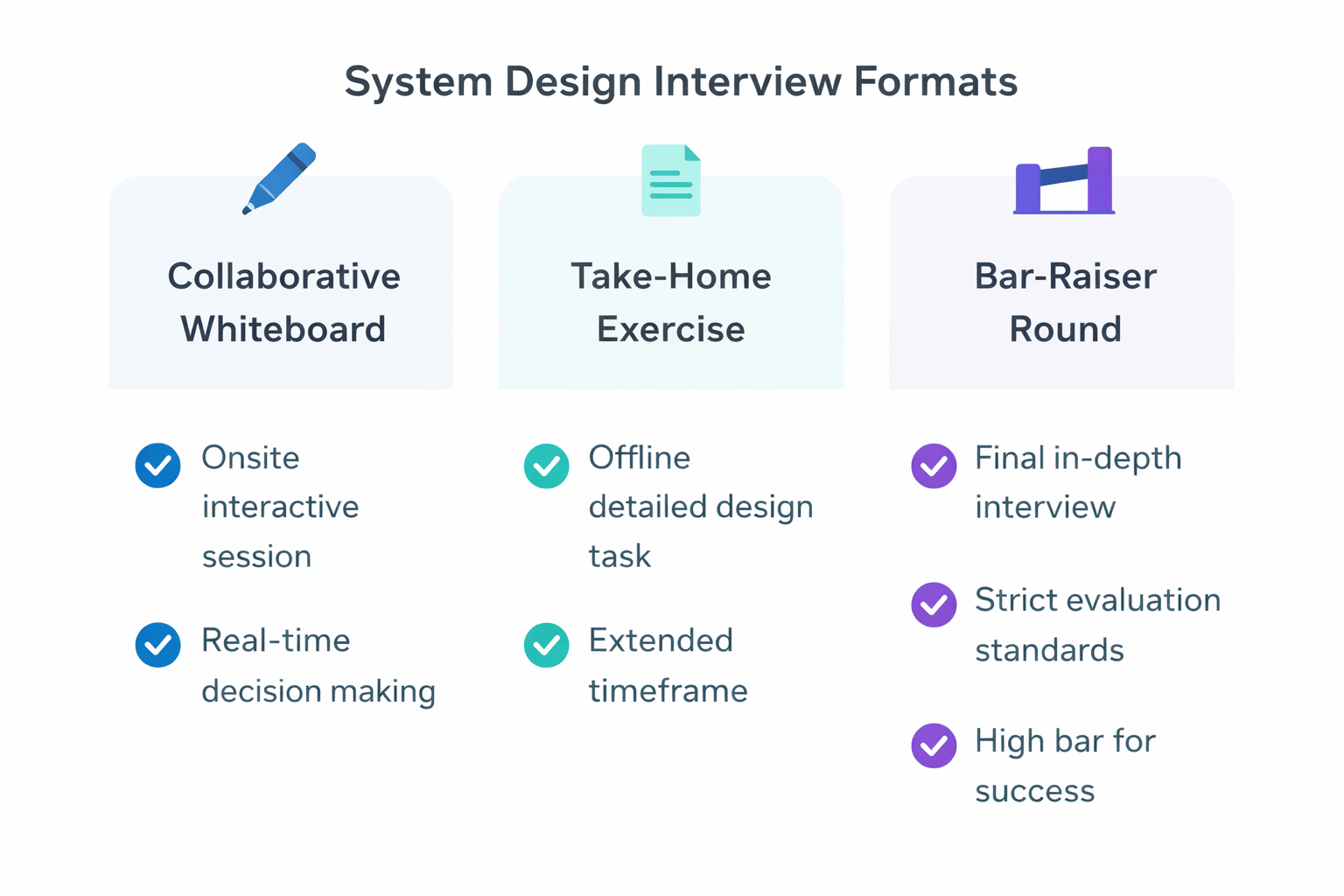
Common Interview Formats
Most companies use one of three formats:
Collaborative Whiteboard (Most Common): You stand at a whiteboard or use a virtual drawing tool and sketch your…
Take-Home Design Exercise: You get 2-4 hours to produce a written design document with diagrams Some companies use…
Bar-Raiser Round: At some FAANG companies one interview is specifically harder and conducted by a very senior engineer…
What “Good” Looks Like
Interviewers aren’t looking for a perfect architecture. They’re evaluating your thought process.
Structured Thinking: Do you approach problems methodically or do you jump around randomly Good candidates clarify before designing…
Trade-Off Awareness: Every decision has costs Strong candidates explain why they chose SQL over NoSQL why they’re using…
Communication Clarity: Can you explain complex systems simply Do you check for understanding Do you adjust depth based…
Realistic Constraints: Real systems have limits Good designs acknowledge latency budgets storage costs operational complexity and team capabilities…
What the Interviewer Is Really Testing
The surface question is “design Twitter.” The real questions underneath are:
- Can this person break down ambiguous problems?
- Do they understand distributed systems fundamentals?
- Can they estimate capacity and identify bottlenecks?
- Do they think about failure modes and reliability?
- Can they communicate technical decisions to different audiences?
- Will they drive the conversation or wait to be led?
You’re not designing the actual system Twitter uses. You’re demonstrating that you think like a senior engineer.
How Senior-Level Expectations Differ
Junior engineers get prompted at every step. Senior engineers are expected to drive.
At L5 senior you should proactively ask about scale suggest requirements and propose trade-offs The interviewer will guide…
At L6 staff principal you’re expected to raise concerns the interviewer hasn’t mentioned Security observability cost operational complexity…
The framework in this guide trains both levels For senior interviews use the core ten steps For staff…
How Companies Evaluate You: The Scorecard
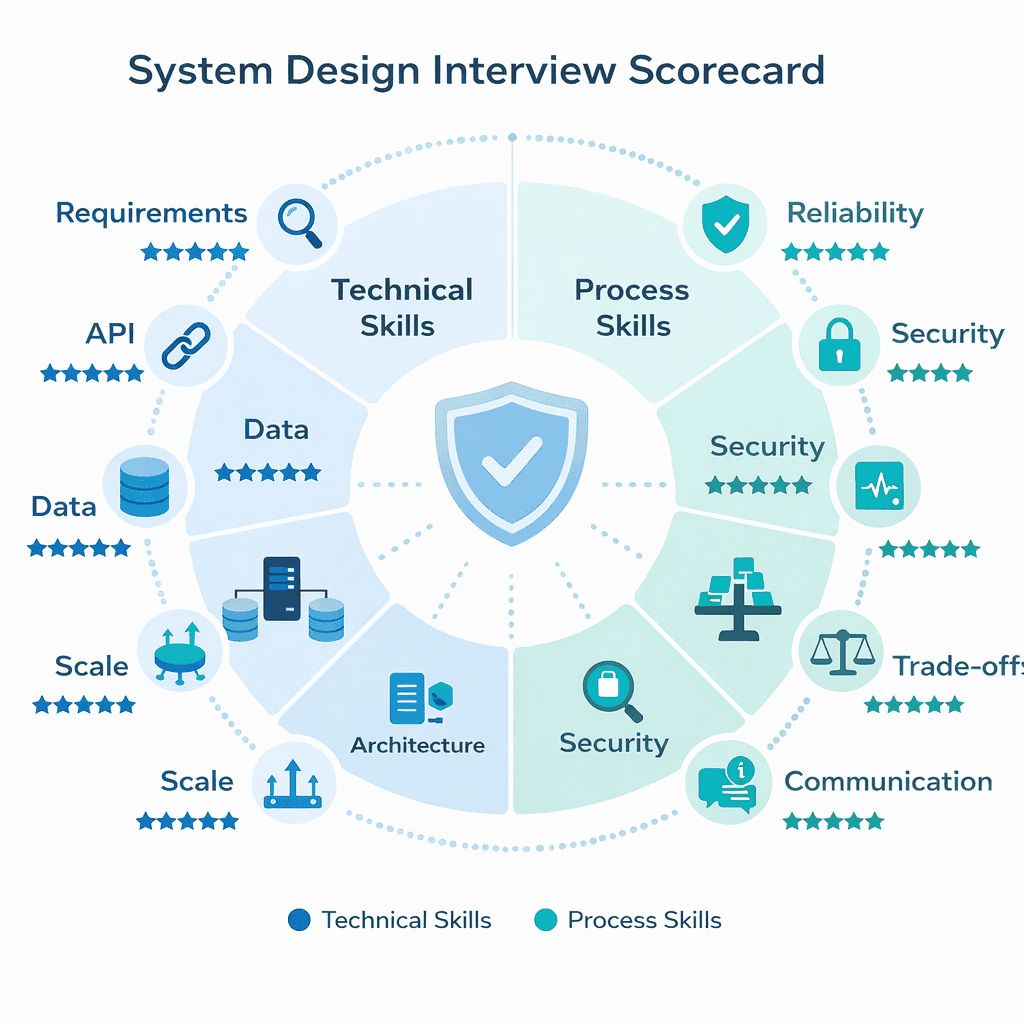
Interviewers don’t grade on vibes. They use structured rubrics with specific scoring dimensions.
Understanding the scorecard helps you allocate time and effort correctly Some candidates spend twenty minutes perfecting their database…
The Ten Scoring Dimensions
Most tech companies evaluate across these areas Not every dimension gets equal weight but you need to touch…
1. Requirements Clarification: Did you ask the right questions upfront Did you establish clear scope boundaries Did you…
- Strong signal: Asks about scale consistency needs latency targets and explicitly lists what’s out…
- Weak signal: Jumps straight to design without clarifying anything
2. API/Interface Design: Can you define clean contracts between components Do your APIs make sense for the…
- Strong signal: Specifies endpoints, request/response formats, error codes, pagination strategy, and idempotency approach
- Weak signal: Vague function names with no parameter details
3. Data Modeling: Did you choose appropriate data structures? Are your entities and relationships clear?
- Strong signal: Identifies entities, defines keys, explains access patterns, chooses appropriate indexing
- Weak signal: Skips data modeling entirely or proposes unrealistic schemas
4. High-Level Architecture: Is your system diagram clear? Do components have well-defined responsibilities?
- Strong signal: Clean boxes with clear data flow, separation of concerns, logical component boundaries
- Weak signal: Spaghetti diagrams with unclear relationships or missing critical components
5. Scalability: Can your design handle growth? Did you identify and address bottlenecks?
- Strong signal: Provides back-of-the-envelope calculations identifies bottlenecks proposes specific scaling strategies sharding caching read…
- Weak signal: Says “we’ll add more servers” without specifics
6. Reliability & Failure Handling: What happens when things break? How do you maintain availability?
- Strong signal: Discusses timeouts, retries with exponential backoff, circuit breakers, idempotency, dead letter queues
- Weak signal: Assumes everything always works
7. Security: Did you think about who can access what? How is data protected?
- Strong signal: Covers authentication authorization rate limiting input validation encryption at rest and in…
- Weak signal: No mention of security unless prompted
8. Observability: How do you know if the system is healthy? What metrics matter?
- Strong signal: Defines SLIs SLOs proposes key metrics latency p99 error rate throughput mentions…
- Weak signal: “We’ll add logging” with no specifics
9. Trade-Off Reasoning: Can you articulate why you chose one approach over alternatives?
- Strong signal: Explicitly discusses alternatives, explains constraints that drove decisions, acknowledges trade-offs
- Weak signal: Makes choices without justification or can’t explain why
10. Communication & Collaboration: Are you clear? Do you listen? Do you adjust based on feedback?
- Strong signal: Checks for understanding, summarizes decisions, responds constructively to pushback
- Weak signal: Talks over the interviewer or becomes defensive
Green Flags vs Red Flags
Interviewers look for specific signals that indicate seniority or lack thereof.
Green Flags (Hire Signals):
- Clarifies ambiguity before designing
- Proposes requirements rather than waiting to be told
- Draws clean diagrams with clear component boundaries
- Provides specific numbers for capacity estimation
- Discusses failure modes without prompting
- Explains trade-offs between alternatives
- Manages time effectively across topics
- Adjusts depth based on interviewer cues
Red Flags (No-Hire Signals):
- Jumps to implementation before understanding requirements
- Uses technologies without explaining why
- Ignores scale considerations
- Assumes perfect reliability with no failure handling
- Can’t estimate basic capacity numbers
- Becomes defensive when challenged
- Runs out of time before covering critical topics
- Over-designs with unnecessary complexity
Common Failure Reasons (And How to Fix Them Fast)
I’ve reviewed hundreds of failed system design interviews. The patterns are remarkably consistent.
Most failures aren’t due to lack of technical knowledge They’re process failures skipping critical steps poor time management…
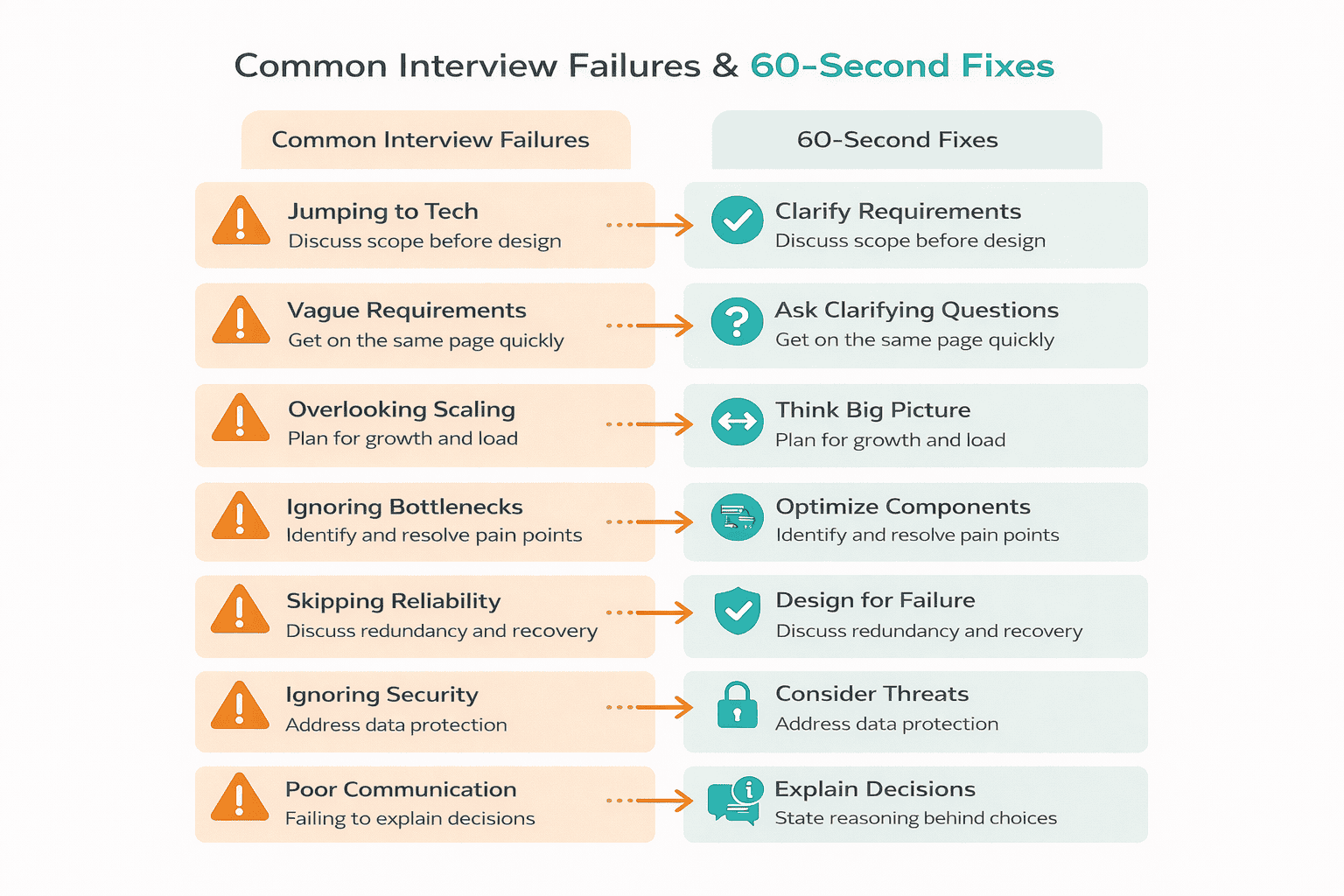
Here are the seven failure modes I see repeatedly, plus 60-second fixes you can apply immediately.
Failure #1: Jumping to Technology Before Clarifying Scope
The interviewer says “design a chat system,” and you immediately start talking about WebSockets and message queues.
But you haven’t asked if this is one-on-one chat or group chat You don’t know if it needs…
Why this fails: You’re solving the wrong problem Interviewers interpret this as inability to handle ambiguity or gather…
Fix in 60 seconds: Before I propose a design let me clarify the scope Are we building one-on-one…
Failure #2: Vague or Non-Measurable Requirements
You say “the system should be fast and reliable” without defining what that means.
Fast for whom A p50 latency of 100ms or p99 of 2 seconds Reliable meaning 99 9 uptime…
Why this fails: Without concrete targets you can’t make informed design decisions SQL vs NoSQL depends on consistency…
Fix in 60 seconds: For non-functional requirements I’m targeting p99 read latency under 200ms write latency under 500ms…
Failure #3: No Capacity Thinking (Even Back-of-the-Envelope)
You design a system without any sense of scale No calculations for requests per second storage requirements or…
Then the interviewer asks “how much storage do we need?” and you can’t provide even a rough estimate.
Why this fails: Senior engineers must be able to estimate capacity to identify bottlenecks and plan infrastructure Skipping…
Fix in 60 seconds: Let me do quick math 10 million daily active users average 50 messages per…
📊 Table: Common Estimation Benchmarks
Keep these reference numbers in mind for quick capacity calculations during interviews They provide reasonable starting points for…
| Metric | Typical Value | Notes |
|---|---|---|
| Text Message Size | 1 KB | Average including metadata |
| Image Size | 200 KB thumbnail to 2… | Compressed JPEG/PNG |
| Video Size | 10-50 MB per minute | Depends on resolution and compression |
| Database Read | 1-10 ms | Indexed query on SSD |
| Cache Read (Redis) | 1 ms | In-memory, same datacenter |
| Network Round Trip | 5-50 ms | Same region, varies by distance |
| SSD Sequential Read | 1 GB/s | Modern NVMe drives |
| SSD Random Read | 100k-500k IOPS | Modern enterprise SSDs |
| Active Users Ratio | 10-20% of total users | Daily active users |
| Peak to Average Traffic | 2-5x | Plan for peak, not average |
Failure #4: Missing Bottlenecks and Hot Partitions
You propose to shard user data by user ID but don’t notice that celebrity users with millions of…
Or you put all writes through a single database without considering write throughput limits.
Why this fails: Real systems have uneven load distribution Failing to identify and address bottlenecks shows lack of…
Fix in 60 seconds: I’m concerned about hot partitions with this sharding approach Users with millions of followers…
Failure #5: No Failure Story (Timeouts, Retries, Idempotency)
Your design shows happy-path request flow but doesn’t discuss what happens when the payment service is down when…
Why this fails: Distributed systems fail constantly. Senior engineers design for failure from the start.
Fix in 60 seconds: For reliability all external service calls get 3-second timeouts with exponential backoff retries We’ll…
Failure #6: No Operational Plan (Metrics, Alerts)
You design a beautiful architecture but can’t answer how do you know if it’s working or what alerts…
Why this fails: Systems need to be operated not just built Lack of observability thinking suggests you’ve never…
Fix in 60 seconds: Key metrics to track request latency p50 p99 p999 error rate by endpoint queue…
Failure #7: Over-Designing with No Time Control
You spend twenty-five minutes perfecting your database schema complete with normalization analysis and index optimization Then you run…
Why this fails: Time management is part of the test You need to cover all major areas even…
Fix in 60 seconds: Use the framework timeboxes Budget 5 minutes for requirements 5 minutes for API design…
The Complete System Design Interview Framework
This is the core playbook Ten steps that guide you from problem statement to complete design in 35-45…
I’ve used this framework to coach 150 developers through FAANG interviews It works because it’s comprehensive without being…
If you’re wondering whether paid guidance is worth it, read Is System Design Interview Coaching Worth It? (so you can decide before investing time or money).
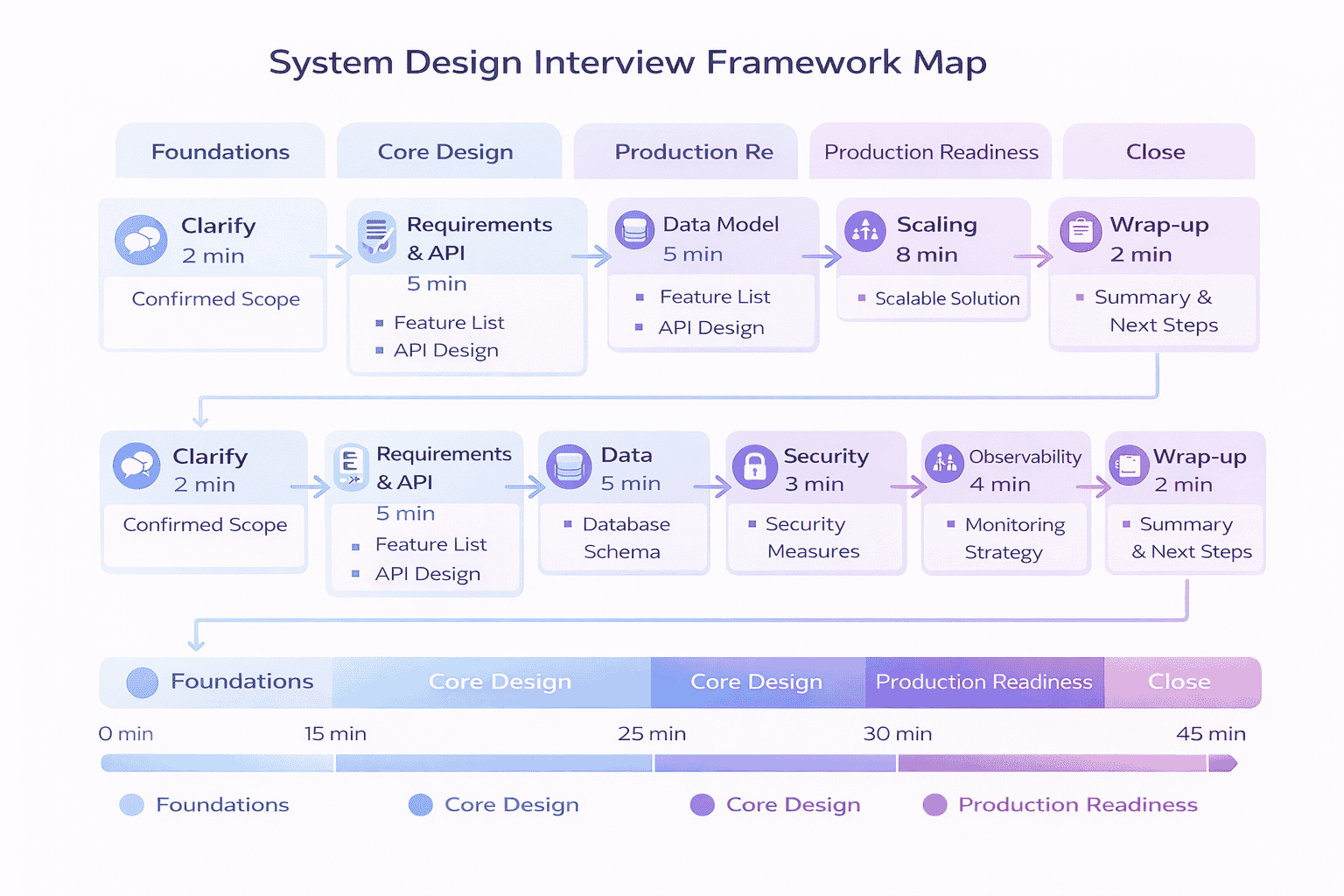
The Framework Map (One-Screen Overview)
Before diving into individual steps, understand the overall flow and timing:
Pacing Strategy: First 5, Middle 30, Last 10
First 5 Minutes (Foundation Phase): Clarify the problem and establish scope Resist the urge to design Ask questions…
Middle 30 Minutes (Design Phase): Requirements API Data Architecture Scaling This is where you build the core system…
Last 10 Minutes (Production Phase): Reliability Security Observability Trade-offs Wrap-up Hit these quickly but thoroughly Even 90 seconds…
Step 1: Clarify the Problem (First 2 Minutes)
Goal: Transform an ambiguous problem statement into a concrete scope everyone agrees on.
Questions to Ask:
- “What’s the core use case? Who are the primary users?”
- “What scale are we targeting—thousands, millions, or billions of users?”
- “What’s explicitly out of scope for this discussion?”
- “Are there any critical constraints I should know about—latency, cost, regulatory?”
- “What does success look like? How do we measure it?”
Output Artifact: A “Scope Box” that lists:
- In scope (core features we’ll design)
- Out of scope (what we explicitly won’t cover)
- Key assumptions (scale, geography, use patterns)
- Success metrics (users served, latency targets, availability)
Time Box: 2 minutes maximum. If the interviewer is vague, propose assumptions and confirm.
Quality Checklist:
- ☑ Confirmed the primary use case
- ☑ Established rough scale (order of magnitude is fine)
- ☑ Listed what’s explicitly excluded
- ☑ Got interviewer agreement on scope
Example (URL Shortener): So we’re building a service that takes long URLs and returns short ones and when…
Step 2: Requirements & API Contract (5 Minutes)
Goal: Define what the system must do functional requirements and how well it must do it non-functional requirements…
Questions to Ask:
- “What are the core operations users will perform?”
- “What latency targets are acceptable? P50? P99?”
- “What consistency model do we need—strong or eventual?”
- “What availability target—three nines, four nines, five nines?”
- “Do we need to support multiple regions? Offline capability?”
Output Artifact: Two deliverables:
Requirements List:
- Functional: Create short URL, redirect to long URL, (optional: custom aliases, expiration)
- Non-Functional: p99 latency 200ms for reads 99 9 availability eventual consistency acceptable support 10k…
API Card:
-
POST /shorten– Request: {longUrl, userId?, ttl?}, Response: {shortUrl, expiresAt}, Idempotency: client-provided request ID -
GET /{shortCode}Response 302 redirect with Location header Error 404 if not found or…
Time Box: 5 minutes. Don’t over-design the API, but do specify request/response formats and error handling.
Quality Checklist:
- ☑ Listed 3-5 functional requirements
- ☑ Specified measurable non-functional requirements (with numbers)
- ☑ Defined main API endpoints with request/response formats
- ☑ Addressed idempotency for write operations
- ☑ Mentioned pagination if list operations exist
Step 3: Data Model & Access Patterns (5 Minutes)
Goal: Define what data you’re storing, how it’s structured, and how you’ll access it.
Questions to Ask:
- “What entities do we need to model?”
- “What are the primary access patterns—by what keys will we query?”
- “What’s the read-to-write ratio?”
- “Do we need relationships between entities?”
- “What consistency guarantees do we need per data type?”
Output Artifact: Data Table showing:
| Entity | Key Attributes | Primary Key | Indexes | Access Pattern |
|---|---|---|---|---|
| URL Mapping | shortCode, longUrl, createdAt, expiresAt, userId | shortCode | userId + createdAt | Lookup by shortCode read-heavy query… |
| Analytics (optional) | shortCode, timestamp, clickCount | shortCode + timestamp | – | Aggregate stats per URL |
Time Box: 5 minutes. Focus on primary entities and access patterns. Skip complex normalization debates.
Quality Checklist:
- ☑ Identified main entities (2-4 is typical)
- ☑ Defined primary keys and any secondary indexes
- ☑ Explained access patterns (read by X, write with Y)
- ☑ Noted read/write ratio if known
- ☑ Made preliminary SQL vs NoSQL decision
Example: I’m modeling this with two entities URL mappings and optionally analytics The URL mapping table uses shortCode…
Step 4: High-Level Architecture (8 Minutes)
Goal: Design the core system components and explain how they interact to fulfill requirements.
Questions to Ask:
- “What are the main system components we need?”
- “How does a request flow through the system?”
- “Where are the component boundaries?”
- “What protocols connect components?”
- “Which components are synchronous vs asynchronous?”
Output Artifact: Architecture sketch showing:
- Client → Load Balancer → API Gateway → Application Servers
- Application Servers → Cache Layer (Redis) → Database (MySQL)
- Short URL generation service (separate component)
- Request flow for both write path (create short URL) and read path (redirect)
- Component responsibilities clearly labeled
Time Box: 8 minutes. This is your core design time. Draw clean boxes, label clearly, explain the flow.
Quality Checklist:
- ☑ Diagram shows 5-8 main components (not too simple, not too complex)
- ☑ Clear separation of concerns between components
- ☑ Request flow is traceable for primary operations
- ☑ Mentioned protocols (HTTP, TCP, gRPC)
- ☑ Identified which parts are stateless vs stateful
Example: For the write path user request hits load balancer routes to API server which calls the ID…
Step 5: Scaling & Performance (8 Minutes)
Goal: Prove the system can handle the required scale and identify bottlenecks before they become problems.
Questions to Ask:
- “What’s our QPS target for reads and writes?”
- “How much data will we store over 1 year, 5 years?”
- “Where will bottlenecks appear first?”
- “What’s our caching strategy?”
- “How do we handle hot keys or celebrity users?”
Output Artifact: Bottleneck Heatmap with mitigation strategies:
📊 Table: Scaling Analysis Template
Use this structure to systematically identify and address scalability concerns. Present your analysis in this format during interviews.
| Component | Bottleneck Risk | Capacity Math | Mitigation Strategy |
|---|---|---|---|
| Database Writes | High 10k writes sec exceeds… | 10k writes sec 1KB 10MB… | Shard by hash shortCode 16… |
| Database Reads | Very High 100k reads sec… | 100k reads sec 1KB 100MB… | Redis cache layer 99 hit… |
| Cache | Medium working set might exceed… | 100M active URLs 1KB 100GB… | Distributed Redis cluster 10 nodes… |
| Storage | Low initially, High over time | 10k writes sec 86400 sec… | Time-based partitioning archive old URLs… |
| Load Balancer | Low becomes bottleneck only at… | 100k requests sec well within… | DNS round-robin across multiple LB… |
Time Box: 8 minutes. Do quick capacity math, identify top 2-3 bottlenecks, propose specific solutions.
Quality Checklist:
- ☑ Performed back-of-envelope calculations for QPS, storage, bandwidth
- ☑ Identified at least 2 bottlenecks
- ☑ Proposed specific mitigation (not just “add caching”)
- ☑ Discussed caching strategy with hit rate estimate
- ☑ Mentioned database scaling approach (sharding, replication, or partitioning)
Example: At 100k reads per second a single database can’t handle the load I’m proposing Redis caching with…
Step 6: Reliability & Failure Handling (5 Minutes)
Goal: Design for failure. Show you understand distributed systems are unreliable by default.
Questions to Ask:
- “What are the critical failure scenarios?”
- “How do we handle timeouts and retries?”
- “What needs to be idempotent?”
- “How do we prevent cascading failures?”
- “What’s our data backup and recovery strategy?”
Output Artifact: Reliability Plan covering:
- Timeouts: All external service calls 3s timeout for DB reads 5s for writes 2s…
- Retries: Exponential backoff with jitter, max 3 retries, only for idempotent operations
- Idempotency: Write operations include client-provided request ID, duplicate requests return cached response
- Circuit Breakers: If database error rate 5 for 10 seconds open circuit and fail…
- Graceful Degradation: If cache unavailable, read directly from database (slower but functional)
- Data Durability: Synchronous replication to standby, async backup to S3 every hour
Top Failure Modes:
- Database down → Failover to standby replica (30s RTO)
- Cache cluster down → Fall back to database reads (degraded performance)
- Upstream service timeout → Return cached stale data with warning flag
- Duplicate request → Idempotency key prevents duplicate URL creation
Time Box: 5 minutes. Cover the major patterns, don’t get lost in edge cases.
Quality Checklist:
- ☑ Specified timeout values for key operations
- ☑ Explained retry strategy with exponential backoff
- ☑ Addressed idempotency for write operations
- ☑ Mentioned circuit breakers or rate limiting
- ☑ Identified top 2-3 failure scenarios with mitigation
Example: For reliability every database call has a 3-second timeout On timeout we retry with exponential backoff first…
Step 7: Security & Abuse Prevention (3 Minutes)
Goal: Show you think about security boundaries and abuse scenarios.
Questions to Ask:
- “Who can create short URLs? Who can access them?”
- “How do we prevent abuse (spam, malicious URLs)?”
- “What data needs encryption?”
- “How do we handle authentication and authorization?”
- “What rate limits do we need?”
Output Artifact: Security Controls list:
- Authentication: JWT tokens for API access, OAuth2 for user login
- Authorization: Users can only delete/modify their own short URLs
- Rate Limiting: 100 URL creations per hour per user 1000 redirects per IP per…
- Input Validation: URL format validation, domain blacklist for known malicious sites
- Encryption: TLS for data in transit, encrypt sensitive user data at rest (email, profile)
- Abuse Prevention: CAPTCHA for anonymous users, content scanning for phishing/malware URLs
Time Box: 3 minutes. Hit the main categories—AuthN/AuthZ, rate limiting, validation, encryption.
Quality Checklist:
- ☑ Mentioned authentication mechanism
- ☑ Defined authorization boundaries
- ☑ Specified rate limiting strategy
- ☑ Addressed input validation
- ☑ Noted encryption for sensitive data
Example: For security we’ll use JWT tokens for authenticated API access Rate limiting prevents abuse 100 URL creations…
Step 8: Observability & Operations (4 Minutes)
Goal: Demonstrate you know how to operate systems in production, not just build them.
Questions to Ask:
- “What metrics tell us if the system is healthy?”
- “What are our SLIs and SLOs?”
- “What alerts do we need?”
- “How do we debug slow requests?”
- “What logs are critical?”
Output Artifact: Dashboard Spec with 8-12 key metrics:
SLIs (Service Level Indicators):
- Request success rate (target: >99.9%)
- Redirect latency p99 (target: <200ms)
- URL creation latency p99 (target: <500ms)
- Cache hit rate (target: >95%)
Key Metrics:
- Requests per second (by endpoint: create, redirect)
- Error rate percentage (4xx, 5xx separately)
- Latency distribution (p50, p90, p99, p999)
- Database query time
- Cache hit/miss ratio
- Queue depth (if using async processing)
- Database connection pool usage
- CPU and memory utilization per service
Critical Alerts:
- Error rate >1% for 5 minutes → Page on-call engineer
- p99 latency >500ms for 10 minutes → Alert team channel
- Cache hit rate <90% for 15 minutes → Investigate
- Database replication lag >10 seconds → Alert
Distributed Tracing: Use trace IDs across all services to debug slow requests Log trace ID in every log…
Time Box: 4 minutes. Define SLIs/SLOs, list key metrics, specify top alerts.
Quality Checklist:
- ☑ Defined 2-3 SLIs with target numbers
- ☑ Listed 6-10 key metrics to track
- ☑ Specified 3-4 critical alerts with thresholds
- ☑ Mentioned distributed tracing or logging strategy
- ☑ Explained how to debug slow requests
Example: We’ll track p99 redirect latency with an SLO of 200ms Key metrics include requests per second error…
Step 9: Trade-Offs & Defending Choices (3 Minutes)
Goal: Show you evaluated alternatives and made informed decisions, not random technology choices.
Questions to Ask:
- “What alternative approaches did I consider?”
- “Why did I choose this design over alternatives?”
- “What are the disadvantages of my chosen approach?”
- “Under what conditions would a different design be better?”
Output Artifact: Trade-off Grid showing alternatives and justification:
📊 Table: Trade-Off Analysis Example
Explicitly comparing alternatives shows senior-level reasoning. Present trade-offs in this structured format rather than just stating choices.
| Decision Point | Option A | Option B | Choice & Rationale |
|---|---|---|---|
| ID Generation | Base62 encoding of auto-increment ID | Hash-based (MD5/SHA) | Chose A: Shorter URLs 7… |
| Database | MySQL (relational) | DynamoDB (NoSQL) | Chose A: Simple key-value lookups… |
| Caching | Application-level (Redis) | CDN for redirects | Use both: Redis for API… |
| Architecture | Monolithic API server | Microservices (separate create/redirect) | Chose A for MVP: Simpler… |
Time Box: 3 minutes. Cover 3-4 major decision points and explain your reasoning.
Quality Checklist:
- ☑ Identified 3-4 key design decisions
- ☑ Listed at least one alternative per decision
- ☑ Explained why chosen approach fits requirements
- ☑ Acknowledged disadvantages or trade-offs
- ☑ Mentioned conditions where alternative would be better
Example: I chose MySQL over DynamoDB because our access pattern is simple key-value lookups our team has MySQL…
Step 10: Strong Close (2 Minutes)
Goal: Wrap up confidently with a summary and clear next steps.
What to Cover:
- Brief recap of the design (30 seconds)
- Top 2-3 trade-offs you made
- Biggest risks or areas needing more investigation
- What you’d tackle first in implementation
Output Artifact: Wrap-up script template:
To summarize we designed a URL shortening service that handles 10k writes sec and 100k reads sec using…
Main trade-offs we chose technology A over technology B because reason accepting trade-off We designed for reliability with…
Biggest risks risk 1 and risk 2 For next steps I’d start by implementing core component and load…
Time Box: 2 minutes maximum. Be concise and confident.
Quality Checklist:
- ☑ Summarized design in 3-4 sentences
- ☑ Mentioned top 2 trade-offs
- ☑ Identified 1-2 risks or unknowns
- ☑ Proposed concrete next steps
- ☑ Invited follow-up questions
Example: To recap we built a horizontally scalable URL shortening service using application servers Redis caching and sharded…
Worked Examples: Run the Framework End-to-End
The framework works across different problem types These three walkthroughs show how to apply it to common interview…
Each example follows the 10-step framework exactly. Study these to see the pattern in action.
Example 1: Design a URL Shortener
Why this example: URL shorteners are fundamental interview questions that test core concepts unique ID generation key-value lookups…
Step 1 – Clarify (2 min): We’re building a service like bit ly Users submit long URLs and get…
Step 2 – Requirements & API (5 min):
- Functional: Create short URL, redirect to long URL, optional expiration
- Non-functional p99 redirect latency 200ms 99 9 availability eventual consistency OK 10k writes sec…
-
API:
POST /shorten {longUrl, ttl?}→{shortUrl};GET /{shortCode}→ 302 redirect
Step 3 – Data Model (5 min): URL mapping table with shortCode PK longUrl createdAt expiresAt Access pattern lookup…
Step 4 – Architecture (8 min): Client Load Balancer API Servers Redis Cache MySQL sharded Separate ID generation service…
Step 5 – Scaling (8 min): 100k reads sec requires caching 99 hit rate reduces DB load to 1k…
Step 6 – Reliability (5 min): Timeouts 3s DB 1s cache Retries with exponential backoff for writes only Idempotency…
Step 7 – Security (3 min): Rate limit 100 URLs hour per user 1000 redirects min per IP URL…
Step 8 – Observability (4 min): SLI p99 redirect latency 200ms Metrics requests sec error rate cache hit ratio…
Step 9 – Trade-offs (3 min): Chose base62 encoding over hashing shorter URLs no collisions MySQL over DynamoDB team…
Step 10 – Wrap-up (2 min): We designed a scalable URL shortener handling 100k redirects sec using Redis caching…
What changes at 10× scale: At 1M redirects sec and 100k writes sec we’d switch to DynamoDB for…
What changes at 100× scale: At 10M redirects sec full CDN edge caching becomes essential NoSQL required for…
Example 2: Design a Chat System
Why this example: Chat systems introduce real-time communication, message ordering, and presence management—different challenges from request-response systems.
Step 1 – Clarify (2 min): Building one-on-one and small group chat up to 100 participants Messages delivered in…
Step 2 – Requirements & API (5 min):
- Functional: Send message, receive messages real-time, fetch message history, see online status
- Non-functional 1s message delivery when online strong ordering per conversation 99 9 delivery guarantee…
-
API: WebSocket for real-time, REST for history.
WS /connect {userId, authToken};POST messages conversationId…
Step 3 – Data Model (5 min): Messages table messageId PK conversationId indexed senderId text timestamp deliveryStatus Conversations table…
Step 4 – Architecture (8 min): Client WebSocket Gateway stateful Message Service Message Queue Kafka Multiple consumers 1 Storage…
Step 5 – Scaling (8 min): 10M concurrent WebSocket connections require 1000 gateway servers 10k connections each Kafka partitioned…
Step 6 – Reliability (5 min): Message queue provides durability during downstream failures Retry delivery to offline users when…
Step 7 – Security (3 min): Authenticate WebSocket connections with JWT Validate userId is in conversation participants before allowing…
Step 8 – Observability (4 min): SLIs message delivery latency p99 1s successful delivery rate 99 9 Metrics WebSocket…
Step 9 – Trade-offs (3 min): Chose Cassandra over MySQL better for time-series writes horizontal scaling Kafka over direct…
Step 10 – Wrap-up (2 min): We designed a chat system handling 10M concurrent connections and 50k messages sec…
What changes at 10× scale: At 100M concurrent connections need regional WebSocket clusters with geo-routing Add message caching…
Example 3: Design a News Feed / Timeline
Why this example: News feeds demonstrate fanout patterns, ranking algorithms, and the classic push-vs-pull trade-off in distributed systems.
Step 1 – Clarify (2 min): Building a Twitter-like news feed Users follow others see posts from followees in…
Step 2 – Requirements & API (5 min):
- Functional: Create post, fetch user’s feed, follow/unfollow users
- Non-functional Feed load 2s eventual consistency OK feeds update within 10s 99 9 availability…
-
API:
POST /posts {userId, content};GET /feed?userId=X&limit=20&before=timestamp;POST…
Step 3 – Data Model (5 min): Posts table postId PK userId content timestamp Follows table followerId followeeId composite…
Step 4 – Architecture (8 min): Write path User posts API Server MySQL posts table Fanout Service Redis pre-compute…
Step 5 – Scaling (8 min): Critical decision fanout-on-write vs fanout-on-read With average 200 followers fanout-on-write is feasible 10M…
Step 6 – Reliability (5 min): Fanout service uses message queue Kafka for durability If fanout fails retry from…
Step 7 – Security (3 min): Authenticate API requests with OAuth Verify post ownership before edit delete Rate limit…
Step 8 – Observability (4 min): SLIs feed load latency p99 2s post publish to feed visibility 10s Metrics…
Step 9 – Trade-offs (3 min): Chose fanout-on-write fast reads slow writes over fanout-on-read slow reads fast writes because…
Step 10 – Wrap-up (2 min): We designed a news feed system handling 100M users and 100k feed loads…
What changes at 10× scale: At 1B users and 1M feed loads sec need multi-region deployment with regional…
📥 Download: System Design Examples Comparison Sheet
A printable reference comparing the three worked examples side-by-side Shows how the same framework applies to different problem…
Download PDFTemplates, Checklists, and Downloadable Worksheets
This section is your utility hub Every template here is designed to be printed filled out during practice…
These aren’t decorative. They’re working documents I use with coaching clients to structure preparation and self-evaluation.
Template 1: Scope Box
Use this in the first 2 minutes of any system design interview to clarify requirements before designing.
📊 Table: Scope Box Template
Fill this out at the start of every interview to ensure clear boundaries and shared understanding with your…
| Category | Questions to Ask | Your Notes |
|---|---|---|
| Core Use Case | What is the primary user… | [Fill during interview] |
| Scale | How many users How many… | [Fill during interview] |
| In Scope | What features MUST we design? | [Fill during interview] |
| Out of Scope | What can we explicitly exclude? | [Fill during interview] |
| Constraints | Any latency cost regulatory or… | [Fill during interview] |
| Success Metrics | How do we measure if… | [Fill during interview] |
Template 2: Requirements Checklist
Ensure you’ve covered both functional and non-functional requirements comprehensively.
📋 Checklist: Requirements Coverage
Run through this list after establishing scope to ensure you haven’t missed critical requirement categories.
Functional Requirements (What the system does):
- ☐ Primary user operations identified (create, read, update, delete)
- ☐ Secondary features listed if in scope
- ☐ User roles and permissions defined
- ☐ Data lifecycle specified (creation, retention, deletion)
Non-Functional Requirements (How well it does it):
- ☐ Latency targets specified (p50, p99 with numbers)
- ☐ Throughput targets defined (requests/sec, messages/sec)
- ☐ Availability requirement stated (99.9%, 99.99%, etc.)
- ☐ Consistency model chosen (strong, eventual, causal)
- ☐ Data durability specified (how much data loss is acceptable)
- ☐ Geographic distribution mentioned if relevant
- ☐ Scalability expectations (current and 5-year projection)
Template 3: API Card
Document your API contracts clearly with this template Interviewers want to see you think about interfaces not just…
📊 Table: API Design Template
Use this structure to define clean API contracts during interviews. Include enough detail to show thoughtfulness without over-engineering.
| Endpoint | Method | Request | Response | Errors | Notes |
|---|---|---|---|---|---|
| /resource | POST | {field1, field2} | {id, status} | 400, 401, 429 | Idempotent via requestId |
| /resource/{id} | GET | – | {resource details} | 404, 403 | Cached, TTL 60s |
| /resources | GET | ?limit=N&cursor=X | {items[], nextCursor} | 400 | Cursor-based pagination |
API Design Principles to Mention:
- Idempotency: Write operations accept client-provided request IDs to safely handle retries
- Pagination: List endpoints use cursor-based pagination for consistent ordering
- Versioning: API versioned via URL path (/v1/) for backward compatibility
- Error Handling: Consistent error response format with error codes and messages
- Rate Limiting: 429 status returned when limits exceeded, with Retry-After header
Template 4: Capacity Estimation Worksheet
Back-of-the-envelope calculations separate senior engineers from junior ones. Use this template to structure your math.
📥 Download: Capacity Estimation Worksheet
A printable worksheet for practicing capacity calculations Includes formulas common benchmarks and space to work through problems Use…
Download PDFTemplate 5: Trade-Off Decision Grid
Document your architectural decisions systematically with this grid. Shows you evaluated alternatives rather than choosing randomly.
📊 Table: Trade-Off Documentation Template
Fill this out for major design decisions to demonstrate structured thinking and trade-off awareness.
| Decision | Option A | Option B | Chosen | Rationale | Trade-Off Accepted |
|---|---|---|---|---|---|
| Database | SQL (MySQL) | NoSQL (DynamoDB) | A | Simple access patterns team expertise… | Harder write scaling vs NoSQL |
| Caching | Redis | Memcached | A | Need persistence data structures pub… | Higher memory usage vs Memcached |
| Architecture | Monolith | Microservices | A (initially) | Team size small simpler ops… | Harder to scale teams features… |
Template 6: Interview Practice Scorecard
Self-evaluate your practice interviews using the same rubric companies use. Track improvement over time.
📥 Download: Interview Practice Scorecard
A detailed evaluation rubric for self-assessment or peer review Rate yourself 1-5 on each dimension after practice interviews…
Download PDF
How to Prepare in 8–12 Weeks (The Practice System)
Knowledge without practice is useless. This preparation plan transforms framework understanding into interview fluency through deliberate repetition.
I’ve used this exact plan with developers who went from failing system design rounds to passing at Google…
The 3-Phase Learning Progression
Most people practice wrong They jump straight to solving full problems without mastering fundamentals That’s like trying to…
This plan builds skills incrementally: foundations first, then integration, then polish.
Phase 1: Foundations (Weeks 1-2)
Goal: Master the first four framework steps until they’re automatic Learn to clarify define requirements design APIs and…
What to practice:
- Week 1: Steps 1-2 Clarify Requirements Do 10 problems but stop after defining requirements…
- Week 2: Steps 3-4 Data Model Basic Architecture Do 10 problems stop after basic…
Practice structure: 30-minute sessions 4 times per week Set a timer Practice saying the questions out loud Write…
Sample Week 1 Schedule:
- Monday: Design Twitter clarify requirements only Time yourself 7 minutes total Review did you…
- Wednesday: Design Instagram clarify requirements only Aim for 7 minutes Focus on image storage…
- Friday: Design Uber (clarify + requirements only). Compare your requirements to sample solution.
- Sunday: Re-do Monday’s problem. Should be faster and more thorough now.
Success criteria: You can clarify scope and list requirements in under 7 minutes for any problem Your requirement…
Phase 2: Integration (Weeks 3-8)
Goal: Run the complete framework end-to-end. Build muscle memory for time management and topic coverage.
What to practice: Full 45-minute designs covering all 10 framework steps. Do 3-4 problems per week.
Week 3-4 focus: Add Steps 5-6 Scaling Reliability Set 45-minute timer Force yourself to cover scaling and reliability…
Week 5-6 focus: Add Steps 7-8 Security Observability These tend to get skipped under time pressure Practice hitting…
Week 7-8 focus: Complete runs including trade-offs and wrap-up. Emphasize strong closes.
Practice structure: 60-minute sessions 45 min design 15 min review 3 times per week Alternate between recording yourself…
Sample Week 5 Schedule:
- Tuesday: Design YouTube 45 min Record yourself Focus video storage CDN encoding pipeline streaming…
- Thursday: Design Dropbox 45 min On paper Focus file sync conflict resolution versioning Review…
- Saturday: Design Netflix 45 min Recorded Focus recommendation video encoding global CDN Self-evaluate using…
Success criteria: You complete all 10 framework steps within 45 minutes Your designs have specific capacity numbers named…
Phase 3: Polish (Weeks 9-12)
Goal: Achieve interview-ready fluency. Smooth delivery, strong communication, adaptive depth control.
What to practice: Mock interviews with peers or coaches Work on weak areas identified in Phase 2 Practice explaining trade-offs…
Practice structure: 2-3 full mock interviews per week with others not solo Plus targeted drills on weak spots…
Mock interview protocol:
- Partner gives you a problem (or use our practice problem bank )
- You design for 45 minutes while they observe and ask clarifying questions
- They evaluate you using the scorecard (10 dimensions)
- 15-minute feedback session: what was strong, what needs work
- You repeat the same problem 3 days later to see improvement
Weak area targeting: If your Phase 2 scorecards show consistent gaps e g always weak on observability or…
- Capacity math drill: Do 10 estimation problems in a row Build automatic recall of…
- Failure modes drill: Take 5 completed designs and add detailed reliability sections retroactively.
- Trade-off drill: For each design, create a 3-option trade-off grid for every major decision.
Success criteria: You pass mock interviews with different partners Feedback consistently mentions strong communication comprehensive coverage and good…
📥 Download: 12-Week Practice Schedule
A day-by-day practice plan with specific problems time allocations and focus areas for each session Includes self-evaluation checkpoints…
Download PDFIf You Only Have 7 Days (Crash Plan)
Seven days isn’t enough to build deep fluency but you can internalize the framework pattern and hit the…
Priority ranking: Not all framework steps matter equally when time is short. Focus here:
- Must master: Steps 1-4 (Clarify, Requirements, Data, Architecture) – 60% of interview scoring
- Should cover: Step 6 (Reliability) + Step 10 (Wrap-up) – differentiates senior from mid-level
- If time permits: Steps 5, 7, 8, 9 (Scaling, Security, Observability, Trade-offs)
7-Day Crash Schedule:
- Day 1: Read this guide completely Do Scope Box Requirements for 5 problems 1…
- Day 2: Practice API design + Data modeling for 5 problems (1.5 hours).
- Day 3: Do 3 complete designs in 45 minutes each focusing on Steps 1-4…
- Day 4: Watch one worked example URL shortener Recreate it from memory Compare 2…
- Day 5: Do 2 full mock interviews with someone else. Get feedback (2 hours).
- Day 6: Review weak areas from mocks Drill those topics capacity math failure modes…
- Day 7: Light review Read the framework steps again Practice one problem focusing on…
What to sacrifice: Deep dives on observability details extensive security discussion multiple trade-off analyses Cover them briefly 30-60…
What not to sacrifice: Clear scope definition measurable requirements clean architecture diagrams at least one failure scenario confident…
When to Get Structured Coaching
Self-study works for many people. But there are clear signs you’d benefit from structured guidance.
You should consider coaching if:
- You’ve failed 2+ system design rounds despite preparation
- You consistently run out of time before covering key topics
- You struggle to estimate capacity or identify bottlenecks
- Feedback mentions “not senior enough” but you can’t identify what’s missing
- You need to prepare quickly (under 4 weeks) and can’t afford trial and error
- You learn better with real-time feedback than solo practice
Our geekmerit.com program provides exactly this: structured curriculum, mock interviews with detailed feedback, and personalized weak-area targeting.
What structured practice provides:
- Real-time feedback on communication style, diagram clarity, and technical depth
- Identification of blind spots you wouldn’t catch alone e g always missing security weak…
- Accountability and pacing (harder to skip practice sessions)
- Access to coaches who’ve conducted hundreds of actual interviews and know current evaluation trends
- Curated problem sets that mirror real interview difficulty and topic distribution
The framework in this guide is the same one we teach in the program you already have the…
Common Myths (That Make People Prepare Wrong)
Most interview advice is wrong. These myths waste your preparation time and set wrong expectations.
Myth 1: “There’s One Right Architecture”
The Reality: Every system design problem has multiple valid solutions Interviewers aren’t checking your answer against a master…
What matters is your reasoning You could choose SQL or NoSQL monolith or microservices fanout-on-write or fanout-on-read all…
I’ve seen candidates pass with completely different designs for the same problem The winner explained trade-offs clearly The…
What to do instead: Focus on justifying every decision Practice saying I chose X over Y because of…
Myth 2: “More Components = Better Design”
The Reality: Complexity without justification is a red flag Adding microservices message queues and caching layers everywhere signals…
Simple designs that meet requirements beat complex designs that over-engineer A monolith serving 10k requests sec is better…
What to do instead: Start simple Add complexity only when requirements force it Explicitly state We could add…
Myth 3: “You Must Memorize System Architectures”
The Reality: You don’t need to memorize how Twitter actually works You need to memorize a process for…
Yes studying real system architectures helps But treating them as templates to copy-paste is wrong Interviewers will give…
What to do instead: Study real systems to understand patterns caching strategies sharding approaches queue usage Then apply…
Myth 4: “Estimation Must Be Perfectly Accurate”
The Reality: Back-of-the-envelope calculations are deliberately rough. Getting within an order of magnitude is sufficient.
If the answer is 500GB and you calculate 200GB or 2TB that’s fine If you calculate 5KB that’s…
Interviewers want to see you can estimate quickly and use those estimates to identify bottlenecks They’re not checking…
What to do instead: Practice rounding aggressively 86 400 seconds day 100k 1 million users 200 followers 200M…
Myth 5: “Security and Observability Are Optional”
The Reality: At senior levels, these topics are expected. Skipping them signals you’ve never operated production systems.
You don’t need deep expertise But spending 2 minutes on we’ll use JWT auth rate limiting and TLS…
Same with observability Saying we’ll track p99 latency error rate and set alerts at 1 error threshold takes…
What to do instead: Make security and observability automatic Even if time is tight allocate 2-3 minutes to…
Your Next Steps: From Framework to Fluency
You now have the complete framework. The question is what you do with it.
Most people read guides like this, feel motivated for a day, then do nothing. Don’t be most people.
Your Week 1 Action Plan
Don’t try to master everything at once. Start with these specific actions in the next 7 days:
Today (30 minutes):
- Print the Scope Box template and Framework Map infographic
- Choose 3 practice problems from our problem bank
- Block 30-minute practice sessions in your calendar for the next week (4 sessions minimum)
Days 2-3 (30 minutes each):
- Practice Steps 1-2 only (Clarify + Requirements) on 2 different problems
- Set a 7-minute timer. Stop when it rings whether you’re done or not
- Compare your scope box to sample solutions—did you miss anything critical?
Days 4-5 (30 minutes each):
- Practice Steps 3-4 (Data Model + Architecture) on 2 new problems
- Draw your architecture diagram by hand—this is how interviews work
- Check: are your component boundaries clear? Is the request flow traceable?
Days 6-7 (45 minutes each):
- Do one complete end-to-end design following all 10 steps
- Record yourself or have a friend watch—this reveals communication issues you miss alone
- Self-evaluate with the scorecard. Identify your weakest dimension.
After Week 1 you’ll know if you’re on track or if you need help If you completed all…
When Self-Study Isn’t Enough
Some signals that you’d benefit from structured guidance:
- You’ve practiced 10+ problems but still run out of time before covering all topics
- You don’t know how to evaluate if your designs are good nothing to compare…
- You keep getting feedback about being “not senior enough” but can’t identify specific gaps
- You have an interview in 2-4 weeks and can’t afford to waste time on…
- You learn better with real-time feedback than solo study
Our geekmerit.com program addresses exactly these gaps. You get:
- Live mock interviews with coaches who’ve conducted 500 real system design interviews at FAANG…
- Detailed feedback on every dimension not just good job but specific improvements like your…
- Personalized weak-area drills targeting your specific gaps (reliability reasoning, trade-off articulation, capacity estimation, etc.)
- Curated problem sets that match current interview difficulty and topic distribution at target companies
- Access to our private community where you can practice with peers at your level
We offer three tiers based on how much support you need:
- Self-Paced ($197): Video curriculum, problem bank, templates, community access. Learn more about Self-Paced
- Guided ($397): Everything in Self-Paced plus 3 mock interviews with detailed feedback and personalized… Learn more about Guided
- Bootcamp ($697): Everything in Guided plus 6 total mock interviews weekly office hours and… Learn more about Bootcamp
Check out our full curriculum breakdown to see exactly what each program covers, or explore our mock interview format and evaluation rubric .
The framework in this guide is your starting point Coaching accelerates the journey from knowing the framework to…
Final Thought: Process Over Outcomes
Here’s what I tell every coaching client on day one:
You can’t control whether you pass a specific interview Interviewers have bad days They ask questions outside your…
What you can control is your process If you follow the framework practice deliberately and get feedback on…
I’ve seen developers go from failing every system design round to passing at Google Meta Amazon and smaller…
You have that framework now. Use it.
Frequently Asked Questions
What if the interviewer asks me to design a system I’ve never seen before?
That’s the point of the framework You don’t need to know how the actual system works you need…
How do I handle it when requirements change mid-interview?
Requirements changes are often intentional tests of adaptability When it happens 1 Acknowledge the change explicitly So now…
What if I don’t know the exact AWS or Azure service names?
Generic terms are fine Say managed NoSQL database instead of DynamoDB or message queue instead of SQS or…
How deep should I go on database schema design?
High-level schema is sufficient Show main entities primary keys important indexes and key relationships Don’t normalize to third…
How do I talk through my thinking when I’m stuck?
Silence kills interviews Narrate your thought process even when uncertain I’m considering two approaches here option A would…
What if I realize I made a mistake 20 minutes into the interview?
Don’t panic or restart Acknowledge it professionally Actually I realize my initial database choice won’t work well given…
Citations
- https://www.educative.io/courses/grokking-the-system-design-interview
- https://github.com/donnemartin/system-design-primer
- https://aws.amazon.com/architecture/well-architected/
- https://learn.microsoft.com/en-us/azure/architecture/guide/
- https://landing.google.com/sre/sre-book/toc/index.html
- https://martinfowler.com/articles/patterns-of-distributed-systems/
Content Integrity Note
This guide was written with AI assistance and then edited, fact-checked, and aligned to expert-approved teaching standards by Andrew Williams . Andrew has over 10 years of experience coaching software developers through technical interviews at top-tier companies including FAANG and leading enterprise organizations. His background includes conducting 500+ mock system design interviews and helping engineers successfully transition into senior, staff, and principal roles. Technical content regarding distributed systems, architecture patterns, and interview evaluation criteria is sourced from industry-standard references including engineering blogs from Netflix, Uber, and Slack, cloud provider architecture documentation from AWS, Google Cloud, and Microsoft Azure, and authoritative texts on distributed systems design.

