You’ve studied every distributed system pattern. You can explain CAP theorem in your sleep. You’ve memorized scaling strategies, database choices, and caching layers. But when the interviewer says, “Design a URL shortener,” you freeze. Not because you don’t know the concepts—but because you don’t know how to approach a system design interview from the first second to the last.
Most candidates fail system design interviews not from lack of knowledge, but from lack of approach. They jump straight into architecture diagrams without clarifying requirements. They design everything at once instead of building incrementally. They treat the interview like a solo coding challenge instead of a collaborative conversation.
The right approach transforms system design interviews from intimidating brainstorming sessions into predictable, manageable conversations. When you follow a structured method, you can handle any design problem—even ones you’ve never seen before—with confidence and clarity.
Why Most Candidates Fail Before They Even Start Designing
I’ve conducted over 150 mock system design interviews with senior developers preparing for FAANG companies. The pattern is always the same.
The candidate knows their stuff. They can explain eventual consistency. They understand sharding strategies. They’ve read all the right blog posts.
But when I ask them to design a system, they stumble. Not on the technical concepts—on the approach.
The Three Fatal Mistakes Candidates Make in the First Five Minutes
Most candidates fall into one of three traps right from the start. These mistakes happen before any actual designing begins, and they doom the entire interview.
Mistake 1: Jumping straight into architecture. The interviewer finishes describing the problem and the candidate immediately starts drawing boxes and arrows. No questions asked. No requirements clarified. They treat system design like a coding challenge where you jump straight to the solution.
The result is an architecture built on assumptions—and when those assumptions are wrong, the entire design crumbles. I’ve watched candidates spend 30 minutes building an elaborate caching layer for a system that actually needed strong consistency guarantees.
Mistake 2: Asking scattered, random questions. Some candidates know they should ask questions, but they don’t know which questions matter. They ask about edge cases before understanding core requirements. They inquire about specific technologies before knowing the scale.
This creates the impression of someone who doesn’t understand how to prioritize. Interviewers want to see systematic thinking, not scattered curiosity.
Mistake 3: Trying to design everything at once. The candidate starts with a high-level architecture, then immediately tries to solve every piece simultaneously. Database design, caching strategy, load balancing, failure handling—all at the same time.
The interviewer loses the thread. The whiteboard becomes cluttered. The candidate can’t explain their reasoning because they’re juggling too many pieces.
Why These Mistakes Happen: The Real Problem Is Sequence, Not Knowledge
Here’s what these three mistakes have in common: they all stem from treating the interview like an open-ended brainstorming exercise instead of a structured problem-solving conversation.
System design interviews feel intimidating because they’re deliberately ambiguous. The interviewer gives you a vague problem and watches how you handle the uncertainty.
Most candidates respond to ambiguity by rushing. They want to look decisive, so they jump in without a plan. But interviewers aren’t evaluating your speed—they’re evaluating your judgment, your ability to ask the right questions, and your capacity to build solutions incrementally.
The solution isn’t more technical knowledge. It’s a repeatable approach that works for any system design problem, whether you’ve seen it before or not.
What Interviewers Actually Want to See (And Why the Right Approach Changes Everything)
After conducting over 150 mock interviews, I can tell you exactly what separates candidates who pass from candidates who fail. It’s not who knows more about distributed systems.
It’s who demonstrates a structured thinking process.
Interviewers evaluate you on five dimensions, and the right approach hits all five naturally. They want to see if you can clarify ambiguity, define reasonable scope, propose solutions incrementally, make explicit trade-offs, and respond to constraints collaboratively.
A candidate with moderate technical knowledge but an excellent approach will outperform a candidate with deep technical knowledge but no systematic method. Every single time.
The approach I’m about to show you addresses this directly. It’s not about memorizing design patterns or studying more architecture diagrams. It’s about following a sequence that demonstrates clear thinking under pressure.
This comparison shows exactly why candidates with strong technical backgrounds still fail system design interviews—and how the right approach bridges the gap between knowledge and interview performance.
Interview Dimension
What Technical Knowledge Gives You
What the Right Approach Gives You
Handling Ambiguity
Awareness that requirements matter
Systematic method for clarifying exactly what to ask
Scoping Decisions
Understanding of scale implications
Framework for stating assumptions explicitly and getting alignment
Solution Building
Knowledge of components and patterns
Step-by-step process for proposing and refining designs incrementally
Trade-Off Analysis
Awareness of pros and cons
Clear method for comparing alternatives and explaining choices
Collaboration
Ability to discuss technical topics
Conversational cadence that invites feedback and adapts to signals
The six-step approach I teach is designed to mirror exactly how senior engineers actually tackle design problems at work. It’s not academic theory—it’s the method experienced architects use when they sit down to design real systems.
When you follow this approach, something remarkable happens: the interview stops feeling like a test and starts feeling like a design conversation. You’re no longer trying to impress the interviewer with how much you know. You’re collaboratively working through a problem, step by logical step.
That shift in dynamic is what transforms interview performance. And it starts with the very first step: learning to pause.
Step 1: Pause and Clarify the Problem (Before You Design Anything)
The most powerful move you can make in a system design interview happens in the first 60 seconds. And it’s not drawing a diagram or proposing an architecture.
It’s pausing.
When the interviewer finishes describing the problem, resist every urge to immediately start solving it. Instead, take a breath, restate what you heard, and ask clarifying questions.
This single action separates senior engineers from junior ones. Junior engineers rush to prove they can solve the problem. Senior engineers prove they can understand the problem first.
Why Pausing Signals Senior-Level Thinking
Here’s what happens when you pause and clarify: you demonstrate comfort with ambiguity. You show the interviewer you won’t make costly assumptions in production systems.
You also buy yourself thinking time.
While you’re asking questions, you’re mentally organizing the problem space. You’re identifying constraints. You’re thinking through edge cases. This groundwork makes every subsequent step easier and clearer.
But most importantly, you establish the conversation dynamic. System design interviews aren’t about you solving problems in isolation while the interviewer watches silently. They’re collaborative discussions where you and the interviewer refine requirements together.
Starting with questions makes this collaborative dynamic explicit from the very beginning.
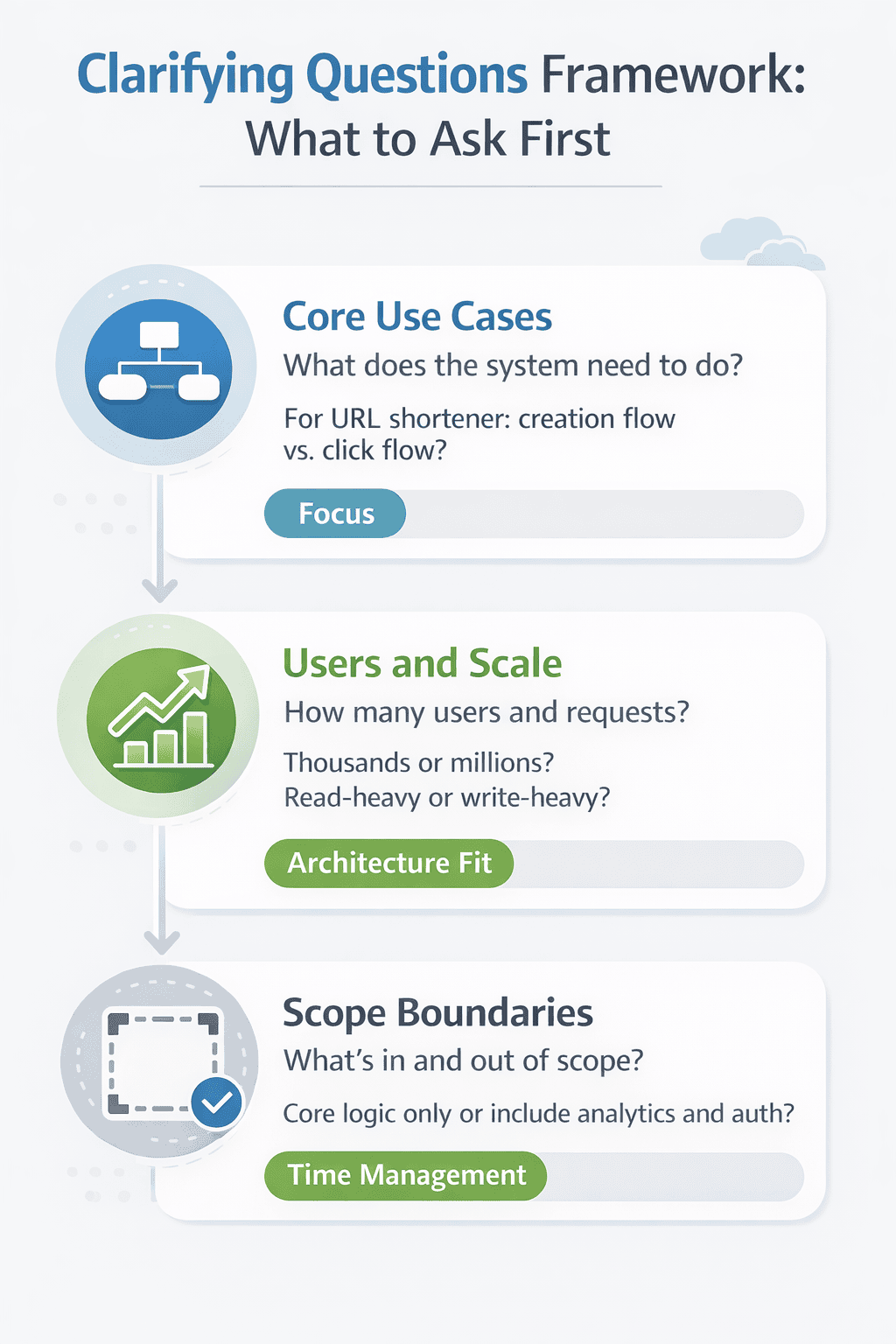
The Three Categories of Questions That Matter Most
Not all clarifying questions are created equal. Some add genuine clarity. Others waste time or reveal you don’t understand the basics.
Focus your questions on three categories that give you the most strategic information in the shortest time.
Category 1: Core use cases. Start by confirming what the system actually needs to do. Don’t assume you know based on the problem title. Ask explicitly about the primary workflows users will execute.
For a URL shortener, you might ask about the typical flow for users creating short links versus users clicking them. For a messaging system, you’d ask whether it’s one-to-one chat, group chat, or both.
These questions help you understand where to focus your design energy. Not every feature deserves equal attention in a 45-minute interview.
Category 2: Users and scale. You need ballpark numbers to make reasonable design choices. Ask about the number of users, the typical request patterns, and the expected data volume.
Don’t get lost in precise calculations. You’re not trying to architect a production system. You’re trying to understand whether this is a read-heavy or write-heavy system, whether it serves thousands or millions of users, and whether data fits in memory or requires distributed storage.
A simple question like “Are we designing for 100 users or 100 million users?” gives you enough information to proceed with appropriate architecture choices.
Category 3: Scope boundaries. This is where you explicitly confirm what’s in scope and what’s out of scope for this interview. Should you design the authentication system? Is analytics collection part of the discussion?
Many candidates skip this step and waste time designing components the interviewer doesn’t care about. Or worse, they skip components the interviewer expected to see.
A direct question solves this: “For this interview, should I focus on the core shortening and redirect logic, or should I also design the analytics dashboard and user management?”
This framework ensures you ask the right questions in the right order, establishing clarity before you propose any solutions. These three categories give you maximum strategic information with minimum time investment.
How to Ask Questions Without Looking Lost
There’s a right way and a wrong way to ask clarifying questions. The wrong way makes you look uncertain or unprepared. The right way makes you look thoughtful and systematic.
Here’s the wrong way: asking scattered, disconnected questions as they pop into your head. “How many users? What database? Should it be real-time? What about mobile apps?”
This creates the impression you’re fishing for information without a plan.
Here’s the right way: restating the problem in your own words, then asking targeted questions organized by category. “Let me make sure I understand. We’re designing a URL shortening service. Users should be able to create short links and have those links redirect to the original URLs. Before I start designing, I’d like to clarify a few things about scale, core use cases, and scope.”
Then proceed through your three question categories methodically. This demonstrates organized thinking and gives the interviewer confidence you’re building from a solid understanding.
The One Question That Instantly Improves Interview Performance
Of all the questions you can ask, one stands above the rest for maximizing both clarity and collaboration. It’s simple, direct, and almost no candidate asks it.
“What aspect of this system would you like me to focus on most during this interview?”
This question accomplishes three things simultaneously. First, it gives you explicit direction on where to invest your limited time. Second, it signals you understand interviews have time constraints and require strategic focus. Third, it invites the interviewer into a collaborative relationship where they guide your priorities.
Sometimes the interviewer will say “I want to see how you handle the high-traffic read path.” Sometimes they’ll say “Let’s focus on data consistency during concurrent writes.” Sometimes they’ll say “I’ll let you decide.”
All three responses give you valuable information. The first two tell you exactly what to prioritize. The third tells you the interviewer wants to see your judgment in action—so you’ll need to make a clear choice and explain your reasoning.
Either way, you’ve demonstrated the collaborative, clarifying mindset that defines senior engineering thinking.
Step 2: Define Scope and Constraints Explicitly
You’ve asked your clarifying questions. You understand the core use cases. Now comes the step that most candidates skip entirely—and it costs them.
Before you draw a single architecture diagram, you need to state your assumptions out loud.
This isn’t about being overly cautious. It’s about demonstrating engineering judgment. In real-world system design, unstated assumptions lead to production failures. In interviews, unstated assumptions lead to misaligned designs.
Why Explicit Assumptions Separate Good Candidates from Great Ones
Here’s what happens when you state assumptions explicitly: you give the interviewer a chance to correct you before you invest 20 minutes building the wrong thing.
I’ve watched countless candidates design elaborate caching strategies for systems where the interviewer actually wanted to discuss data consistency. The candidate assumed the system needed to handle massive read traffic. The interviewer wanted to explore write-heavy scenarios.
One simple statement would have prevented this mismatch: “Based on what you’ve described, I’m assuming this is primarily a read-heavy system with a 100:1 read-to-write ratio. Is that correct?”
The interviewer corrects you, you adjust your approach, and you save 20 minutes of wasted effort. Or the interviewer confirms, you proceed with confidence, and you’ve demonstrated clear communication.
Both outcomes are wins. The losing scenario is making unstated assumptions and discovering 30 minutes later that your entire design is off-target.
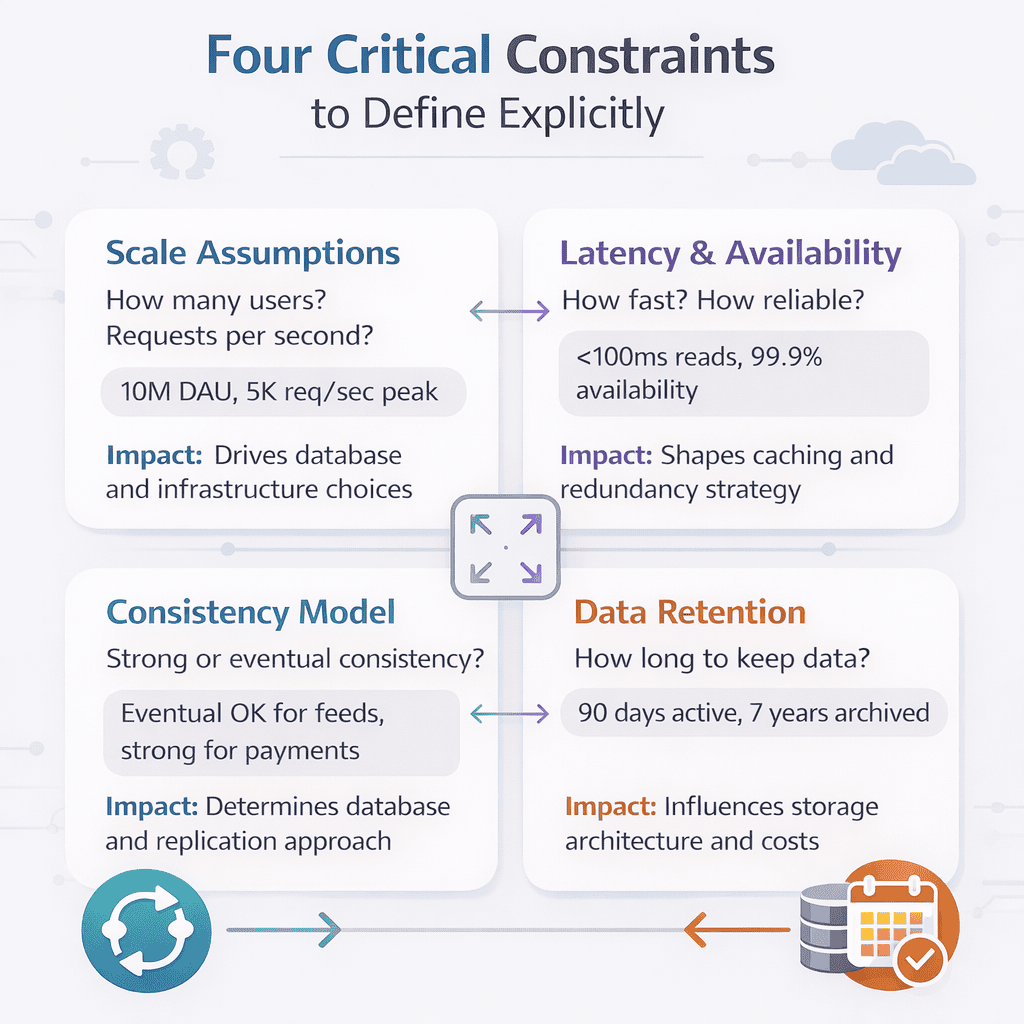
The Four Constraints Every System Design Must Address
You can’t design every aspect of a system in 45 minutes. You need to make choices about what to optimize for and what to deprioritize.
These choices become explicit when you state your constraints clearly. There are four dimensions you should always address, even if briefly.
Constraint 1: Scale assumptions. State the numbers you’re designing for. Don’t just think them—say them out loud. “I’m designing for 10 million daily active users, with peak traffic around 5,000 requests per second.”
This gives you a concrete target for all subsequent decisions. Database choices, caching strategies, and infrastructure decisions all flow from scale assumptions.
If you state a number and the interviewer thinks it’s too high or too low, they’ll tell you. Then you adjust and continue. But if you never state a number, you’re both designing for different scales in your heads.
Constraint 2: Latency and availability requirements. Should reads complete in 100ms or 1000ms? Can the system tolerate 99.9% availability or does it need 99.99%?
These aren’t arbitrary numbers. They fundamentally shape your architecture. A system optimized for 50ms latency looks completely different from a system optimized for cost efficiency with 500ms acceptable latency.
Make a reasonable assumption based on the problem domain, state it clearly, and ask for confirmation. “For a URL shortener, I’m assuming sub-100ms latency for redirects is critical, but the link creation flow can tolerate 500ms. Does that align with your expectations?”
Constraint 3: Consistency requirements. Does every user need to see the exact same data at the exact same time? Or is eventual consistency acceptable?
This is where many candidates stumble. They know the CAP theorem but don’t know when to apply it. The key is matching consistency requirements to the business use case, not defaulting to strong consistency because it sounds safer.
For a social media feed, eventual consistency is fine. For a banking transaction, strong consistency is required. State which model you’re choosing and why it fits the use case.
Constraint 4: Data retention and compliance. How long does data need to be stored? Are there regulatory requirements to consider?
This constraint often gets ignored in interviews, but it signals maturity when you address it. A candidate who thinks about data retention policies and compliance implications is thinking like a senior engineer, not just a system designer.
These four constraints form the foundation of every system design decision you’ll make. State them explicitly at the start, get alignment with your interviewer, and use them to guide every subsequent architectural choice.
How to State Assumptions Without Sounding Uncertain
There’s a verbal pattern that works perfectly for stating assumptions. It demonstrates confidence while remaining open to feedback.
Here’s the pattern: “Based on [the information we discussed], I’m going to assume [specific constraint]. This means I’ll optimize for [consequence]. Does that make sense for this design?”
Let me show you this in action with a real example. “Based on our discussion about the URL shortener serving 10 million users, I’m going to assume we’re optimizing for read performance since redirects will far outnumber new link creations. This means I’ll focus on a caching-heavy architecture with eventual consistency. Does that make sense for this design?”
Notice what this accomplishes. You’re stating a specific assumption, explaining the architectural consequence, and inviting feedback. You sound decisive, not wishy-washy. But you’re also collaborative, not stubborn.
If the interviewer agrees, you proceed with confidence. If they push back, you’ve learned something valuable before investing time in the wrong direction.
The Power of Scope Reduction (And When to Use It)
Sometimes the problem the interviewer describes is too large to design comprehensively in 45 minutes. This is often intentional—they want to see if you can identify the core problem and focus your energy appropriately.
This is where explicit scope reduction becomes your best friend.
Here’s how it works. After clarifying questions, you identify the most critical piece of the system and propose focusing there. “This system has several major components: user authentication, content creation, content delivery, and analytics. For this interview, I’d like to focus primarily on the content delivery architecture since that’s where the scale challenges are most interesting. We can touch on the other components at a high level. Does that work?”
Most interviewers will appreciate this clarity. You’re showing judgment about what matters most. You’re managing time strategically. And you’re setting clear expectations about what will and won’t be covered.
The alternative—trying to design everything equally and running out of time—leaves the interviewer unsure whether you can actually design anything deeply.
Better to design one component thoroughly than to sketch five components superficially.
Step 3: Propose a Simple High-Level Design
You’ve clarified the problem. You’ve stated your assumptions and constraints. Now it’s time to propose your first architecture—and this is where most candidates make a critical mistake.
They try to design the final, production-ready system immediately.
Don’t do this. Start simple. Propose a high-level design that addresses the core use case with the minimum number of components necessary.
You’re not trying to solve every problem at once. You’re establishing a foundation you can incrementally improve.
Why Simple Beats Clever in the First Design Iteration
The best system designers I know all follow the same pattern: they start with the simplest possible solution that could work, then they systematically identify and address its limitations.
This approach works brilliantly in interviews because it demonstrates architectural maturity. You’re showing the interviewer you understand the value of iterative design. You know that real systems evolve from simple foundations, not from complex initial architectures.
Here’s what a simple first design looks like for a URL shortener: a web server receives link creation requests, generates a short code, stores the mapping in a database, and returns the short URL. When users click short links, the web server looks up the mapping and redirects.
That’s it. No caching yet. No load balancing yet. No replication yet. Just the core flow that makes the system work.
This simplicity serves multiple purposes. It establishes shared understanding with the interviewer. It gives you a clear baseline to compare against when you add complexity. And it shows you’re not over-engineering prematurely.
The Five Components That Appear in Almost Every System Design
While every system is different, most designs include variations of five fundamental components. Understanding these building blocks helps you propose high-level architectures quickly and clearly.
Component 1: Client layer. This represents how users or systems interact with your design. It could be a web browser, a mobile app, or another service making API calls.
In your initial design, you don’t need to get fancy here. Just acknowledge that requests come from somewhere and establish the interface contract. “Users interact through a REST API” is sufficient for the first iteration.
Component 2: Application servers. This is where your business logic lives. In the simple first design, you might just have “web servers” or “API servers” without worrying about specific frameworks or languages.
The key is identifying what these servers need to do. For a URL shortener, they generate short codes and look up mappings. For a messaging system, they route messages between users. Keep it focused on responsibilities, not implementation details.
Component 3: Data storage. Every system persists data somewhere. In your first iteration, identify what data needs to be stored and propose a simple storage approach.
For most designs, starting with “a relational database” or “a key-value store” is perfectly fine. You’ll refine the storage architecture later. Right now you’re just establishing that data needs persistence and roughly what kind of data it is.
Component 4: Communication patterns. How do your components talk to each other? Are clients making synchronous HTTP requests? Are services communicating through message queues?
In the simple design, synchronous request-response is usually the right starting point. You can introduce asynchronous patterns and message queues later when you address scale and reliability concerns.
Component 5: External dependencies. Does your system need to call third-party APIs? Does it send emails or push notifications? These external interactions should be represented in your high-level design.
Even if you’re not designing the external service itself, showing where your system integrates with external dependencies demonstrates complete thinking.
📊 Table: High-Level Design Components for Common System Types
This reference shows how the five fundamental components manifest in different system design problems. Use this to quickly structure your initial high-level proposal for any interview scenario.
Component Type
URL Shortener
Message Queue
Content Delivery
Rate Limiter
Client Layer
Web browsers, mobile apps
Producer/consumer applications
Video player clients
API clients making requests
Application Servers
Link generation & redirect logic
Queue management & routing
Content ingestion & streaming
Request counting & throttling
Data Storage
URL mappings (key-value)
Message persistence (queue)
Video files & metadata (blob + DB)
Request counters (in-memory + DB)
Communication
Synchronous HTTP
Asynchronous messaging
HTTP streaming protocols
Synchronous API calls
External Dependencies
Analytics services
Dead letter queue handling
CDN providers
Monitoring & alerting
How to Draw Your Design (Without Overcomplicating the Diagram)
Whether you’re using a whiteboard or a digital drawing tool, your diagram should communicate clearly without artistic flair. You’re a system designer, not a graphic designer.
Here’s the simple pattern that works: boxes for components, arrows for data flow, and brief labels for clarity.
Draw your client as a simple box labeled “Client” or “User.” Draw your application servers as a box labeled “API Servers” or “Web Servers.” Draw your database as a box labeled “Database” or “URL Mappings DB.”
Connect them with arrows showing the direction of data flow. Label each arrow with a brief description of what’s happening: “Create short URL,” “Store mapping,” “Lookup URL,” “Redirect.”
That’s it. No need for elaborate shapes, colors, or architectural symbols. Clarity beats artistry every time.
The key is keeping your diagram simple enough that you can explain it in 60 seconds. If it takes you five minutes to walk through your diagram, it’s too complex for a first iteration.
The Critical Step Nobody Teaches: Explain the Happy Path First
After drawing your high-level design, don’t immediately jump to edge cases, failure modes, or scaling strategies. Instead, walk through the happy path—the normal, successful flow through your system.
This accomplishes two important goals. First, it ensures you and the interviewer have the same understanding of how the system works. Second, it gives you a baseline to reference when you later discuss what could go wrong.
Here’s how to do it. Pick the most common use case and narrate the flow step by step, pointing to your diagram as you go.
“Let’s walk through what happens when a user creates a short link. First, the user submits a URL through the client, which sends a POST request to our API servers. The server generates a unique short code—we can discuss the algorithm in a moment—and stores the mapping between the short code and the original URL in our database. The server returns the shortened URL to the client. Later, when someone clicks that short link, the client makes a GET request with the short code. The server looks up the original URL in the database and returns a redirect response.”
Notice this narrative is concrete and sequential. You’re not describing abstract components—you’re walking through actual requests and responses. This makes it easy for the interviewer to follow along and identify any gaps or misunderstandings.
Once you’ve established the happy path, you’ve created a solid foundation. Everything else you discuss—scaling, failures, edge cases—will be variations or improvements on this core flow.
When to Stop and Invite Feedback (The Collaboration Checkpoint)
After you propose your simple high-level design and walk through the happy path, pause. This is your collaboration checkpoint.
Ask the interviewer: “Does this high-level approach make sense? Is there anything you’d like me to change or any area you’d like me to dive deeper into first?”
This question serves multiple purposes. It gives the interviewer a chance to correct course if you’re heading in the wrong direction. It signals you’re collaborating, not performing a monologue. And it gives you explicit direction on where to focus next.
Sometimes the interviewer will say your approach looks good and ask you to continue. Sometimes they’ll point to a specific component and say “Tell me more about how you’d implement the short code generation.” Sometimes they’ll raise a concern: “What about handling concurrent writes to the same URL?”
All of these responses are valuable. They tell you exactly where to direct your energy for maximum impact.
The worst thing you can do is plow forward with your design without checking if you’re aligned with the interviewer’s expectations. The collaboration checkpoint prevents this. Use it every time you complete a major design step.
Step 4: Deepen One Area at a Time (Based on Signals)
You’ve proposed your simple high-level design. The interviewer has confirmed it makes sense. Now comes the part where most candidates lose control of the interview.
They try to design everything at once.
Database schema, caching layer, load balancing, API design, monitoring, security—all simultaneously. The whiteboard becomes cluttered. The explanation becomes scattered. The interviewer loses the thread of your reasoning.
Senior engineers don’t work this way. They deepen one area at a time, following signals about where the most interesting problems lie.
How to Read Interviewer Signals (The Hidden Communication Layer)
System design interviews have two parallel conversations happening. There’s the explicit conversation—what you and the interviewer are saying out loud. And there’s the implicit conversation—the signals the interviewer sends about what they care about most.
Learning to read these signals is what separates good interview performance from great interview performance.
Here are the signals that tell you where to focus. When the interviewer asks follow-up questions about a specific component, that’s a signal. “How would you generate those short codes?” means they want you to dive deep on the ID generation algorithm.
When the interviewer mentions a constraint or scenario, that’s a signal. “What if two users submit the same URL simultaneously?” means they want you to explore concurrency and race conditions.
When the interviewer says “interesting” or “good point” after you mention something, that’s a signal. They’re telling you that topic resonates—explore it further.
Pay attention to these cues. They’re the interviewer actively guiding you toward the areas they want to evaluate. Following these signals feels collaborative and demonstrates your ability to work effectively with senior engineers who communicate through questions and subtle guidance.
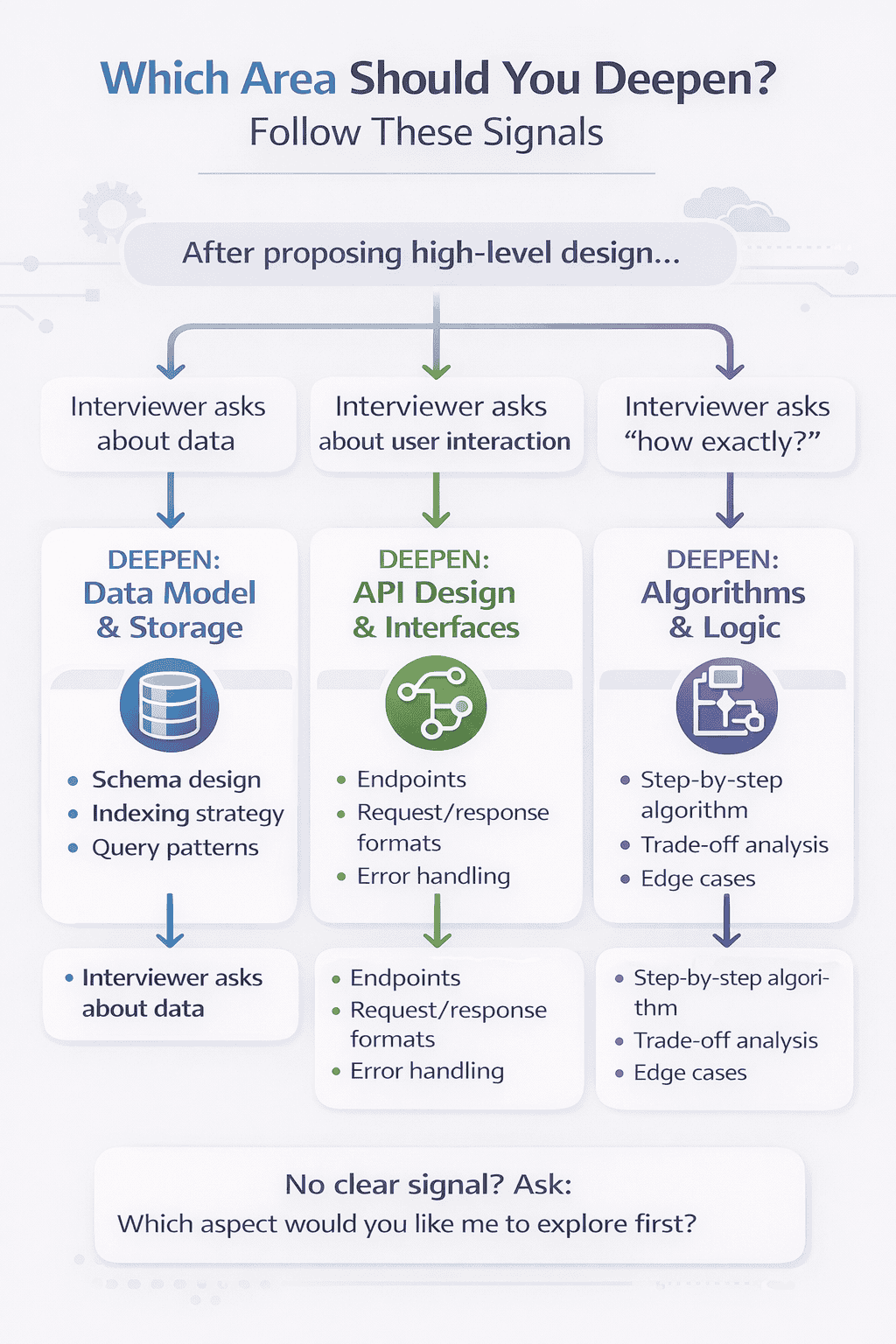
The Three Areas Most Interviewers Want You to Deepen
While every interview is different, there are three areas that come up repeatedly. Being prepared to dive deep in these areas gives you confidence regardless of which direction the interviewer pushes.
Area 1: Data model and storage. How exactly do you structure and store the data? What does the database schema look like? How do you handle relationships between entities?
When an interviewer asks you to deepen here, they want specifics. Don’t just say “we use a database.” Describe the tables, the primary keys, the indexes. For a URL shortener, explain that you’d have a mapping table with short_code as the primary key, original_url as a column, and potentially created_at and expiration_date for metadata.
Talk about why you chose those fields. Explain what queries this schema optimizes for. Mention any indexes you’d add to support common lookups. This level of detail shows you’ve thought through the practical implementation, not just the high-level concept.
Area 2: API design and interfaces. What do the actual API calls look like? What parameters do they accept? What responses do they return?
When deepening here, specify the HTTP methods, endpoints, request bodies, and response formats. For creating a short URL: “POST /api/shorten with a JSON body containing the original URL, returning a JSON response with the shortened URL and metadata.”
Also address error cases. What happens if the URL is invalid? What HTTP status codes do you return? How do you handle rate limiting? These details demonstrate you think about the full interface contract, not just the happy path.
Area 3: Algorithms and business logic. How do the core algorithms actually work? What’s the logic behind the critical operations?
For a URL shortener, this means explaining exactly how you generate unique short codes. Do you use a hash function? A base62 encoding of an auto-incrementing ID? A random string with collision detection?
Walk through the algorithm step by step. Explain the trade-offs of each approach. A hash function gives deterministic codes but requires collision handling. Sequential IDs are simple but reveal usage patterns. Random generation is secure but needs more collision checking.
This is where technical depth really shines. You’re showing the interviewer you can think through implementation details and make informed choices between alternatives.
Use this decision framework to identify which area to deepen based on interviewer signals. Following their cues shows collaborative design skills and ensures you’re addressing their evaluation priorities.
How to Deepen Without Losing the Big Picture
Here’s the challenge: you need to dive deep enough to show technical competence, but not so deep that you lose sight of the overall system design.
The technique that works is bookending. You explicitly mark when you’re zooming in and when you’re zooming back out.
Before you deepen: “Let me zoom in on the short code generation algorithm for a moment.” This signals to the interviewer that you’re about to get detailed and they should follow along closely.
After you deepen: “Okay, zooming back out to the overall architecture.” This signals you’re returning to the high-level view and prevents the interview from getting stuck in implementation details.
This verbal framing keeps both you and the interviewer oriented. You can discuss implementation specifics without the conversation becoming fragmented.
It also demonstrates metacognitive awareness—you’re not just designing a system, you’re managing the conversation effectively. This is exactly what senior engineers do in design reviews: zoom in when detail matters, zoom out to maintain context.
The One Question That Prevents Rabbit Holes
Sometimes you’ll be deepening into an area and realize you’re going down a rabbit hole. Maybe the interviewer asked about the database schema and you’ve spent five minutes discussing normalization trade-offs.
You need a graceful way to check if you’re still on track or if you should move on.
Here’s the question that works: “Is this level of detail useful, or should I move on to another aspect of the design?”
This question accomplishes several things simultaneously. It shows self-awareness about depth versus breadth trade-offs. It gives the interviewer an easy way to redirect you if you’re over-indexing on one area. And it demonstrates comfort with feedback—you’re not defensive about adjusting your focus.
Most interviewers will appreciate this question. They’ll either encourage you to continue because you’re hitting exactly what they want to evaluate, or they’ll guide you to a different area. Either way, you stay aligned with their priorities.
I’ve seen candidates spend 20 minutes perfecting one component while completely neglecting critical system aspects the interviewer wanted to discuss. This single question prevents that failure mode.
Step 5: Address Scalability, Bottlenecks, and Trade-Offs
You’ve proposed a simple design. You’ve deepened one or two areas based on interviewer signals. Now it’s time to show you can think about scale—but not in the way most candidates approach it.
Most candidates try to demonstrate scale knowledge by throwing technologies at the problem. “We’ll add Redis for caching, Kafka for messaging, and shard the database across 100 nodes.”
This approach fails because it skips the critical step: identifying what actually breaks as scale increases.
Senior engineers don’t start with solutions. They start by analyzing where bottlenecks will emerge, then they propose targeted improvements to address those specific bottlenecks.
How to Identify Bottlenecks Without Memorizing Formulas
You don’t need to perform detailed capacity calculations in a system design interview. What you need is the ability to reason qualitatively about where problems will emerge.
Here’s the framework that works. Look at your simple design and ask yourself three questions about each component.
Question 1: What happens to this component if request volume increases 100x? If your database currently handles 50 requests per second, what happens at 5,000 requests per second?
For most stateful components like databases, this is where the first bottleneck appears. Write throughput becomes a constraint. Single-server capacity gets exceeded. You need to think about horizontal scaling or read replicas.
Question 2: What happens if the data volume increases 100x? If you’re storing 1GB of mappings today, what happens when it’s 100GB? What about 10TB?
This reveals different bottlenecks. You might need to partition data across multiple databases. You might need to implement data archival strategies. You might need to optimize storage format or compression.
Question 3: What happens if users are distributed globally? If all your users are currently in one region and your simple design has a single data center, what changes when you need to serve users in Asia, Europe, and North America?
This brings up latency challenges, data replication across regions, and consistency trade-offs. The solutions are often very different from the solutions to pure throughput problems.
By asking these three questions systematically, you identify real bottlenecks based on the specific characteristics of your system. You’re not guessing—you’re reasoning.
📊 Table: Common Bottlenecks and Targeted Solutions by System Component
Use this reference to quickly identify likely bottlenecks in your design and propose appropriate scaling strategies. These patterns appear repeatedly across different system types.
Disk space warnings, degraded performance as disk fills
Data growth exceeds single node capacity
Data archival to cold storage, compression, partitioning across multiple nodes
The Art of Explaining Trade-Offs (Not Just Listing Them)
Every scaling solution comes with trade-offs. This is where many candidates stumble—they know solutions exist, but they can’t articulate why you’d choose one approach over another.
The key is connecting each trade-off back to your stated constraints from Step 2. Remember those assumptions you made explicit? Now they become decision criteria.
Here’s how to explain a trade-off effectively. Let’s say you’re deciding between caching and read replicas to handle increased read traffic.
Don’t just say: “We could use caching or read replicas. Both would work.”
Instead, say: “We have two main options for handling the increased read load. We could add a caching layer like Redis, which would give us sub-millisecond read latency and dramatically reduce database load. The trade-off is that we’d need to handle cache invalidation and accept that some reads might see slightly stale data.”
“Alternatively, we could add read replicas of our database. This maintains strong consistency for all reads and requires no cache invalidation logic. The trade-off is higher latency—still sub-100ms but slower than cache—and higher infrastructure cost since we’re replicating the entire database.”
“Given our earlier assumption that sub-100ms latency is acceptable and eventual consistency is fine for this use case, I’d go with the caching approach. It’s more cost-effective and better matches our latency requirements.”
Notice what this accomplishes. You’ve presented two viable options. You’ve explained the concrete trade-offs of each. And you’ve made a clear choice grounded in your earlier constraints. This is exactly how senior engineers present architectural decisions.
When to Introduce Specific Technologies (And When to Stay Abstract)
One of the most common questions I get is: “Should I name specific technologies like Redis, Cassandra, or Kafka in my system design interview?”
The answer is nuanced. Naming technologies can demonstrate familiarity with real-world systems, but it can also box you into defending implementation details you don’t fully understand.
Here’s the guideline that works: stay abstract when describing capabilities, get specific only if you’re confident explaining the technology in depth.
Instead of saying “we’ll use Redis,” say “we’ll use an in-memory cache.” If the interviewer asks for specifics, then you can say “Redis would be a good choice because…” and explain why.
This approach gives you flexibility. If you don’t know Redis well, you can say “there are several options like Redis or Memcached—Redis tends to be popular for its rich data structures, but the specific choice would depend on operational requirements.”
You’ve shown technology awareness without claiming expertise you don’t have. And if you do know Redis deeply, the interviewer’s follow-up question gives you a chance to demonstrate that depth.
The key principle: technologies are solutions to specific problems. Always explain the problem first, then mention technologies as potential solutions, not as magic fixes.
How to Propose Scaling Improvements Incrementally
Don’t propose all your scaling solutions at once. Introduce them incrementally as you identify specific bottlenecks.
Here’s the narrative flow that works: “As our traffic grows, the first bottleneck we’ll hit is database reads. To address that, we’d add a caching layer in front of the database.”
Draw that on your diagram. Explain how it works. Then continue.
“The next bottleneck would be our single application server. We’d address that by adding multiple server instances behind a load balancer.”
Add that to your diagram. Explain the load balancing strategy.
“Eventually, write traffic would overwhelm our single database. At that point, we’d need to consider database sharding.”
This incremental approach serves multiple purposes. It shows you understand systems evolve rather than being built perfectly from day one. It demonstrates priority—you’re addressing the most pressing bottlenecks first. And it keeps your explanation coherent rather than overwhelming.
You’re telling a scaling story: here’s the problem, here’s the solution, here’s the next problem, here’s the next solution. The interviewer can follow along easily, and you can pause at any point for questions or course corrections.
📥 Download: System Design Scaling Checklist
This printable checklist walks you through the incremental scaling approach for any system design interview. Use it during practice sessions to build the habit of systematic bottleneck identification and targeted solutions.
Step 6: Handle Follow-Up Questions Without Losing Structure
You’ve designed your system. You’ve addressed scaling concerns. You’ve explained trade-offs clearly. Then the interviewer asks: “What if the database goes down?” or “How would you handle malicious users?” or “What about GDPR compliance?”
This is the moment where many candidates panic. They’ve finished their structured approach and now they’re being asked to handle scenarios they didn’t prepare for.
But here’s what most candidates don’t realize: follow-up questions aren’t disruptions to your structured approach. They’re extensions of it.
The same six-step method that got you this far works perfectly for handling follow-ups. You just apply it to a smaller, more focused problem.
Why Follow-Ups Feel Like Traps (But Aren’t)
Follow-up questions trigger anxiety because they feel like gotchas. The interviewer is pointing out something you didn’t think about, which feels like a failure.
This is the wrong mental model. Follow-up questions aren’t the interviewer catching your mistakes. They’re the interviewer exploring how you handle new constraints and unexpected scenarios.
In real system design work, requirements change constantly. New constraints emerge mid-project. Security teams raise concerns you didn’t anticipate. Product managers add features that weren’t in the original spec.
Follow-up questions simulate this reality. The interviewer wants to see if you can adapt your design without starting over, if you can incorporate new information gracefully, and if you can maintain clear thinking when the problem space expands.
Understanding this reframes follow-ups from threats into opportunities to demonstrate adaptability.
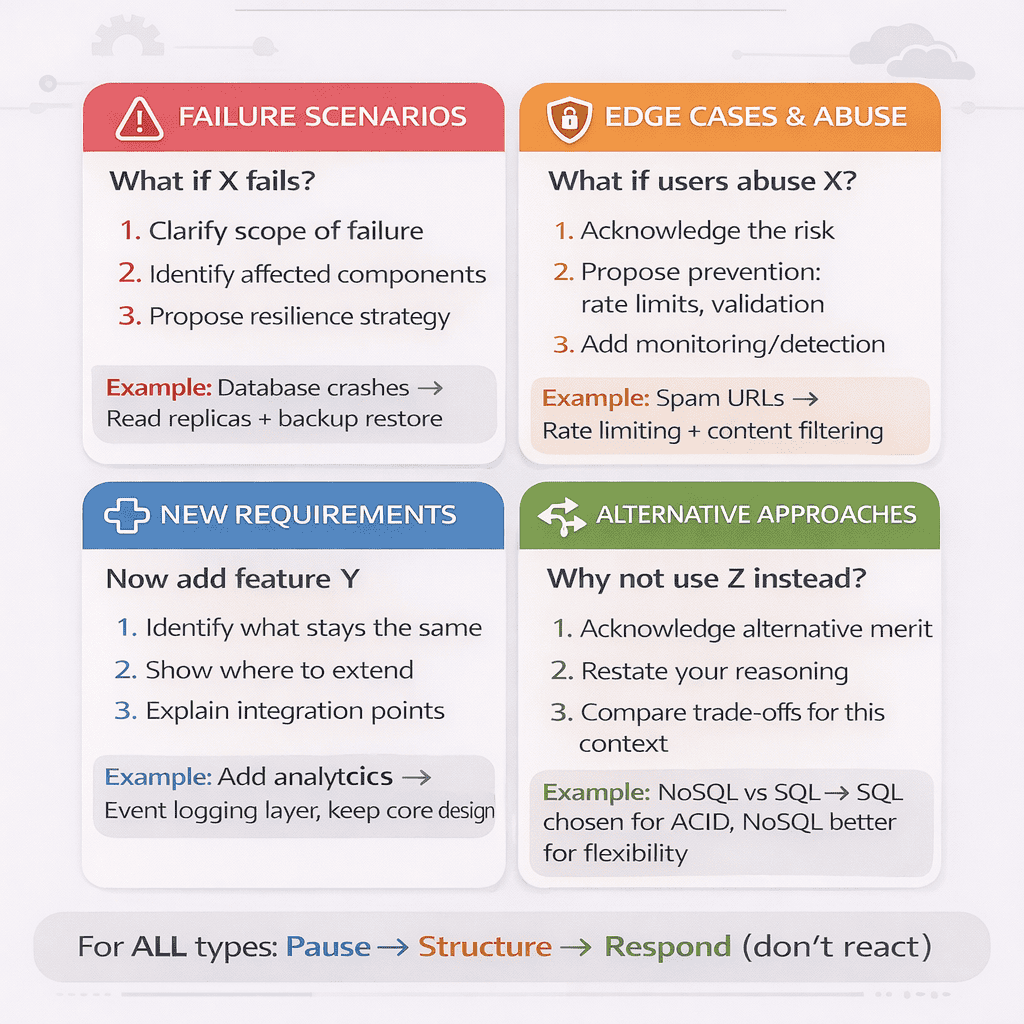
The Four Types of Follow-Up Questions You’ll Encounter
Follow-up questions fall into predictable categories. Recognizing the category helps you structure your response effectively.
Type 1: Failure scenarios. “What if the database crashes?” “What happens if the cache becomes stale?” “How do you handle network partitions?”
These questions probe your understanding of reliability and fault tolerance. The interviewer wants to see if you can identify single points of failure and propose resilience strategies.
When you get a failure scenario question, use the same structured approach: clarify the scope of the failure, identify which components are affected, propose a solution, and explain the trade-offs.
Type 2: Edge cases and abuse. “What if a user tries to create a million short URLs in one second?” “How do you prevent URL manipulation attacks?” “What if someone uses your service to spam?”
These questions test whether you think about security, rate limiting, and abuse prevention. They’re common because real production systems constantly face malicious traffic.
Address these by proposing validation, rate limiting, authentication, or monitoring solutions. The key is showing you understand that systems need protection, not just functionality.
Type 3: New requirements. “Now add analytics for click tracking.” “What if we need to support custom domains?” “How would you add user authentication?”
These questions evaluate how well your initial design accommodates change. Can you extend it gracefully or does it require a complete redesign?
When handling new requirements, explicitly identify which parts of your existing design remain unchanged and which need modification. This demonstrates you’re building on your foundation, not abandoning it.
Type 4: Alternative approaches. “Why did you choose SQL over NoSQL?” “Could you use a different caching strategy?” “What about using event sourcing instead?”
These questions probe the depth of your technical knowledge and your ability to compare approaches. The interviewer wants to see if you made informed choices or just picked the first solution that came to mind.
Answer by restating your original reasoning, acknowledging the alternative’s merits, and explaining why your choice better fits the specific constraints. You don’t need to defend your choice as the only option—just as a reasonable option given the context.
This framework categorizes follow-up questions into four types and provides a structured response approach for each. Recognizing the question type lets you respond systematically instead of reactively, demonstrating senior-level composure under pressure.
The Response Pattern That Works for Any Follow-Up
Regardless of the question type, there’s a three-step response pattern that consistently works well. It mirrors the structured thinking you’ve demonstrated throughout the interview.
Step 1: Pause and restate. Don’t immediately jump to answering. Take a breath and restate the question in your own words. “So you’re asking how we’d handle a database failure scenario where the primary database becomes unavailable?”
This brief pause accomplishes three things. It gives you a moment to think. It ensures you understood the question correctly. And it signals thoughtfulness rather than reactivity.
Step 2: Connect to existing design. Before proposing a solution, explicitly connect the follow-up to your existing architecture. “In our current design, the database is a single point of failure. If it goes down, all read and write operations would fail.”
This shows you’re not treating the follow-up as an isolated problem. You’re integrating it into the system you’ve already designed.
Step 3: Propose and explain. Now offer your solution with the same trade-off analysis you’ve used throughout. “To address this, we’d implement database replication with automatic failover. We’d have a primary database and one or more read replicas. If the primary fails, one replica gets promoted. The trade-off is increased complexity and cost, but we gain resilience against database failures.”
This three-step pattern—pause and restate, connect to existing design, propose and explain—works for virtually any follow-up question. It’s the same structured thinking you’ve demonstrated from the beginning, just applied to new constraints.
When to Modify Your Design Versus When to Stand Your Ground
Here’s a subtle but important skill: knowing when a follow-up question requires changing your design versus when it’s better to explain why your current design already handles the concern.
Some candidates immediately propose design changes for every follow-up, even when their existing design already addresses the issue. This makes them look uncertain about their own choices.
Other candidates defensively insist their design is perfect and resist all modifications. This makes them look inflexible.
The balance is acknowledging when your design needs extension versus when it already handles the scenario. Here’s how to navigate this.
If the follow-up reveals a genuine gap—something you didn’t consider that would cause a real problem—acknowledge it directly. “That’s a good point. My current design doesn’t handle that scenario well. Here’s how I’d modify it…”
This shows intellectual honesty and adaptability. You’re not pretending you thought of everything. You’re demonstrating you can recognize gaps and address them.
But if your existing design already handles the concern, explain how. “Actually, the caching layer we added earlier would handle that scenario. Here’s why…”
This shows you designed with foresight and understand the implications of your own architecture. You’re not making changes just to please the interviewer—you’re explaining why changes aren’t necessary.
The key is confidence without defensiveness. You’re having a technical discussion about design choices, not defending your ego.
How to Handle “I Don’t Know” Gracefully
Sometimes you’ll get a follow-up question about a technology, pattern, or domain you simply don’t know well. Maybe the interviewer asks about a specific database’s replication mechanism or a regulatory compliance requirement you’ve never worked with.
The wrong response is to fake knowledge or make up an answer. Interviewers can tell when you’re bluffing, and it destroys trust.
The right response has three parts. First, be direct about the knowledge gap. “I haven’t worked with that specific compliance requirement before.”
Second, explain how you’d approach learning about it. “I’d need to research the specific data retention and deletion requirements to design the archival system properly.”
Third, propose a general approach based on first principles. “But generally for compliance requirements, I’d focus on auditability, data isolation, and clear retention policies. I’d probably work with a compliance specialist to ensure the implementation meets all requirements.”
This response shows honesty, demonstrates your learning process, and proves you can reason from first principles even without specific domain knowledge. That’s exactly what senior engineers do when they encounter new domains.
Remember: interviewers aren’t expecting you to know everything. They’re evaluating how you handle uncertainty and gaps in knowledge. Honest, thoughtful responses to “I don’t know” moments often score better than weak attempts to fake expertise.
Mini Example: Applying the Approach (URL Shortener)
Let’s walk through a complete example to see how this six-step approach works in practice. I’ll use a URL shortener—a common interview problem—and show you exactly how to apply each step.
This isn’t about memorizing a solution for this specific problem. It’s about seeing the approach in action so you can apply it to any system design question.
The Interview Begins: Problem Statement
Interviewer: “Design a URL shortening service like bit.ly. Users should be able to create short URLs and have them redirect to the original URLs.”
Here’s where most candidates would immediately start drawing boxes. Don’t do that. Start with Step 1: pause and clarify.
Step 1 in Action: Clarification Questions
You: “Let me make sure I understand the requirements. We’re designing a service where users submit long URLs and receive shortened versions. When someone visits a short URL, they get redirected to the original. Before I start designing, I’d like to clarify a few things.”
“First, for core use cases: are we supporting just basic URL shortening and redirection, or do we need features like custom short URLs, analytics, or link expiration?”
Interviewer: “Focus on core shortening and redirection. Analytics would be nice if we have time, but it’s not the priority.”
You: “Got it. Second, for scale: roughly how many URLs are we shortening per day? Are we designing for thousands of users or millions?”
Interviewer: “Assume 10 million daily active users creating about 100 million short URLs per day. Clicks on those URLs would be about 10x higher—around 1 billion redirects per day.”
You: “That’s helpful. And for scope: should I focus primarily on the shortening and redirect mechanism, or also design the user authentication and URL management dashboard?”
Interviewer: “Focus on the core shortening and redirect architecture. Assume authentication exists but you don’t need to design it.”
Notice what just happened. You’ve established clear boundaries, confirmed scale assumptions, and aligned on priorities. You haven’t designed anything yet, but you’ve set yourself up for success.
Step 2 in Action: Stating Constraints Explicitly
You: “Based on what we discussed, I’m going to make a few assumptions explicit. With 100 million creates per day and 1 billion redirects per day, this is clearly a read-heavy system with roughly a 10:1 read-to-write ratio. That means I’ll optimize for fast redirect performance.”
“For latency, I’m assuming redirects need to be very fast—under 100ms—because users expect instant navigation. Link creation can tolerate a few hundred milliseconds since it’s a less frequent operation. Does that sound right?”
Interviewer: “Yes, redirect speed is critical.”
You: “Perfect. And for data consistency, I’m assuming eventual consistency is acceptable. If a user creates a link and immediately clicks it, seeing a 404 for a second or two is tolerable. Strong consistency isn’t required. Agreed?”
Interviewer: “Agreed, eventual consistency is fine.”
You’ve now established the constraints that will guide every decision: read-heavy workload, low-latency redirects, eventual consistency acceptable. These will justify your caching choices, your database approach, and your architecture patterns.
Step 3 in Action: Simple High-Level Design
You: “Let me start with a simple high-level design that addresses the core use case.” [You draw on the whiteboard as you speak]
“We have client applications—web browsers or mobile apps. They talk to our API servers. When a user wants to create a short URL, the client POSTs the long URL to our API. The API server generates a unique short code, stores the mapping between short code and long URL in a database, and returns the short URL.”
“For redirects, when someone visits a short URL like bit.ly/abc123, the client makes a GET request. Our API server looks up ‘abc123’ in the database, finds the original URL, and returns an HTTP 301 redirect to that URL.”
“That’s the core flow. Does this basic approach make sense before I add more detail?”
Interviewer: “Yes, that makes sense. How would you generate those short codes?”
Perfect. The interviewer just gave you a signal. They want you to deepen on the short code generation algorithm. That’s Step 4.
Step 4 in Action: Deepening on Short Code Generation
You: “Let me zoom in on the short code generation. We have a few options here.”
“Option 1 is hashing the long URL. We take the URL, hash it with something like MD5, then take the first 6-8 characters. This is deterministic—same URL always gets same short code. The downside is collision handling and predictability.”
“Option 2 is using a base62 encoding of an auto-incrementing ID. Every new URL gets the next number: 1, 2, 3… and we convert that to base62 to keep it short. This guarantees uniqueness but reveals creation order, which might be a privacy concern.”
“Option 3 is generating random strings and checking for collisions. We generate a random 6-character base62 string and check if it exists. If it does, we try again. This is simple and secure but requires database lookups during creation.”
“Given our scale—100 million URLs per day—and our priority on redirect performance over creation performance, I’d use the base62 encoding of auto-incrementing IDs. It’s the simplest approach that guarantees uniqueness without collision checks during creation.”
Interviewer: “Makes sense. Now how would you handle the high redirect volume?”
Another signal. They want to hear about scaling. That’s Step 5.
Step 5 in Action: Addressing Scale and Bottlenecks
You: “With 1 billion redirects per day, we’re looking at roughly 11,000 requests per second on average, with peaks probably 3-5x higher. Let me think through where bottlenecks will emerge.”
“The first bottleneck will be database reads. Even with good indexing, a single database handling 30,000-50,000 reads per second during peak will struggle. To address this, I’d add a caching layer—something like Redis—in front of the database.”
[You add the cache to your diagram]
“When a redirect request comes in, we first check the cache. If the mapping exists there, we return it immediately—sub-millisecond latency. If it’s a cache miss, we query the database, return the result, and populate the cache for future requests.”
“Given that some short URLs get clicked thousands of times while others might only get clicked once, this cache will have a very high hit rate for popular links—probably 95%+ hit rate—which reduces database load dramatically.”
“The trade-off is added complexity and cost for the cache infrastructure, plus we need to handle cache invalidation if users can delete or modify their URLs. But given our scale and latency requirements, the cost is justified.”
“The second bottleneck would be our API servers. We’d handle that with horizontal scaling—multiple server instances behind a load balancer. Since our redirect logic is stateless, we can scale horizontally easily.”
Interviewer: “What if the database goes down?”
A follow-up question. That’s Step 6.
Step 6 in Action: Handling a Follow-Up
You: “Good question. Let me think about database failure scenarios.” [Pause to think]
“In our current design, the database is a single point of failure. If it crashes, all redirect requests that result in cache misses would fail, and all URL creation requests would fail.”
“To address this, we’d implement database replication. We’d have a primary database for writes and multiple read replicas. Read traffic—which is our dominant pattern—gets distributed across the replicas. This gives us redundancy and load distribution.”
“If the primary database fails, we lose the ability to create new short URLs temporarily, but redirects continue working since read replicas are still available. If a read replica fails, we simply route traffic to the remaining replicas.”
“For full resilience, we’d implement automatic failover where one replica can be promoted to primary if the primary fails. The trade-off is increased infrastructure cost and operational complexity, but for a production service, that’s acceptable.”
Interviewer: “That makes sense. I think we’re good on the core design.”
And that’s the complete walkthrough. Notice how each step flowed naturally from the previous one. You weren’t jumping randomly between topics—you were building a design incrementally, responding to signals, and handling new constraints as they emerged.
Why This Approach Works in Real Interviews
You might be wondering: why does following these six steps lead to better interview performance than just demonstrating technical knowledge?
The answer connects to what interviewers are actually evaluating. They’re not just testing whether you know about distributed systems. They’re testing whether you can think like a senior engineer.
What “Senior Engineering Thinking” Actually Means
Senior engineers don’t just solve problems. They solve the right problems in the right order with clear communication to stakeholders.
When you follow this six-step approach, you’re demonstrating all three of these capabilities simultaneously.
By pausing to clarify requirements, you show you solve the right problems. By defining constraints explicitly, you show you prioritize correctly. By proposing simple designs first, you show you understand iterative development. By deepening based on signals, you show you can collaborate effectively. By analyzing trade-offs, you show you make informed decisions. By handling follow-ups gracefully, you show you adapt to changing requirements.
These are the exact skills that separate senior engineers from junior ones in real work environments. The technical knowledge is table stakes. The structured thinking is what gets you promoted.
System design interviews exist to evaluate these higher-level capabilities. When you apply this approach, you’re speaking the language interviewers are listening for.
How This Approach Reduces Interview Anxiety
One unexpected benefit of this structured approach: it dramatically reduces anxiety during interviews.
Most interview anxiety comes from uncertainty. You don’t know if you’re answering what the interviewer wants. You don’t know if you’re going deep enough or too deep. You don’t know if you should keep talking or pause for questions.
This approach eliminates most of that uncertainty. You know exactly what to do at each stage. You have clear decision points where you check alignment with the interviewer. You have a framework for handling any question or scenario that arises.
Instead of trying to impress the interviewer with how much you know, you’re collaborating with them to solve a problem. That shift in mindset—from performance to collaboration—makes interviews feel less like tests and more like professional conversations.
Many of my students report that once they internalize this approach, system design interviews become the round they look forward to most. Not because they’ve memorized more patterns, but because they have a reliable method that works regardless of the specific problem.
The Compounding Effect: How This Approach Makes You a Better Engineer
Here’s the most valuable benefit: practicing this approach doesn’t just help you pass interviews. It makes you better at actual system design work.
Every time you practice applying these six steps to a new problem, you’re building the exact thinking patterns senior engineers use in production environments. You’re training yourself to clarify ambiguity, state assumptions, build incrementally, analyze trade-offs, and collaborate effectively.
These skills transfer directly to your day-to-day work. Design reviews become easier because you naturally think about trade-offs. Technical documentation becomes clearer because you structure your thinking explicitly. Cross-team collaboration improves because you ask better clarifying questions.
Students who adopt this approach often tell me they notice improvements not just in interviews but in their architecture discussions at work, their design documents, and their technical leadership.
You’re not just learning to pass an interview. You’re internalizing the thought process that defines senior technical leadership.
Your Next Steps: From Understanding to Mastery
Understanding this approach intellectually is the first step. Mastery comes from deliberate practice.
Here’s how to practice effectively. Pick a system design problem—any problem. Set a 45-minute timer. Walk yourself through all six steps out loud, as if you’re in an actual interview. Record yourself if possible.
The key is practicing the complete flow, not just studying individual concepts. You’re building muscle memory for the approach, training yourself to apply these steps naturally under pressure.
Start with common problems like URL shorteners, messaging systems, or content delivery networks. Once you’re comfortable with the six-step flow on familiar problems, move to less common scenarios. The approach works the same way regardless of the specific domain.
After 10-15 practice sessions, you’ll find the approach becomes automatic. You won’t need to consciously think “now I’m on step 3″—you’ll naturally pause to clarify, explicitly state constraints, and build incrementally.
That’s when you know you’re ready. Not because you’ve memorized solutions, but because you’ve internalized a method that works for any problem.
If you’re serious about mastering system design interviews, consider structured preparation that gives you expert feedback on your approach. Our System Design Interview Bootcamp provides live coaching sessions where you can practice this six-step method with experienced interviewers who provide detailed feedback on your thinking process, communication clarity, and technical choices.
Your Path to System Design Interview Confidence Starts Here
The difference between candidates who struggle with system design interviews and candidates who excel isn’t technical knowledge. It’s approach.
You now have a method that works regardless of the specific problem. Whether you’re asked to design a URL shortener, a messaging system, a content delivery network, or something you’ve never seen before, the six-step approach remains the same.
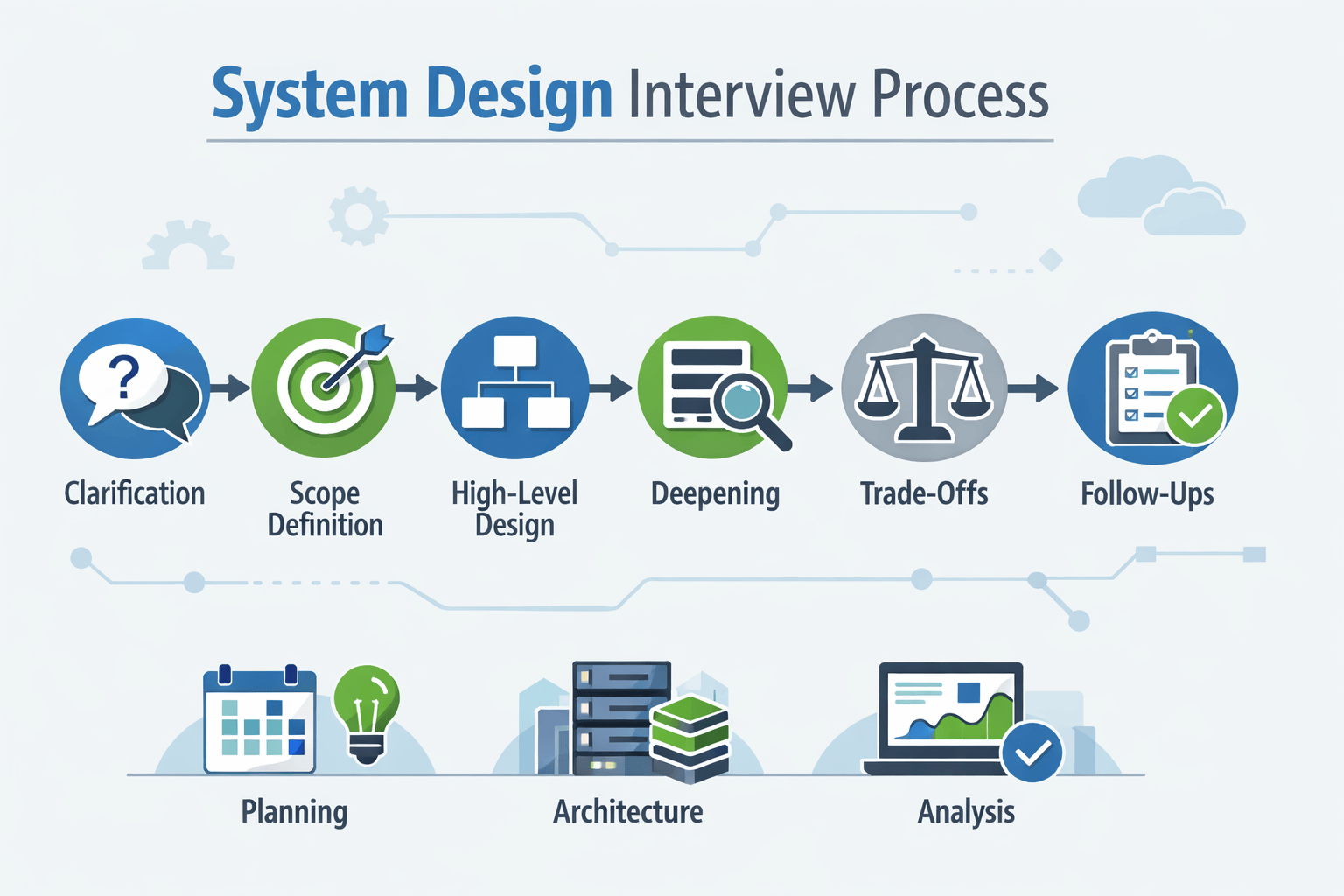
Pause and clarify before designing anything. Define scope and constraints explicitly. Propose simple high-level designs first. Deepen one area at a time based on signals. Address scalability through systematic bottleneck analysis. Handle follow-ups as extensions of your structured thinking.
This isn’t just interview preparation. This is how senior engineers actually design systems in production environments. Every time you practice this approach, you’re building skills that will serve you throughout your career.
What to Do Right Now
Knowledge without action doesn’t change outcomes. Here’s your immediate next step: pick one system design problem and practice this six-step approach today.
Don’t just think through it mentally. Say it out loud. Draw the diagrams. Walk through each step as if you’re in an actual interview. This deliberate practice is what transforms understanding into skill.
If you’re preparing for upcoming interviews, consistency matters more than intensity. Practice one problem every two days for the next three weeks. That’s ten complete walkthroughs. By the tenth practice session, this approach will feel natural.
For those who want structured guidance and expert feedback, our System Design Interview Bootcamp provides live coaching sessions where experienced interviewers evaluate your approach, identify gaps in your thinking process, and help you refine your communication style. You’ll practice this six-step method on diverse problems with immediate feedback on what’s working and what needs adjustment.
The Mindset Shift That Changes Everything
Before you go, remember this: system design interviews aren’t about proving you already know everything. They’re about demonstrating how you think when you don’t know everything.
The interviewer wants to see how you handle ambiguity, how you prioritize under constraints, how you collaborate when solving complex problems, and how you make informed decisions with imperfect information.
This six-step approach showcases all of these capabilities. It transforms the interview from a test of memorized patterns into a demonstration of senior engineering thinking.
When you walk into your next system design interview, you won’t be hoping you get a problem you’ve seen before. You’ll be confident you can handle any problem because you have a reliable method that works every time.
That confidence isn’t arrogance. It’s the natural result of having a structured approach you’ve practiced deliberately. And it’s exactly what interviewers respond to when they decide to move candidates forward.
Your system design interview success doesn’t depend on luck or memorization. It depends on approach. And now you have the approach that works.
Frequently Asked Questions
How much technical knowledge do I need before learning this approach?
You should understand basic distributed systems concepts like databases, caching, load balancing, and scaling patterns. If you know what these terms mean and roughly what they do, you have enough foundational knowledge to apply this approach. The six-step method helps you organize and communicate what you already know effectively. As you practice, you’ll naturally identify gaps in your technical knowledge and can study those areas specifically. Most candidates who struggle in system design interviews don’t lack technical knowledge—they lack a systematic way to apply it.
Should I memorize solutions to common system design problems?
No. Memorizing solutions makes you rigid and obvious to interviewers. If you get a slight variation on a memorized problem, you’ll struggle to adapt. Instead, practice applying this six-step approach to many different problems. Learn the underlying patterns—not specific solutions. When you understand why certain design choices make sense for certain constraints, you can handle any problem variation. That said, studying existing system architectures to understand how real companies solve problems is valuable for building your technical intuition.
How do I practice this approach if I don’t have anyone to practice with?
Solo practice is highly effective if done deliberately. Set a timer for 45 minutes, choose a problem, and walk through all six steps out loud as if explaining to an interviewer. Record yourself on video or audio. Watch the recording and evaluate: Did you clarify before designing? Did you state constraints explicitly? Did you build incrementally? This self-review reveals habits you wouldn’t notice while practicing. For additional feedback, consider our mock interview sessions where experienced engineers provide detailed critiques on your approach and communication.
What if the interviewer doesn’t give me clear signals about what to deepen?
This happens occasionally. When you don’t get clear signals, ask explicitly: “Which aspect of this design would you like me to explore in more depth?” or “Should I focus on the data model, the API design, or the scaling strategy?” This question demonstrates good judgment about prioritization and invites the interviewer into collaboration. Most interviewers appreciate this directness and will guide you. If they say “your choice,” pick the area most critical to the system’s core functionality and explain why you’re choosing to deepen there.
How detailed should my diagrams be during the interview?
Start simple and add detail incrementally as you deepen specific areas. Your initial high-level diagram should be simple enough to explain in 60 seconds—just boxes for major components and arrows for data flow. As you zoom into specific areas, you can add more detailed boxes for sub-components or specific data flows. Avoid trying to create a comprehensive, detailed diagram all at once. The diagram should support your explanation, not replace it. Clean, simple diagrams with clear labels communicate better than elaborate architectural artwork.
What’s the best way to prepare for system design interviews in a limited timeframe?
If you have limited time, focus on quality over quantity. Practice this six-step approach thoroughly on 5-7 diverse problems rather than superficially reviewing 30 problems. Master the approach so it becomes automatic, then your existing technical knowledge will shine through naturally. Prioritize problems that match your target companies’ domains—e-commerce companies often ask about product catalogs and checkout systems, social media companies ask about feeds and messaging. Our System Design Curriculum organizes practice problems by industry and complexity to help you prioritize effectively.
This guide was written with AI assistance and then edited, fact-checked, and aligned to expert-approved teaching standards by Ram Arun. Ram has 10 years of experience coaching system design candidates into top tech companies. System design principles, interview frameworks, and architectural patterns are sourced from industry best practices at companies like Amazon, Google, Meta, and Microsoft, and are cited throughout this article.