
Design a Cloud File Storage System (Like Google Drive): Step-by-Step Interview Walkthrough

When an interviewer asks you to design a cloud file storage system they’re not testing whether you know Google Drive’s feature set They’re evaluating how you think under…
Want another common interview prompt to practice with the same step-by-step approach? Try Design Notification System – System Design Interview.
Most senior engineers fail this question not because they lack the technical knowledge but because they jump straight to implementation details without establishing requirements They sketch components without explaining trade-offs They…
If you feel behind because you haven’t done formal architecture work before, start here: How to Crack System Design Interviews Without Prior Design Experience.
This walkthrough demonstrates exactly how a strong candidate approaches the file storage system design question from first principles You’ll see the complete interview arc from requirement clarification through… real sessions
Last updated: Feb. 2026
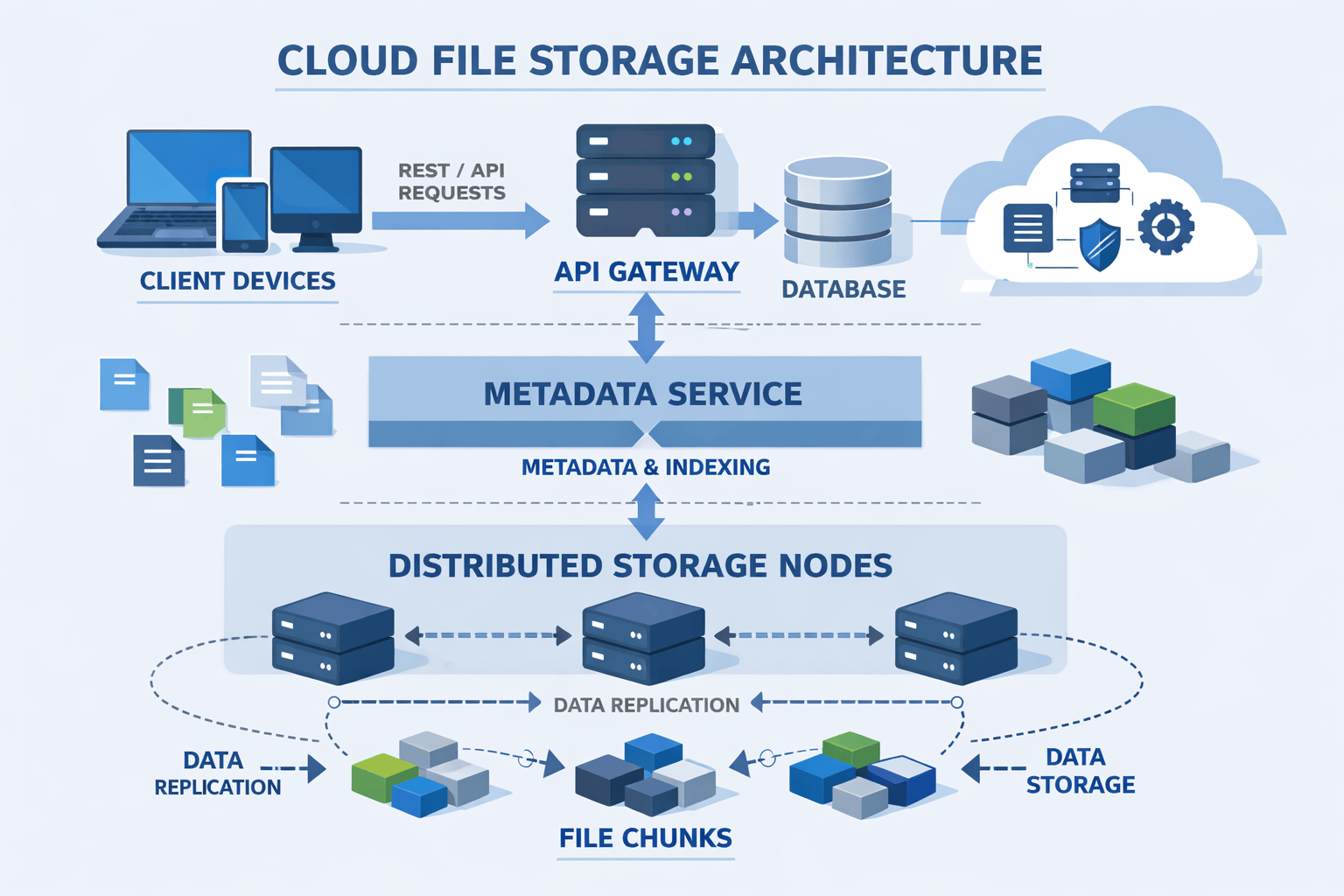
Table of Contents
- 1. What This Question Really Tests
- 2. Leading the Interview: Requirement Clarification
- 3. Defining Functional and Non-Functional Requirements
- 4. The Baseline Architecture
- 5. Upload Flow: The Write Path Explained
- 6. Download Flow: The Read Path Explained
- 7. Scaling to Millions of Users
- 8. Designing for Failures
- 9. Closing the Interview Strong
- 10. FAQs
Contents










What This Question Really Tests
The cloud file storage system design question appears in roughly 30% of system design interviews at major tech companies. It’s popular because it touches every critical evaluation area interviewers care about.
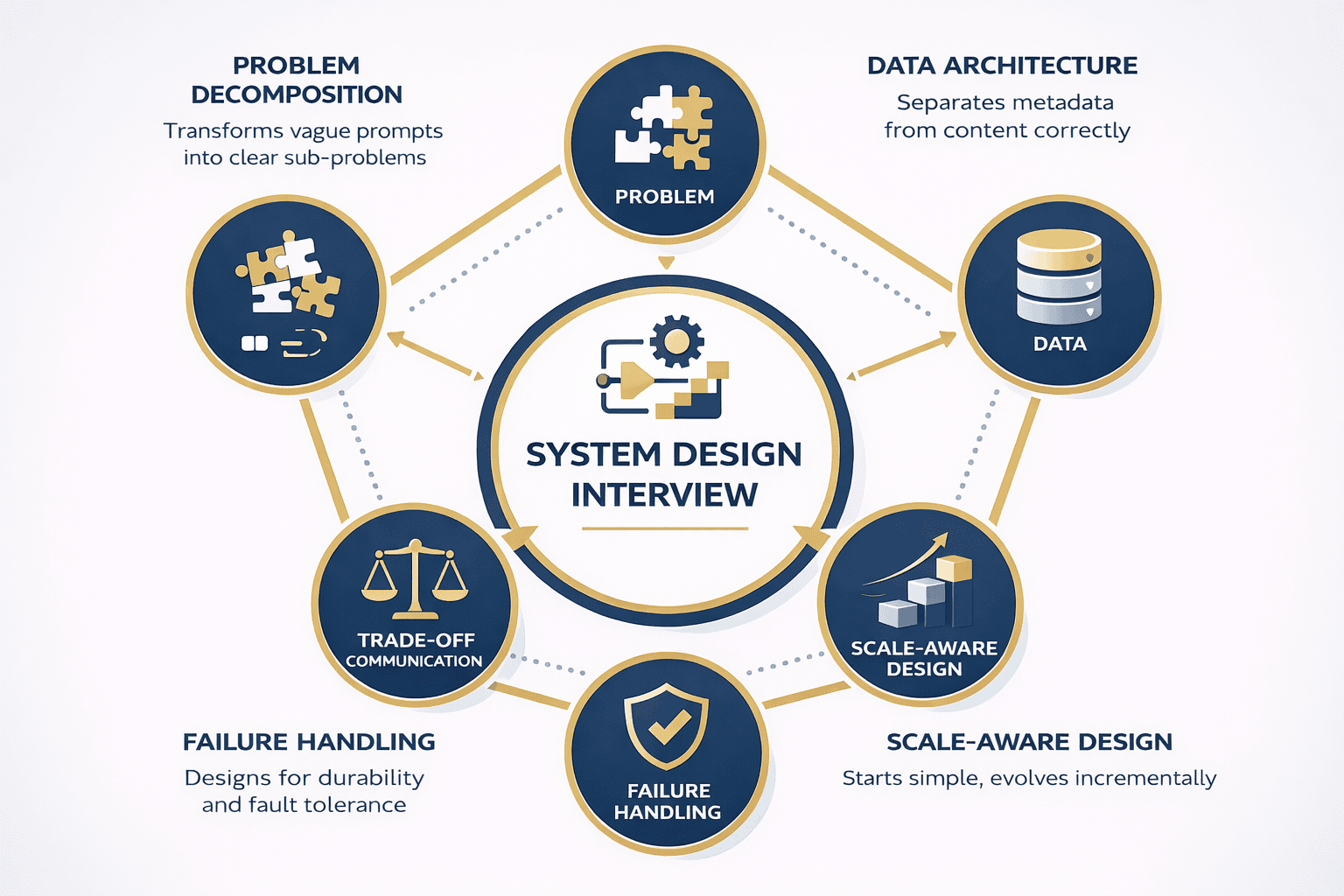
Interviewers aren’t testing your knowledge of Google Drive features. They’re evaluating five specific competencies.
Problem Decomposition Under Ambiguity
Can you take a vague prompt and transform it into clear answerable sub-problems Weak candidates immediately start drawing boxes labeled API and Database without understanding what they’re actually…
Strong candidates ask clarifying questions first. They establish scope. They confirm assumptions. They define success metrics before writing a single line of pseudo-code.
This isn’t just interview theater—it mirrors real engineering work where product requirements are incomplete and stakeholder needs conflict.
Data Architecture Fundamentals
The file storage problem forces you to separate metadata from content correctly. This distinction reveals whether you understand data modeling at scale.
Metadata file names sizes permissions locations needs fast random access and strong consistency File content needs high durability and efficient storage Candidates who conflate these concerns expose a…
Scale-Aware Design Thinking
Interviewers introduce scale gradually to see if you over-engineer upfront or wait for actual constraints. They want to see incremental thinking, not premature optimization.
A candidate who immediately proposes sharding for 100 users looks inexperienced. A candidate who starts simple and evolves the design as user counts grow demonstrates judgment.
Failure-Mode Awareness
Storage systems must handle failures gracefully. Interviewers probe whether you think about durability, replication, and recovery mechanisms naturally or only when explicitly prompted.
Strong candidates mention these concerns even during the baseline design. They don’t wait for “what if a server crashes?” to start considering redundancy.
Trade-Off Communication
Every design decision involves trade-offs . Consistency versus availability. Latency versus durability. Cost versus performance.
Interviewers reward candidates who articulate these trade-offs clearly and explain why they chose one path over another given specific constraints There’s rarely one correct answer context determines the…
Understanding what interviewers actually evaluate transforms your preparation. You stop memorizing architectures and start practicing how to think aloud, ask good questions, and explain your reasoning.
The rest of this walkthrough demonstrates these competencies in action. You’ll see exactly how strong candidates handle each interview stage, from requirement gathering through failure handling.
Leading the Interview: Requirement Clarification
The interview typically opens with a deceptively simple prompt: “Design a cloud file storage system like Google Drive.”
Weak candidates immediately start sketching components. Strong candidates recognize this vagueness as an invitation to lead the conversation.
Why Clarification Matters
Jumping straight to design without clarifying requirements signals poor judgment. It suggests you build systems before understanding user needs—exactly what companies don’t want in senior engineers.
Asking questions demonstrates several critical skills You show awareness that real-world requirements are always incomplete You prove you can extract information from stakeholders You establish scope before committing…
Most importantly, you take control of the interview direction rather than reacting passively to whatever the interviewer throws at you.
The Essential Clarifying Questions
File characteristics: “What types of files will users store? What’s the typical size distribution—mostly documents under 10MB or large media files up to 10GB?”
This matters because small files optimize differently than large files. Documents might stay in single chunks while videos require sophisticated chunking strategies.
User scale: “How many users should the system support initially? What growth trajectory should we plan for?”
A system for 10,000 users uses vastly different architecture than one for 100 million. Starting with concrete numbers prevents over-engineering.
Access patterns: “Is this read-heavy or write-heavy? What’s the ratio of uploads to downloads?”
Read-heavy systems benefit from aggressive caching and CDNs. Write-heavy systems need optimized ingestion pipelines. The access pattern shapes your entire architecture.
Latency requirements: “What latency expectations exist for uploads and downloads? Are we optimizing for mobile networks or high-speed connections?”
Sub-second response times demand different design choices than “within 5 seconds is acceptable.” This constraint affects chunking, caching, and replication strategies.
Collaboration features: “Do we need file sharing and permissions? Should multiple users collaborate on the same file simultaneously?”
Basic storage is simpler than collaborative editing. Confirming scope prevents spending interview time on features that don’t matter for this question.
Versioning requirements: “Should the system maintain file version history? If so, how many versions and for how long?”
Versioning significantly increases storage costs and system complexity. Knowing whether it’s required shapes your metadata model.
Geographic distribution: “Are users concentrated in a single region or distributed globally? Do we need multi-region support?”
Global distribution introduces latency, consistency, and data residency challenges. A single-region system sidesteps these entirely.
📊 Table: Clarifying Questions and Why They Matter
Each question you ask narrows the design space and demonstrates strategic thinking. This table maps essential questions to the architectural decisions they inform.
| Question Category | Specific Question | Why It Matters | Design Impact |
|---|---|---|---|
| File Characteristics | Typical file sizes and types? | Determines chunking strategy and storage optimization | Large files need chunking; small files might stay intact |
| User Scale | Initial users and growth rate? | Prevents premature optimization or under-design | Shapes when to introduce sharding and replication |
| Access Patterns | Read vs write ratio? | Influences caching and replication strategies | Read-heavy systems benefit from CDNs and aggressive caching |
| Latency Expectations | Target response times? | Determines acceptable trade-offs in consistency and cost | Affects choice between sync/async operations |
| Features | Sharing, permissions, collaboration? | Establishes scope and metadata complexity | Simple storage vs complex access control models |
| Versioning | File version history needed? | Impacts storage costs and metadata structure | Adds complexity to write path and delete operations |
| Geography | Single region or global? | Introduces latency and consistency challenges | Multi-region requires replication and conflict resolution |
How to Ask Questions Effectively
Don’t mechanically list all seven questions. That feels like a checklist, not a conversation.
Instead, ask 2-3 high-priority questions, listen to the answers, then ask follow-ups based on what you learned. This demonstrates genuine curiosity and adaptability.
For example What types of files will users primarily store If the answer is mostly documents and photos follow up with What percentage of files exceed 100MB This…
Sample clarification dialogue:
Candidate: Before we dive into the architecture I’d like to clarify a few things about the system scope First what types of files and typical sizes are we…
Interviewer: “Let’s assume mostly documents and photos—average file size around 5MB, with some videos up to 1GB.”
Candidate: “Got it. And for user scale, should we design for thousands of users or millions?”
Interviewer: “Let’s start with 10 million users and plan for growth to 100 million.”
Candidate: “Perfect. Last question on scope—do we need file sharing and permissions, or just basic upload/download for individual users?”
Interviewer: “Basic sharing with access control, but no real-time collaborative editing.”
Candidate: “Excellent. Let me summarize what I heard…”
This back-and-forth feels natural and demonstrates active listening. You’re building requirements collaboratively, not interrogating the interviewer.
After gathering clarifications, always summarize your understanding before moving forward. This gives the interviewer a chance to correct misunderstandings early.
Based on our discussion I’m designing for 10 million users growing to 100 million storing mostly small-to-medium files with some large videos supporting basic sharing and permissions with…
This summary checkpoint prevents wasting time building the wrong system.
Defining Functional and Non-Functional Requirements
After clarification, strong candidates formalize requirements before touching architecture. This demonstrates structured thinking and creates a reference point for later trade-off discussions.
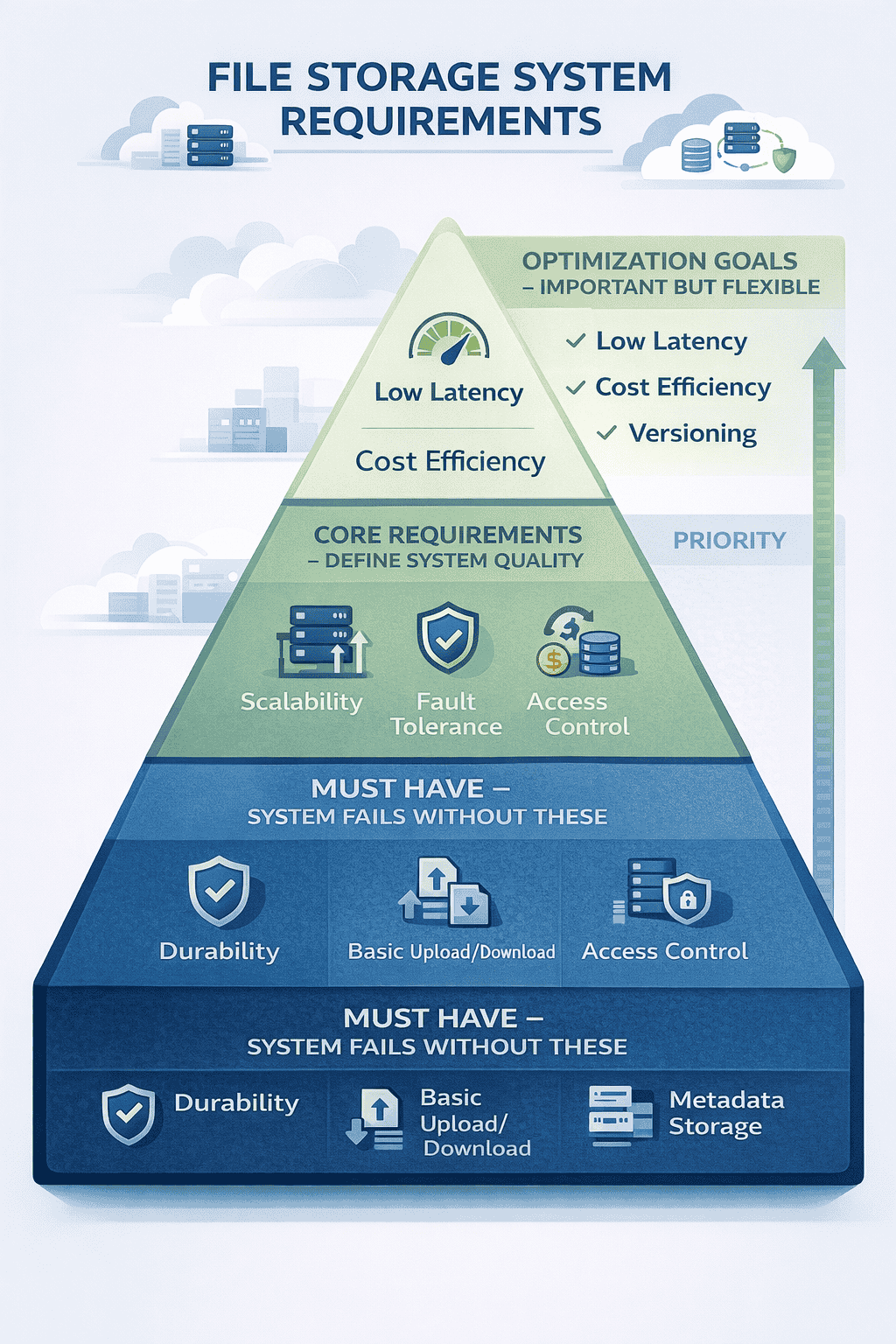
Requirements fall into two categories: what the system does (functional) and how well it performs (non-functional).
Functional Requirements
Upload files: Users must store files of varying sizes from their devices to the cloud. The system accepts files through web browsers, mobile apps, or desktop clients.
Download files: Users retrieve their stored files on demand. Downloads must work across different devices and network conditions.
Store metadata: The system maintains file information including names, sizes, creation dates, modification timestamps, ownership, and storage locations.
Support large files: Files up to 10GB must upload and download reliably. This requires chunking, resumable transfers, and progress tracking.
Delete files: Users remove files they no longer need. Deletion must reclaim storage space eventually while handling shared file scenarios correctly.
Update files: Users replace existing files with new versions. The system handles conflicts when simultaneous updates occur.
Basic access control: File owners grant read or write permissions to specific users. The system enforces these permissions on every access attempt.
Non-Functional Requirements
High durability: Once uploaded files must never disappear due to hardware failures Target durability of 99 999999999 eleven nines means losing at most one file per 100 billion…
Durability isn’t the same as availability. A file can be durable but temporarily unavailable during maintenance. Durability means permanent loss prevention.
Horizontal scalability: The system must handle growth by adding more machines, not bigger machines. Doubling users shouldn’t require replacing servers—just adding more.
This constraint eliminates vertical scaling solutions and forces distributed architecture thinking from the start.
Fault tolerance: Individual component failures cannot bring down the entire system. When storage nodes crash, file uploads, downloads, and metadata operations continue functioning.
Reasonable latency: Small file uploads complete within 2 seconds on good connections Downloads start streaming within 1 second These aren’t hard real-time requirements but users notice degradation beyond…
Cost efficiency: Storage and bandwidth costs dominate at scale. The design should minimize unnecessary replication and optimize for storage density without sacrificing durability.
This requirement creates tension with durability and availability. More replicas improve reliability but increase costs. Strong candidates acknowledge this trade-off explicitly.
Why This Summary Matters
Explicitly stating requirements serves multiple purposes during interviews.
It creates alignment with the interviewer When you later make a design choice you can reference these requirements I’m choosing replication over erasure coding because we prioritized durability…
It demonstrates completeness. Missing obvious requirements like “users should be able to delete files” signals sloppy thinking.
It provides scope boundaries When interviewers later ask about advanced features you can evaluate them against this baseline Adding real-time collaboration would require changing our consistency model which…
Most importantly, it shows you don’t jump into implementation without understanding the problem. This separates senior engineers from junior ones.
Capacity Planning Estimates
After defining requirements, strong candidates provide back-of-envelope calculations. This isn’t about precision—it’s about demonstrating quantitative thinking.
Storage calculation: 10 million users × 1GB average storage = 10 PB total storage. At 3× replication for durability = 30 PB raw storage needed.
Bandwidth calculation: If each user uploads 10MB daily and downloads 50MB daily that’s 100MB 500MB 600MB per user For 10 million users 6 PB daily traffic or roughly…
Metadata volume: Average metadata per file 1KB If users store 1 000 files average 10 million users 1 000 files 1KB 10 GB metadata Small enough to fit…
These estimates don’t need perfect accuracy They establish scale and identify bottlenecks For example 70 GB sec bandwidth is significant but achievable with CDNs 30 PB storage requires…
Candidates who skip capacity estimates miss opportunities to show quantitative reasoning and identify potential problem areas early.
The Baseline Architecture
With requirements established, you can finally start designing. The key principle: start simple, then evolve.
Candidates who immediately propose complex distributed systems with multiple caching layers and sophisticated sharding schemes signal poor judgment. Real systems grow incrementally as needs emerge.
Core Components
API Gateway: The single entry point for all client requests. Handles authentication, request routing, and rate limiting . Clients never talk directly to backend services.
This indirection layer provides flexibility. You can change backend implementations without affecting clients, add caching transparently, and implement cross-cutting concerns like logging in one place.
Metadata Service: Manages file information names sizes ownership permissions chunk locations This service answers questions like what files does user X own and where are the chunks for…
The metadata service uses a relational database initially Our capacity estimate showed only 10 GB metadata for 10 million users which fits comfortably in a single PostgreSQL or…
Storage Nodes: Dedicated servers that store actual file data. They provide simple interfaces: write chunk, read chunk, delete chunk, verify chunk integrity.
Storage nodes don’t understand files or users—they just manage chunks. This separation keeps them simple and scalable.
Block Storage: The underlying storage mechanism on each node. Could be local SSDs, attached EBS volumes, or object storage buckets depending on cloud provider and cost constraints.
The Critical Design Decision: Metadata and Data Separation
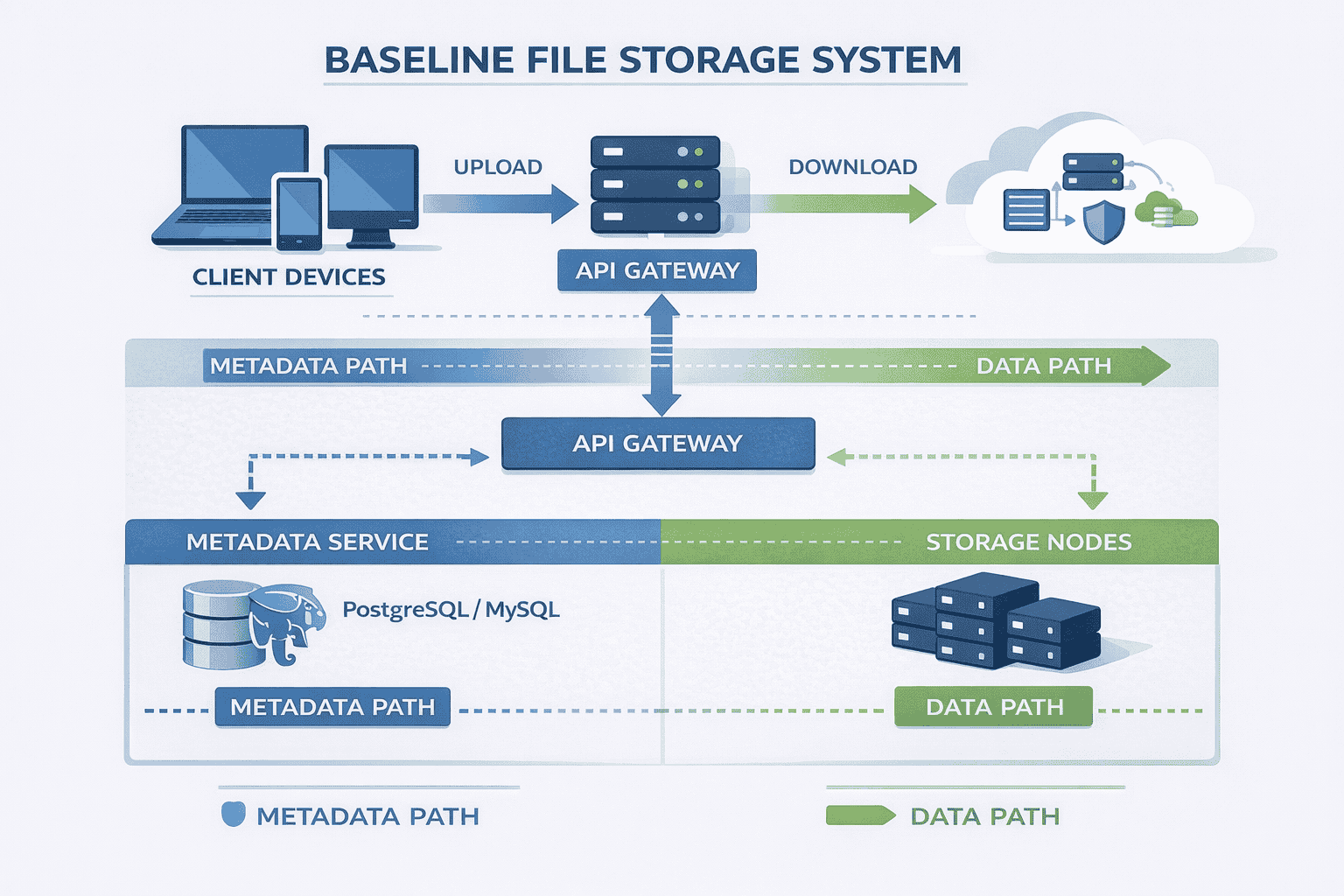
The most important architectural choice in file storage systems is separating metadata from file data.
Why metadata needs different storage: Metadata requires fast random access strong consistency and complex queries You frequently search for files by name filter by date or check permissions…
Why file data needs different storage: File content requires high durability sequential access patterns and efficient storage of large objects You rarely read parts of files usually the…
Mixing these concerns creates problems Storing file content in databases wastes resources on features you don’t need complex queries transactions Storing metadata in object storage makes queries slow…
Strong candidates explain this separation clearly because it demonstrates understanding of data access patterns and appropriate technology selection.
Component Interactions
Understanding how components work together matters more than knowing individual pieces exist.
For metadata operations: Client → API Gateway → Metadata Service → Database → Response. Examples include listing files, checking permissions, or searching by filename.
For data operations: Client → API Gateway → Metadata Service (get chunk locations) → Storage Nodes (transfer data) → Client. The metadata service coordinates but doesn’t touch file content.
This distinction prevents the metadata database from becoming a bandwidth bottleneck. File data flows directly between clients and storage nodes after the initial metadata lookup.
Why Start Simple
This baseline architecture handles millions of files without complex distributed systems machinery. It lacks sharding, sophisticated caching, or multi-region replication—and that’s intentional.
Adding complexity should respond to specific constraints. “We have 10 million users” isn’t sufficient justification for sharding. “Our database is hitting CPU limits at 50,000 QPS” is.
Interviewers specifically watch for this incremental approach. They want engineers who add complexity only when measurements justify it, not because it sounds sophisticated.
The baseline also provides a stable foundation for discussing more advanced features later. Every optimization or scaling technique modifies this core architecture in specific ways.
With the baseline established you can now walk through how uploads and downloads actually work These flows reveal whether you understand distributed systems mechanics or just memorize component…
Upload Flow: The Write Path Explained
Describing data flows step-by-step demonstrates that you understand system behavior, not just structure. Interviewers often probe these flows with “what happens when…” questions.
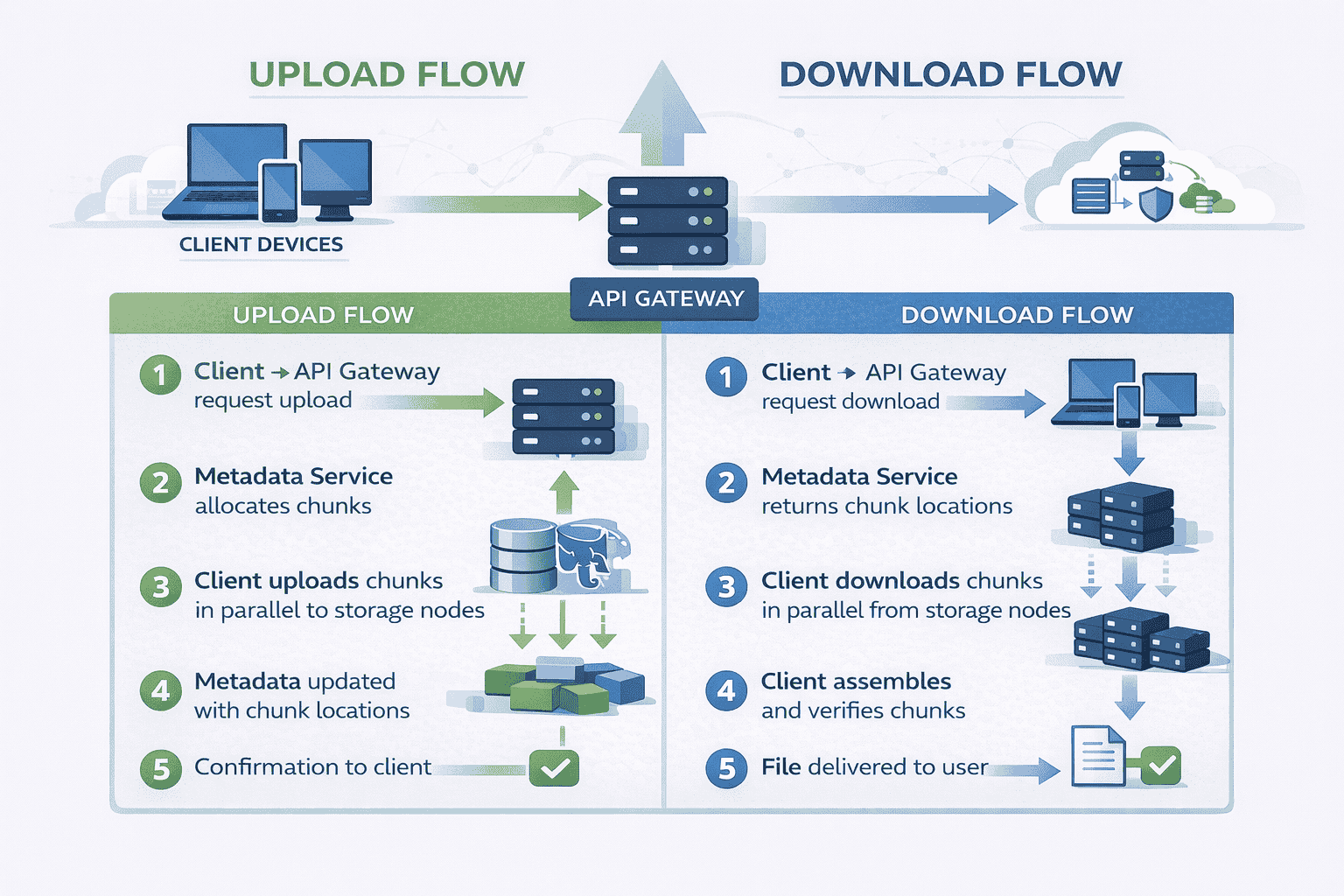
The Complete Upload Sequence
Step 1 – Client preparation: The user selects a file to upload. The client application computes a hash (SHA-256) of the file content for integrity verification later.
Why hash client-side? It allows deduplication checks before transferring data and provides end-to-end integrity guarantees independent of network reliability.
Step 2 – Upload request: Client sends a request to the API Gateway: “I want to upload a file named ‘presentation.pdf’, size 15MB, hash XYZ.”
The gateway authenticates the request, checks the user’s storage quota, and validates the filename. If everything passes, it forwards the request to the Metadata Service.
Step 3 – Metadata allocation: The Metadata Service generates a unique file ID (UUID) and determines the chunking strategy.
For our 15MB file we’ll split it into 4MB chunks four chunks total The service decides which storage nodes should receive each chunk based on current node capacity…
Step 4 – Upload coordinates returned: The Metadata Service responds with upload instructions Send chunk 1 to storage node A chunk 2 to node B chunk 3 to node…
Signed URLs provide temporary write access to storage nodes without exposing permanent credentials. They also prevent replay attacks and limit upload windows.
Step 5 – Chunking and upload: The client divides the file into 4MB chunks and uploads each chunk in parallel to its assigned storage node using the signed URLs.
Parallel uploads utilize network bandwidth better than sequential transfers. If one chunk fails, others continue uploading.
Step 6 – Storage node processing: Each storage node receives a chunk, verifies its hash, writes it to local disk, and confirms success to the client.
The storage node also writes the chunk to a replication queue so background processes can create additional copies for durability.
Step 7 – Metadata update: After all chunks upload successfully the client notifies the Metadata Service The service updates the database with file status File XYZ is complete consisting…
Step 8 – Confirmation: The API Gateway returns success to the client. The file now appears in the user’s file list.
📊 Table: Upload Flow Step-by-Step
This sequence shows how file uploads coordinate between multiple components. Each step has specific purposes—understanding the “why” behind each action demonstrates deep system knowledge.
| Step | Action | Component | Purpose |
|---|---|---|---|
| 1 | Compute file hash | Client | Enable integrity verification and deduplication |
| 2 | Request upload | API Gateway | Authenticate, validate quota, route request |
| 3 | Allocate metadata | Metadata Service | Generate file ID, plan chunking, assign storage nodes |
| 4 | Return upload URLs | Metadata Service | Provide temporary credentials for direct storage access |
| 5 | Split and upload chunks | Client | Maximize bandwidth, enable resumable uploads |
| 6 | Store and verify chunks | Storage Nodes | Persist data, confirm integrity, queue replication |
| 7 | Update metadata | Metadata Service | Record chunk locations, mark file complete |
| 8 | Confirm to user | API Gateway | Notify client of successful upload |
Why Chunking Matters
Large file uploads fail without chunking. Network interruptions corrupt entire transfers. Users can’t resume from where they left off.
Chunking solves multiple problems simultaneously.
Resumability: If chunk 3 fails during a 1GB upload, only that 4MB chunk needs re-uploading, not the entire gigabyte.
Parallelization: Uploading 10 chunks simultaneously utilizes network bandwidth better than one sequential stream. This especially helps on high-latency connections where round-trip time dominates.
Load distribution: Different chunks go to different storage nodes, distributing write load across the cluster rather than overwhelming one machine.
Partial access: Applications streaming videos can download chunks out of order, fetching only the segments users actually watch.
The chunk size 4MB in our example represents a trade-off Smaller chunks increase overhead more metadata records more network requests Larger chunks reduce parallelization benefits and make resumability…
Industry standards range from 1MB to 10MB depending on expected file sizes and network characteristics You don’t need to justify a specific number during interviews but explaining the…
Handling Upload Failures
Strong candidates proactively address failure scenarios without waiting for interviewer prompts.
Network interruption mid-upload: The client retries failed chunks using the same signed URLs if they haven’t expired. Successfully uploaded chunks remain valid—no duplicate work.
Storage node crash: If a storage node becomes unavailable after receiving a chunk but before confirming the client times out and retries to a different node The Metadata…
Metadata service failure: Upload requests fail fast. Clients retry with exponential backoff. Since no partial state exists yet, retries remain safe.
The key insight: uploads are optimistic operations that can safely retry because they create new data rather than modifying existing state.
Download Flow: The Read Path Explained
Download flows mirror uploads but with important differences. Understanding these distinctions demonstrates grasp of distributed system patterns.
The Complete Download Sequence
Step 1 – Client request: User clicks a file in their interface. The client sends a download request to the API Gateway: “Get file with ID ABC123.”
The gateway validates authentication and checks whether the user has read permission for this file. Permission checks happen on every access, not just writes.
Step 2 – Metadata lookup: The API Gateway queries the Metadata Service: “Where are the chunks for file ABC123?”
The service returns chunk metadata This file has 4 chunks Chunk 1 is on storage node A chunk 2 on node B chunk 3 on node C chunk…
Step 3 – Download coordinates: The Metadata Service generates signed download URLs for each chunk valid for a limited time window These URLs allow direct access to storage nodes…
Step 4 – Parallel chunk retrieval: The client downloads all chunks simultaneously from their respective storage nodes. This parallelization significantly reduces download time compared to sequential fetching.
Each storage node streams its chunk directly to the client. The metadata service isn’t involved in data transfer—it only provided coordinates.
Step 5 – Assembly and verification: As chunks arrive the client assembles them in order After receiving all chunks it computes the file hash and compares it against the…
Hash verification catches corruption from bit rot, network errors, or malicious tampering. If verification fails, the client re-downloads corrupted chunks.
Step 6 – Delivery to user: Once verified, the file becomes available. For streaming media, chunks can be processed as they arrive rather than waiting for complete assembly.
Read Path Optimizations
The baseline download flow works but leaves performance on the table. Strong candidates identify optimization opportunities without over-engineering.
Metadata caching: File metadata rarely changes. Caching chunk locations at the API Gateway eliminates database queries for repeated downloads of popular files.
Cache invalidation happens when files are deleted or updated. This trade-off accepts slightly stale reads (someone might briefly see old metadata) for dramatically improved read performance.
Content Delivery Networks (CDNs) : For frequently accessed files storing copies at edge locations near users reduces latency significantly A user in Tokyo downloading a file stored in Virginia sees 200ms latency just…
CDNs introduce complexity—cache invalidation becomes harder, costs increase, and cold storage vs. hot storage decisions matter. But for read-heavy workloads, the latency improvement justifies the complexity.
Range requests: Allowing clients to request specific byte ranges enables video seeking and partial file downloads Give me bytes 1000000-2000000 lets video players jump to specific timestamps without…
Storage nodes must support range requests natively which most object storage systems do The metadata service tracks chunk boundaries so the API Gateway can translate file byte ranges…
Download Failure Scenarios
Storage node unavailable: If the storage node holding chunk 2 is down the download fails for that chunk The client retries against a replica of chunk 2 on…
This requires the metadata service to track multiple replica locations per chunk not just the primary copy During downloads it returns all replica locations so clients can failover…
Corrupted chunk: Hash verification detects corrupted data The client re-downloads the corrupted chunk from a different replica If all replicas are corrupted extremely rare the file is unrecoverable…
Network interruption: Similar to uploads, interrupted downloads resume from the last successfully received chunk. The client doesn’t re-download already received chunks.
The key difference from uploads: downloads are idempotent reads. Retrying doesn’t create duplicate data or inconsistent state, making failure handling simpler.
Why Direct Storage Access Matters
Notice that data flows directly between clients and storage nodes, not through the metadata service or API Gateway. This architectural choice prevents central bottlenecks.
If downloads routed through the API Gateway it would need bandwidth proportional to total download traffic At 70 GB sec from our capacity estimate that’s an enormous single…
Direct access distributes bandwidth load across storage nodes. Adding storage nodes increases both storage capacity and aggregate bandwidth proportionally.
This pattern appears frequently in distributed systems—separate the control plane (metadata service) from the data plane (storage nodes). Control planes coordinate; data planes transfer bulk data.
Scaling to Millions of Users
After explaining the baseline, interviewers introduce scale: “What if users grow from 10 million to 100 million?” This tests whether you add complexity thoughtfully or reflexively.
When Scaling Becomes Necessary
Strong candidates don’t immediately propose massive architectural changes. They identify which specific component hits limits first.
Metadata database bottleneck: With 100 million users storing 1,000 files each, metadata grows to 100 GB—still manageable in a single database. But query load increases 10×.
At 500,000 queries per second, a single database struggles. Read replicas help read-heavy workloads, but write traffic still hits one primary. This is where sharding becomes necessary.
Storage node capacity: Growing from 30 PB to 300 PB total storage requires adding more storage nodes. This scales horizontally without architectural changes—just provision more machines.
API Gateway throughput: The gateway handles authentication and routing but not data transfer. With proper load balancing across multiple gateway instances, it scales linearly with user count.
The critical insight: different components hit scaling limits at different times. Address each bottleneck independently rather than redesigning everything preemptively.
📊 Table: Scaling Decisions by Component
Each component scales differently based on its role and bottleneck type. Understanding which scaling strategy applies to which component demonstrates architectural maturity.
| Component | Bottleneck Signal | Scaling Strategy | Complexity Trade-off |
|---|---|---|---|
| API Gateway | High request latency, CPU saturation | Horizontal scaling with load balancers | Low – stateless, easy to replicate |
| Metadata Service | High query latency, write contention | Read replicas, then sharding by user ID or file ID | Medium – sharding adds routing complexity |
| Metadata Database | QPS limits, storage capacity, query slowness | Caching layer, read replicas, sharding | High – sharding requires rebalancing logic |
| Storage Nodes | Disk capacity full, network bandwidth saturated | Add more nodes, distribute chunks across cluster | Low – nodes are independent, no coordination |
| Network Bandwidth | Slow downloads, high latency for distant users | CDN for popular content, regional storage nodes | Medium – cache invalidation complexity |
Sharding the Metadata Service
When a single metadata database can’t handle query load, sharding distributes the data across multiple database instances.
Sharding by user ID: User 1-10 million on shard A users 10-20 million on shard B etc This keeps all of one user’s files on the same shard…
The downside: users with many files create hot shards. Uneven data distribution leads to some shards being much busier than others.
Sharding by file ID: Hash the file ID and route to one of N shards based on the hash This distributes load more evenly since file IDs are…
The downside: listing all files for a user requires querying all shards since that user’s files are scattered. This makes common operations slower.
Hybrid approach: Shard by user ID for metadata tables but use a separate lookup service to find which shard owns which user This adds complexity but maintains query…
There’s no perfect sharding strategy The choice depends on workload characteristics are users querying their own files constantly favor user ID sharding or is load evenly distributed favor…
Strong candidates explain these trade-offs explicitly rather than claiming one approach is universally better.
Handling Hot Files
Some files get downloaded far more frequently than others. A viral video might get millions of downloads while most files get accessed rarely.
Replication for hot files: When a file’s download rate exceeds a threshold, create additional chunk replicas on more storage nodes. This distributes read load across many machines.
The metadata service tracks access patterns and triggers replication automatically. As popularity decreases, extra replicas are garbage collected to reclaim storage.
CDN caching: For extremely popular files, push copies to CDN edge locations worldwide. Users download from nearby edges instead of origin storage nodes.
CDNs work best for public or widely-shared files. Private files with access control require careful CDN configuration to respect permissions.
Load balancing across replicas: When multiple replicas exist, the metadata service returns all replica locations. Clients randomly select which replica to download from, naturally distributing load.
This simple strategy works surprisingly well. More sophisticated approaches use consistent hashing or track per-node load, but random selection prevents hot spots in most cases.
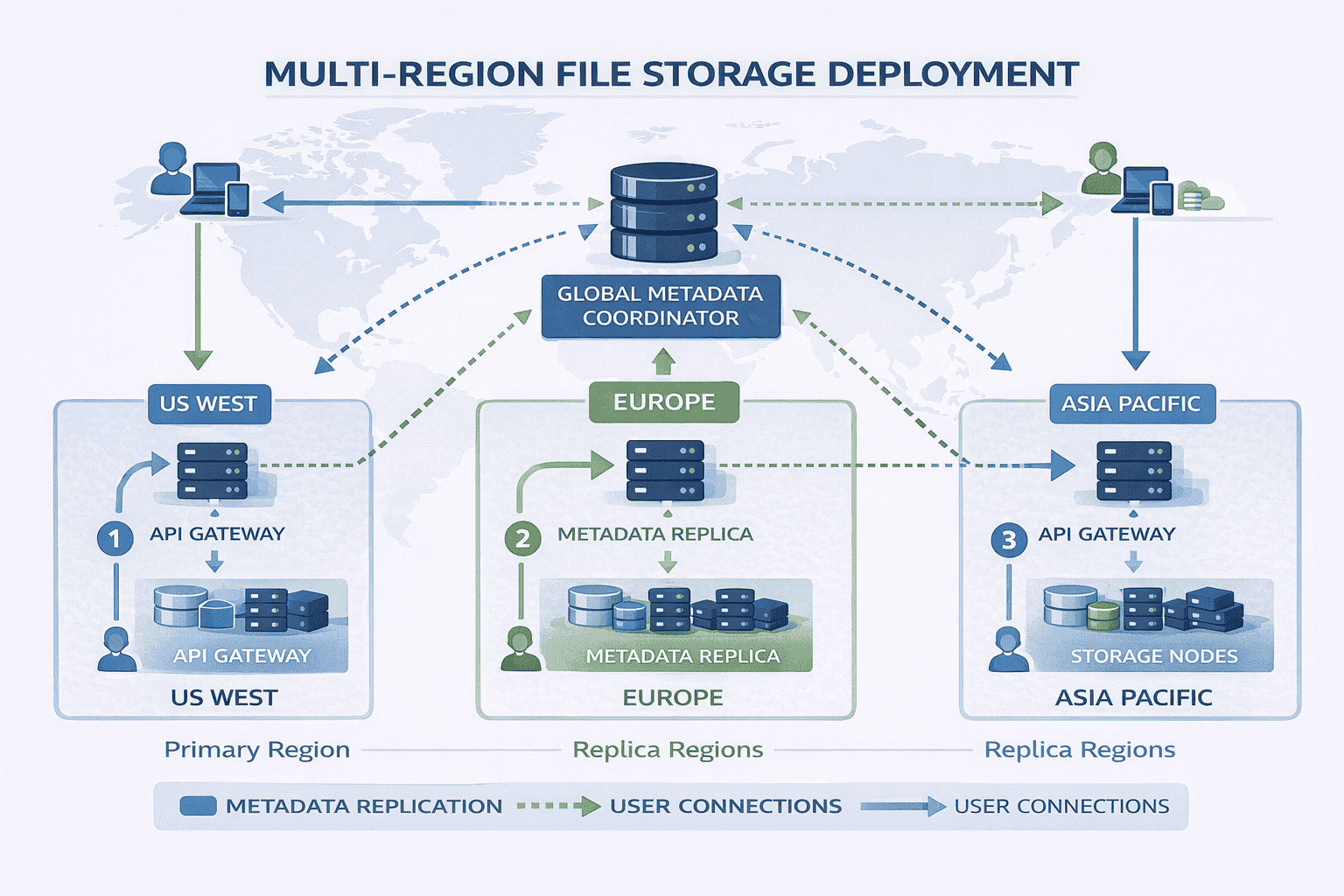
Geographic Distribution
For global user bases, single-region deployment creates latency problems. A user in Singapore downloading from US storage nodes experiences 200ms+ base latency before any data transfer.
Multi-region storage nodes: Deploy storage nodes in multiple geographic regions. Store users’ files in the region closest to them.
The metadata service tracks file regions. When assigning storage nodes during uploads, it selects nodes in the user’s region. Downloads automatically fetch from nearby nodes.
Metadata replication: Replicate the metadata database to multiple regions so metadata queries remain fast regardless of user location.
This introduces consistency challenges If a user uploads a file in one region and immediately downloads it from another region has the metadata replicated yet These eventual consistency…
Smart routing: The API Gateway routes requests to the nearest regional deployment. Users in Europe hit European gateways; users in Asia hit Asian gateways.
DNS-based geo-routing or anycast IP addresses make this transparent to clients. They connect to what appears as a single service but actually reaches different regional deployments.
The Incremental Scaling Narrative
Notice how scaling decisions build on each other logically. You don’t start with sharding and multi-region deployment. You start simple and add complexity as specific metrics justify it.
At 10 million users a single database handles metadata fine At 50 million users we add read replicas At 100 million users with 500K QPS we shard by…
This incremental approach demonstrates engineering judgment. You’re not showing off every distributed systems pattern you know—you’re solving problems as they actually emerge.
Interviewers specifically test for this. They want to see you resist premature optimization while understanding when complexity becomes justified.
Designing for Failures
Failure handling separates strong candidates from weak ones. Weak candidates treat failures as edge cases. Strong candidates design systems that assume failures happen constantly.
At scale rare failures become frequent If a disk has 99 99 annual reliability and you have 10 000 disks you’re experiencing disk failures weekly Your architecture must…
Types of Failures
Storage node crashes: Servers fail due to hardware issues, power outages, or software bugs. When a storage node crashes, all chunks stored on it become temporarily unavailable.
Without replication, those files are gone permanently. With replication, other replicas serve requests while the failed node recovers or gets replaced.
Network partitions: Network failures can isolate groups of servers from each other. A storage node might be running fine but unreachable from the metadata service.
The system must distinguish between “node is down” and “node is unreachable due to network issues.” These require different handling strategies.
Data corruption: Bit rot, cosmic rays, or buggy software can corrupt data silently. A chunk written correctly might return corrupted bytes months later.
Hash verification catches corruption during reads. Background scrubbing processes periodically verify stored chunks against their expected hashes, detecting corruption before users encounter it.
Partial uploads: Uploads can fail after some chunks succeed but before all chunks complete. The file exists in a partially uploaded state—some chunks present, others missing.
The metadata service tracks upload status. Incomplete uploads are marked “in progress” and don’t appear in file listings. After a timeout, incomplete uploads are garbage collected.
Metadata service failures: If the metadata database becomes unavailable, users can’t upload new files or list existing files. However, downloads of already-accessed files might continue using cached metadata.
Database replication provides high availability. At least two replicas ensure one survives most failure scenarios. Automatic failover promotes a replica to primary when the current primary fails.
📊 Table: Failure Scenarios and Mitigation Strategies
Every distributed system faces predictable failure modes. Designing mitigation strategies upfront rather than reactively demonstrates production-ready thinking.
| Failure Type | Impact Without Mitigation | Mitigation Strategy | Recovery Time |
|---|---|---|---|
| Storage Node Crash | All chunks on that node become unavailable | 3× replication across different nodes; automatic failover to replicas | Immediate (transparent to users) |
| Network Partition | Nodes unreachable but data intact | Health checks with timeouts; retry from different replicas | Seconds (retry latency) |
| Data Corruption | Users receive corrupted files | Hash verification on reads; background scrubbing; restore from replicas | Immediate detection, minutes to restore |
| Partial Upload | Orphaned chunks waste storage | Mark uploads “in progress”; garbage collect after timeout; resumable uploads | User resumes or restarts upload |
| Metadata DB Failure | Cannot list files or start uploads/downloads | Database replication; automatic failover; cached metadata for hot files | Seconds to minutes for failover |
| Simultaneous Updates | Lost updates or corrupted files | Optimistic locking with version numbers; last-write-wins with timestamps | Immediate (one update succeeds) |
| Cascading Failures | One failure triggers many others | Circuit breakers; rate limiting; degraded mode operation | Depends on recovery of initial failure |
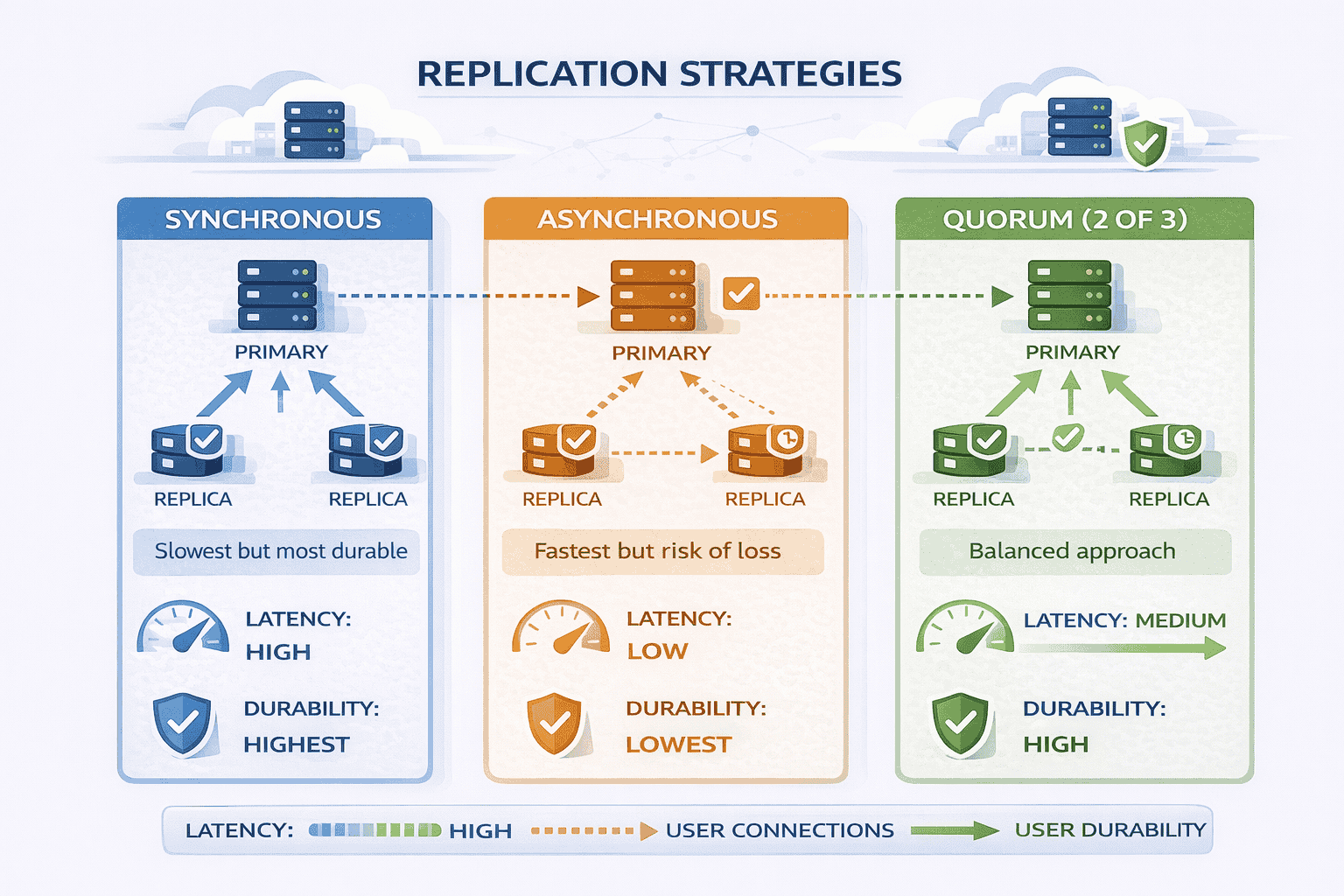
Replication Strategies
Replication protects against data loss but introduces trade-offs in cost, consistency, and performance.
Synchronous replication: When a chunk is written, the storage node waits until all replicas acknowledge successful writes before confirming to the client.
This guarantees all replicas are identical immediately If the primary fails any replica has the complete data The downside writes are slower because you wait for the slowest…
Asynchronous replication: The storage node confirms writes to the client after storing locally, then replicates to other nodes in the background.
Writes are faster—clients don’t wait for replication. The risk: if the primary fails before replication completes, recently written chunks are lost. This violates our durability requirements.
Quorum-based replication: A middle ground. Write to N replicas, wait for acknowledgment from W replicas (where W > N/2), then confirm to client.
For example, with 3 replicas, wait for 2 acknowledgments. This provides durability (data survived on majority of nodes) while tolerating one slow or failed node.
For file storage prioritizing durability, synchronous or quorum-based replication makes sense. We can tolerate slightly slower writes to guarantee files never disappear.
Consistency Considerations
Consistency determines what users see when accessing files after writes, especially across replicas.
Strong consistency: After a write completes, all subsequent reads return the new value, regardless of which replica handles the read.
This requires coordination between replicas. The system might route all reads to the primary or use distributed consensus protocols. Strong consistency simplifies application logic but limits scalability.
Eventual consistency: After a write completes, replicas might temporarily disagree. Eventually (usually seconds to minutes), all replicas converge to the same value.
This allows independent operation of replicas without coordination. It scales better but creates edge cases where users see stale data.
For file storage: Strong consistency makes sense for metadata file names permissions where seeing outdated information causes confusion Eventual consistency works for file content since users typically don’t…
This hybrid approach—strong consistency for metadata, eventual consistency for data—optimizes for the common case while avoiding complexity where it’s not needed.
Health Checks and Failure Detection
The system needs mechanisms to detect failures quickly and accurately.
Heartbeat mechanism: Storage nodes send periodic heartbeat messages to the metadata service. If heartbeats stop arriving, the service marks the node as potentially failed.
Timeouts must balance fast detection against false positives. Too short and network blips trigger unnecessary failovers. Too long and users wait too long during actual failures.
Active health checks: The metadata service periodically queries storage nodes with test requests. Failed requests indicate problems even if heartbeats are arriving.
This catches partial failures where the node is alive but can’t serve requests properly—full disk, corrupted filesystem, or buggy code.
Client-side failure detection: Clients track which storage nodes respond slowly or return errors. They avoid problematic nodes even if the metadata service hasn’t detected issues yet.
This defense-in-depth approach prevents single points of failure in failure detection itself.
Repair and Recovery Processes
Detecting failures is only half the battle. The system must repair damage automatically.
Re-replication: When a storage node fails, chunks stored on it fall below target replication count. Background processes identify under-replicated chunks and create new copies on healthy nodes.
Re-replication happens continuously in the background. It doesn’t block user traffic but ensures durability remains high despite ongoing failures.
Scrubbing: Periodic verification of stored chunks catches corruption before users encounter it. The scrubber reads chunks, computes hashes, and compares against expected values.
Corrupted chunks are deleted and restored from replicas. This prevents corruption from spreading across all replicas over time.
Garbage collection: Orphaned chunks from incomplete uploads or deleted files waste storage. Background processes identify chunks no longer referenced by metadata and delete them.
This runs at low priority during off-peak hours to minimize impact on user traffic.
Graceful Degradation
When failures occur, the system should degrade gracefully rather than failing completely.
Read-only mode: If the metadata database accepts reads but not writes, users can still download files and list their existing files. Only uploads fail.
This is preferable to complete unavailability. Users can continue working with existing files while engineers fix the write path.
Cached metadata serving: When the metadata service is slow or unavailable, the API Gateway serves cached metadata for popular files. Downloads continue working for frequently accessed files.
Circuit breakers: When a storage node is failing repeatedly the system stops routing requests to it automatically This prevents cascading failures where one slow node slows down the…
After a timeout, the circuit breaker tries the node again. If it’s recovered, normal routing resumes. If it’s still failing, the circuit breaker opens again.
These patterns prevent single component failures from cascading into total system failures. Each component fails independently, and the system continues providing reduced functionality.
Closing the Interview Strong
How you finish the interview matters as much as the design itself. Strong candidates summarize clearly, acknowledge limitations, and propose logical extensions.
The Closing Summary
After covering the design, provide a concise summary that reinforces key decisions.
We’ve designed a cloud file storage system that separates metadata from file data for scalability The metadata service uses a relational database for fast queries and strong consistency…
The system handles 100 million users storing 300 PB total data We scale horizontally by adding storage nodes and shard the metadata database by user ID when query…
This summary demonstrates you haven’t lost track of the big picture while discussing details. It shows ability to communicate complex systems concisely.
Acknowledging Assumptions and Trade-offs
Explicitly state assumptions you made during the design. This shows awareness that different constraints might lead to different choices.
I assumed read-heavy workload which justified aggressive caching and CDN usage If the workload were write-heavy instead we’d optimize the write path differently perhaps batch writes or use…
I chose 3 replication for durability which balances cost and reliability If cost were a larger concern we might use erasure coding to achieve similar durability with 1…
I designed for eventual consistency on file data but strong consistency on metadata This optimizes for the common case where users don’t frequently modify files but it does…
These acknowledgments show maturity. You’re not claiming your design is perfect—you’re explaining the context that made it appropriate.
📥 Download: System Design Interview Closing Checklist
Use this simple checklist during practice interviews to ensure you close strong. Covering these points systematically demonstrates completeness and professionalism.
Download PDFProposing Extensions
If time permits, suggest logical next features or optimizations. This shows you’re thinking beyond the immediate requirements.
File versioning: To support version history we’d add a version number to file metadata Each update creates a new version rather than overwriting The UI shows current version…
Sharing and permissions: For file sharing we’d add an access control list ACL table mapping file IDs to user IDs and permission levels The metadata service checks ACLs…
Real-time collaboration: Supporting simultaneous editing requires operational transformation or CRDT algorithms to merge concurrent changes We’d need to track per-chunk editing sessions and resolve conflicts at the character…
Lifecycle policies: We could add automatic archiving where files unused for 90 days move to cheaper cold storage This requires tracking access timestamps and background processes to migrate…
Deduplication: If many users upload identical files we could store one copy and reference it multiple times Hash the entire file check if that hash exists and create…
These extensions demonstrate breadth of knowledge. You’re showing familiarity with advanced features without claiming your baseline design already includes them.
Handling Follow-up Questions
Interviewers often probe deeper on specific areas. Strong candidates welcome these questions rather than becoming defensive.
“How would you handle accidental deletes?” Add a trash bin where deleted files remain for 30 days before permanent deletion The metadata marks files as deleted but doesn’t…
“What about data privacy regulations like GDPR?” Add region locking where users can specify data residency requirements The metadata tracks allowed regions per file Storage node selection during…
“How do you prevent users from uploading malicious files?” Add virus scanning as a post-upload step After chunks are stored background processes scan files and quarantine any containing…
Notice how these answers are specific and thoughtful but acknowledge they weren’t part of the original scope You’re showing you can extend the design not claiming you already…
What Interviewers Really Evaluate
Looking back at the entire interview, remember what actually matters.
Interviewers don’t expect you to design Google Drive perfectly in 45 minutes They’re evaluating whether you can decompose problems systematically explain trade-offs clearly and design systems that grow…
They want to see you think about failures proactively, understand data modeling, and communicate technical decisions in ways non-technical stakeholders could follow.
The specific architecture matters less than the process you followed to reach it Two candidates might propose different designs and both could receive strong evaluations if they demonstrated…
This walkthrough showed you not just what to design, but how to approach the design process in ways that signal senior-level thinking.
If you’re preparing for system design interviews and want structured practice with real feedback, our live coaching programs provide exactly that We run mock interviews using questions like this one then…
The Guided plan includes three 1-on-1 coaching sessions where we work through designs together, plus personalized feedback on five of your practice designs. The Bootcamp plan adds eight…
You can also schedule individual mock interview sessions to test your readiness before actual interviews. Many engineers use these to calibrate their performance and identify blind spots.
For self-study, explore our complete curriculum covering ten system design modules with 200+ practice problems. The self-paced option gives you lifetime access to all materials at $197.
Common Interview Variations
Interviewers often introduce twists to the standard file storage question. Recognizing these variations and adapting your baseline design demonstrates flexibility.
Media Storage System (Photos and Videos)
When the question specifies media storage rather than general files, certain optimizations become more important.
Key differences: Media files are larger (videos can be gigabytes), read-heavy (users view photos/videos far more than uploading), and benefit from transcoding (multiple resolutions for different devices).
Design adjustments: Add a transcoding service that generates multiple versions of uploaded videos 1080p 720p 480p etc Store these as separate chunks The metadata service tracks which resolutions…
CDN usage becomes critical. Media files are accessed frequently and benefit enormously from edge caching. Users streaming videos from nearby CDN nodes experience significantly better playback.
Thumbnail generation runs as a post-upload background process. Small preview images help UI responsiveness without forcing users to download full media files.
Backup Storage System
Backup storage optimizes for different priorities than general file storage.
Key differences: Backups are write-once, read-rarely. Users upload backups regularly but only download during disaster recovery. Cost efficiency matters more than access latency.
Design adjustments: Use erasure coding instead of 3× replication. Erasure coding provides equivalent durability with 1.5× storage overhead instead of 3×, significantly reducing costs.
Implement storage tiers automatically Recent backups stay on fast storage for quick recovery Older backups migrate to cold storage higher latency but much cheaper Background processes handle tier…
Add deduplication aggressively. Backup data contains many duplicates—daily backups of mostly unchanged files. Block-level deduplication identifies identical chunks across different backups and stores them once.
Document Collaboration Platform
Real-time collaboration introduces synchronization complexity that basic file storage avoids.
Key differences: Multiple users edit the same document simultaneously. The system must merge concurrent changes without conflicts or data loss.
Design adjustments: Move from file-level versioning to operation-level tracking. Every character insertion, deletion, or formatting change becomes an operation with a timestamp and author.
Use Operational Transformation OT or Conflict-free Replicated Data Types CRDTs to merge concurrent edits These algorithms ensure all users converge to the same final document state regardless of…
Add a real-time synchronization service separate from the metadata service This handles websocket connections broadcasts operations to active editors and resolves conflicts It’s more complex than basic file…
Cold Storage Archive
Archive systems optimize for long-term retention at minimal cost, accepting slower access.
Key differences: Data is written once and rarely accessed, maybe retrieved years later. Retrieval can take hours instead of seconds. Cost per GB is the primary metric.
Design adjustments: Use tape storage or deep archive cloud tiers (like AWS Glacier Deep Archive). These have retrieval times measured in hours but cost pennies per GB annually.
Aggressive compression before storage. Archive data doesn’t need fast decompression, so use maximum compression ratios even if decompression is slow.
Eliminate metadata caching entirely. Since access is rare, keeping metadata hot in caches wastes resources. Simple database lookups suffice for the occasional retrieval request.
📊 Table: Design Variations by Use Case
The same core architecture adapts to different use cases by adjusting priorities and optimization strategies Understanding these variations shows you can apply patterns flexibly rather than memorizing rigid…
| Variation | Key Characteristics | Primary Optimizations | Storage Strategy |
|---|---|---|---|
| General File Storage | Mixed file sizes, balanced read/write, user-facing | Balanced durability and latency; chunking for large files; metadata caching | 3× replication on standard storage |
| Media Storage | Large files, read-heavy, multiple device types | CDN for delivery; transcoding service; thumbnail generation; aggressive caching | 3× replication; hot files on CDN |
| Backup Storage | Write-once, read-rarely, cost-sensitive | Deduplication; storage tiering; erasure coding for efficiency | Erasure coding (1.5× overhead); cold storage for older backups |
| Collaboration Platform | Concurrent editing, real-time sync, conflict resolution needed | Operation-level tracking; OT/CRDT algorithms; websocket sync service | 3× replication; operation log storage |
| Cold Archive | Long-term retention, hours-to-retrieve acceptable, minimal cost | Maximum compression; tape/glacier storage; no caching | Tape or deep archive tiers; erasure coding |
Adapting Your Baseline Design
When interviewers introduce variations, demonstrate that you understand what changes and what stays the same.
For a backup system the core architecture remains similar metadata service storage nodes chunking But we’d optimize differently Instead of 3 replication we’d use erasure coding to reduce…
This shows you’re adapting thoughtfully rather than starting from scratch. The baseline architecture provides a foundation; variations tweak priorities and optimization strategies.
In my live mock interview sessions we practice exactly these kinds of variations I’ll introduce a twist mid-interview actually this is a backup system not general file storage and evaluate how quickly…
Frequently Asked Questions
Do I need to know specific technologies like AWS S3 or Google Cloud Storage?
No Interviewers care about architectural principles not vendor-specific APIs You should understand concepts like object storage block storage and their trade-offs but you don’t need to memorize S3…
How detailed should I be about implementation code?
System design interviews focus on architecture not implementation You won’t write actual code in most cases However you should be comfortable discussing API contracts the upload endpoint accepts…
What if I forget to mention replication during my initial design?
That’s completely fine and actually shows good judgment Starting simple and adding replication when discussing failure handling demonstrates incremental thinking Just say In the baseline I showed single…
Should I discuss security and authentication in depth?
Mention authentication at a high level users authenticate via OAuth the API Gateway validates tokens but don’t spend interview time designing the entire auth system unless the interviewer…
How do I know when to stop adding complexity?
Let the interviewer guide you After presenting your baseline design pause and ask Should we discuss scaling this to higher loads or dive deeper into a specific component…
What’s the biggest mistake candidates make on this question?
Jumping straight to implementation without clarifying requirements or explaining the separation of metadata and data. Many candidates start drawing boxes labeled “API,” “Database,” and “Storage” without explaining why
Citations
- https://aws.amazon.com/s3/faqs/
- https://cloud.google.com/storage/docs
- https://www.usenix.org/system/files/conference/osdi16/osdi16-muralidhar.pdf
- https://static.googleusercontent.com/media/research.google.com/en//archive/gfs-sosp2003.pdf
- https://www.allthingsdistributed.com/files/amazon-dynamo-sosp2007.pdf
- https://dropbox.tech/infrastructure/streaming-file-synchronization
Content Integrity Note
This guide was written with AI assistance and then edited, fact-checked, and aligned to expert-approved teaching standards by Andrew Williams . Andrew has over 10 years of experience coaching software developers through technical interviews at top-tier companies including FAANG and leading enterprise organizations. His background includes conducting 500+ mock system design interviews and helping engineers successfully transition into senior, staff, and principal roles. Technical content regarding distributed systems, architecture patterns, and interview evaluation criteria is sourced from industry-standard references including engineering blogs from Netflix, Uber, and Slack, cloud provider architecture documentation from AWS, Google Cloud, and Microsoft Azure, and authoritative texts on distributed systems design.

